±Recent Visitors

Recent Visitors to Com-Central!

±User Info-big


Welcome Anonymous

Nickname
Password

Membership:
Latest: HighestAce
New Today: 0
New Yesterday: 0
Overall: 6648

People Online:
Members: 0
Visitors: 276
Total: 276
Who Is Where:
 Visitors:
01: Community Forums
02: Home
03: Community Forums
04: Home
05: Home
06: Home
07: Statistics
08: Member Screenshots
09: Member Screenshots
10: Member Screenshots
11: Community Forums
12: Community Forums
13: Member Screenshots
14: Home
15: Member Screenshots
16: Downloads
17: Community Forums
18: Home
19: Downloads
20: Home
21: Community Forums
22: Community Forums
23: Your Account
24: Community Forums
25: Community Forums
26: Home
27: Home
28: Home
29: Community Forums
30: Photo Gallery
31: News Archive
32: Home
33: Community Forums
34: Community Forums
35: Community Forums
36: Community Forums
37: Downloads
38: Community Forums
39: Community Forums
40: Photo Gallery
41: Statistics
42: Downloads
43: Member Screenshots
44: Downloads
45: Community Forums
46: Photo Gallery
47: Community Forums
48: Community Forums
49: Home
50: Home
51: Home
52: Photo Gallery
53: Downloads
54: Community Forums
55: Downloads
56: Community Forums
57: Downloads
58: Home
59: Community Forums
60: Photo Gallery
61: Photo Gallery
62: Photo Gallery
63: Home
64: Photo Gallery
65: Home
66: Home
67: Community Forums
68: Community Forums
69: Community Forums
70: Community Forums
71: Community Forums
72: Community Forums
73: Community Forums
74: Your Account
75: Home
76: Photo Gallery
77: Community Forums
78: Statistics
79: Home
80: Community Forums
81: Community Forums
82: Photo Gallery
83: Community Forums
84: Member Screenshots
85: Community Forums
86: Member Screenshots
87: Community Forums
88: Community Forums
89: Home
90: Member Screenshots
91: Downloads
92: Downloads
93: Home
94: Downloads
95: Community Forums
96: Home
97: Home
98: Home
99: Home
100: Home
101: Home
102: Home
103: Photo Gallery
104: Home
105: Member Screenshots
106: Community Forums
107: Community Forums
108: Home
109: Photo Gallery
110: Member Screenshots
111: Community Forums
112: News Archive
113: Downloads
114: Community Forums
115: Member Screenshots
116: Downloads
117: Photo Gallery
118: Community Forums
119: Photo Gallery
120: Photo Gallery
121: Community Forums
122: Home
123: Member Screenshots
124: Photo Gallery
125: Member Screenshots
126: Community Forums
127: Home
128: Community Forums
129: Member Screenshots
130: Community Forums
131: Photo Gallery
132: Community Forums
133: Home
134: Photo Gallery
135: Downloads
136: Photo Gallery
137: Community Forums
138: Community Forums
139: Photo Gallery
140: Home
141: Community Forums
142: Member Screenshots
143: Photo Gallery
144: Community Forums
145: Photo Gallery
146: Community Forums
147: Community Forums
148: Home
149: Home
150: Community Forums
151: Home
152: Community Forums
153: Member Screenshots
154: Downloads
155: Photo Gallery
156: Community Forums
157: Photo Gallery
158: Downloads
159: Home
160: Community Forums
161: Community Forums
162: Member Screenshots
163: Downloads
164: News Archive
165: Community Forums
166: Home
167: Home
168: Community Forums
169: Community Forums
170: Community Forums
171: Community Forums
172: Photo Gallery
173: Community Forums
174: Photo Gallery
175: Home
176: Downloads
177: Community Forums
178: Community Forums
179: Community Forums
180: Community Forums
181: Community Forums
182: Member Screenshots
183: Home
184: Home
185: Community Forums
186: Community Forums
187: Home
188: Community Forums
189: Member Screenshots
190: Home
191: Home
192: Community Forums
193: Community Forums
194: Community Forums
195: Community Forums
196: Community Forums
197: Community Forums
198: Home
199: Community Forums
200: Downloads
201: Home
202: Community Forums
203: Member Screenshots
204: Home
205: Downloads
206: Community Forums
207: Your Account
208: Home
209: Downloads
210: Photo Gallery
211: Community Forums
212: Home
213: Home
214: Photo Gallery
215: Community Forums
216: Community Forums
217: Community Forums
218: News Archive
219: Home
220: Photo Gallery
221: Home
222: Photo Gallery
223: Community Forums
224: Community Forums
225: Community Forums
226: Member Screenshots
227: Community Forums
228: Downloads
229: Community Forums
230: Community Forums
231: Community Forums
232: Community Forums
233: Community Forums
234: Home
235: News Archive
236: Home
237: Downloads
238: Community Forums
239: Community Forums
240: Community Forums
241: Member Screenshots
242: Community Forums
243: Your Account
244: Home
245: Community Forums
246: Home
247: Community Forums
248: Community Forums
249: Community Forums
250: Home
251: Community Forums
252: Downloads
253: Photo Gallery
254: Community Forums
255: Home
256: Community Forums
257: Downloads
258: Community Forums
259: Downloads
260: Home
261: Community Forums
262: Home
263: Member Screenshots
264: Your Account
265: Community Forums
266: Home
267: Photo Gallery
268: Home
269: Member Screenshots
270: Community Forums
271: Community Forums
272: Member Screenshots
273: Home
274: Community Forums
275: Member Screenshots
276: Community Forums

Staff Online:

No staff members are online!
CFS3 Multiplayer Cannot HOST :: Archived
This is for General Discussions about the CFS3 game.
Post new topic    Revive this topic    Printer Friendly Page     Forum Index ›  CFS3

Topic Archived View previous topic :: View next topic  
Author Message
sarchstanton99
Power User

Offline Offline
Joined: Jan 19, 2007
Posts: 4

PostPosted: Fri Jan 19, 2007 1:07 am
Post subject: CFS3 Multiplayer Cannot HOST

Hello Everyone,

I've been playing CFS3 for two years now. I can play multiplayer on many other people's games.

However, I have never been able to HOST a game. I set up everything for my own games, and I can join my own game and fly around. The trouble is that no one ever joins. Never. Most people just tell me that it says "Connecting" but nothing ever happens.

I've tried turning off the firewall (I have Microsoft Service Pack 2), but it still doesn't allow me to host.

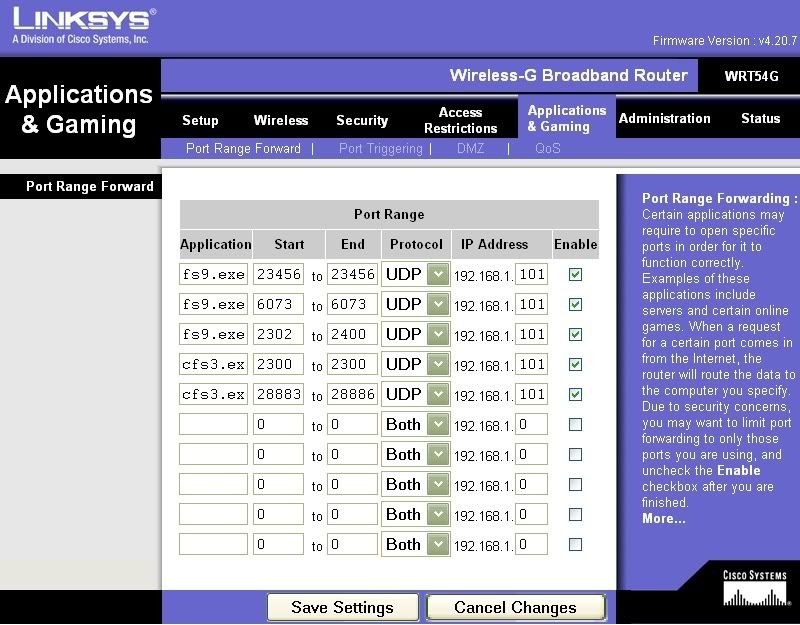
Another player told me to open trigger port 2300 UDP and forward 28883 to 28886 UDP. I've been fooling around with this stuff but I can't seem to get it right.

Does anyone have any suggestions? Does anyone know the correct procedure for setting up the port stuff above? Thanks!!
Back to top
View user's profile
JG300-Stoopy
Power User

Offline Offline
Joined: Jan 05, 2005
Posts: 5840
Location: Group W bench
PostPosted: Fri Jan 19, 2007 1:14 am
Post subject: Re: CFS3 Multiplayer Cannot HOST

Do you have a router? This is where the port settings need to be set - but you don't mention that.

If you do, here's an example of how to do that on a LinkSys router. The advice you've been given is correct, at least in 95% of the cases, the router settings (or lack of them) are what cause the problem.


_________________
"Once your reputation is ruined, you can live quite freely."
Back to top
View user's profile Visit poster's website Photo Gallery
sarchstanton99
Power User

Offline Offline
Joined: Jan 19, 2007
Posts: 4

PostPosted: Fri Jan 19, 2007 2:28 am
Post subject: Re: CFS3 Multiplayer Cannot HOST

Thanks for the quick response.

Yes, I do have a router. It is a Linksys broadband router that I use for Vonage. I do not have a wireless router or anything like that.

The funny thing is I don't recall any software being installed when I set it up. I'll take a look at it. Thanks!!
Back to top
View user's profile
JG300-Stoopy
Power User

Offline Offline
Joined: Jan 05, 2005
Posts: 5840
Location: Group W bench
PostPosted: Fri Jan 19, 2007 3:38 am
Post subject: Re: CFS3 Multiplayer Cannot HOST

Usually there's no software needed, you actually just point your web browser to it by entering an IP address. The software is actually embedded in the router's firmware, so it's built-in....what a world we live in huh? So you just point your web browser at the dang thing. Least, that's how I access mine after "The Cable Guy" (who ate all my wife's cookies and stole a beer out of our fridge when I wasn't looking) showed me how to do it when I had them come out to troubleshoot a wiring problem. You might try the same, but when the dude shows you how to access it make sure he STAYS IN THE ROOM (unless you're out of beer anyway).

Thing is, you gotta find that IP address.....cain't tell ya mine becuase, well, that's not a good thing to advertise on the 'net....but it;s usually related to your IP address with the last two numbers changed.

For instance, going to a command prompt (Windows Start menu, Run..., enter "cmd" without the quotes), and typing "IPCONFIG /ALL" (no quotes) I see my address which let's say is 142.56.89.101

Here, I use the first two octets and replace the last two numbers with "1"'s.... So if I go to my web broswer and type in the address of

142.56.1.1

....up comes my Linksys menu......I believe the default login is "admin with no password, it's probably a good idea to set up a password for it. Oh yeah then add it to your web browser "favorites" list so you can get to it easier to mess it up even more, next time.

Good luck, and if you haven't set these ports up on your router I'll bet that's it, been there done that, as have many others with CFS3!!!!!!

Oh.....and welcome to Com-C, first round is on me since you chose "my" forum to post in for the first time....good taste I must say......make yerself at home but watch out what stories people tell ya 'round here.....especially the sheep in Miss Kitty's....those sheep lie!!


_________________
"Once your reputation is ruined, you can live quite freely."
Back to top
View user's profile Visit poster's website Photo Gallery
sarchstanton99
Power User

Offline Offline
Joined: Jan 19, 2007
Posts: 4

PostPosted: Fri Jan 19, 2007 1:01 pm
Post subject: Re: CFS3 Multiplayer Cannot HOST

Thanks again for the instructions. I'll look at this stuff this afternoon and I'll let you know how it goes!!
Back to top
View user's profile
JG300-Stoopy
Power User

Offline Offline
Joined: Jan 05, 2005
Posts: 5840
Location: Group W bench
PostPosted: Fri Jan 19, 2007 4:07 pm
Post subject: Re: CFS3 Multiplayer Cannot HOST

Good luck. By the way, you may need to know that's an old picture, and apprently Linksys has since changed their fimware so that the application name ("cfs3.exe" in the above example) must be UNIQUE per EACH entry. In the picture, "cfs3.exe" is entered the same in all 3 entries, whcih is no longer possible.

I found this out when replacing my router. Pretty stupid change if you ask me. Anyway, I had no choice but to enter "cfs3.exe" for the first entry, then "cfs31.exe" for the second, and "cfs32.exe" for the third. Strange thing is, it works!

Or maybe I enetered "cfs3.exe1" and "cfs3.exe2"....I forget now.

So this may or may not be the case depending on the firmware version of your Linksys.

_________________
"Once your reputation is ruined, you can live quite freely."
Back to top
View user's profile Visit poster's website Photo Gallery
sarchstanton99
Power User

Offline Offline
Joined: Jan 19, 2007
Posts: 4

PostPosted: Fri Jan 19, 2007 6:52 pm
Post subject: Re: CFS3 Multiplayer Cannot HOST

Thank you!! I finally solved the problem and it definitely was the router!!

I pretty much followed your instructions, but I ran into a few problems.

1) I couldn't get the Linksys menu to show with the internal IP address that I got from the IPCONFIG -ALL menu. Internet Explorer kept saying the page was unavailable. Finally, I got lucky and entered the EXTERNAL IP address. This was available at www.portforward.com

2) After entering the EXTERNAL IP address, I finally got the Linksys menu for the router. I followed the same format you in your graphic and it worked fine. The only problem I ran into here is that you had a .101 as the last three numbers of the IP Address, but my computer uses .100

I am sure that it varies from user to user, and each computer is different. I also realize that your graphic is just an example.

One thing that did help me was hosting a game on CFS3 and then hitting CTRL H. This showed my IP address and the port that was being used. For example:

xxx.xx.xx.xxx:YYYYY

The little x is for the IP address and the big Y is the port.

I don't know if this accomplishes anything, but I put a separate entry in the Linksys menu for this port number that I got after hitting CTRL H. I don't know if this was just extra, but I do know that it works. Anyhow,

1) Find your internal IP address and pull up your Linksys (or other router) menu
2) If that doesn't work, find your external IP address via portforward.com
3) Go to the Linksys menu for Applications and Gaming/Port Range forward
4) For CFS3, enter these:

2300 to 2300 UDP
28883 to 28886 UDP
YYYYY (from CFS3 when you use CTRL H)

5) Make sure you enter the correct last three digits (.100 or .101, etc.)
6) Save settings
7) Go back to CFS3 and host a game
Cool Make sure you don't have any mismatched aircraft.

Thanks again!!
Back to top
View user's profile
JG300-Stoopy
Power User

Offline Offline
Joined: Jan 05, 2005
Posts: 5840
Location: Group W bench
PostPosted: Fri Jan 19, 2007 7:05 pm
Post subject: Re: CFS3 Multiplayer Cannot HOST

Excellent!! And, I gotta say...WOW!!!! VERY GOOD DETAIL on the process and thank you!!!

It's become, sadly, "normal" for folks to ask a question, and they get it working, and ya never hear back, and you wonder. So the detail is very much appreciated!

I think you're probably right on the money about the additional number, this is actually the socket being used on the TCP/IP port. Maybe it can't hurt, I might try it, as over the years I've alwys had a problem with people who can join my hosted games, but do not get the aircraft selection menu after they choose sides. (CTRL-SHIFT-S fixes it if they try it, but some people don't understand what you're typing to them when they're asking why they can't choose a plane)

On the mismatched planes.....been there done that and it used to drive us all NUTS......over the years we just decided we have two choices : Multiplayer, with stock planes and a good fun crowd, or AvHistory stuff with aircraft mismatches, empty rooms and frustrated people.

MP always wins in my book!


_________________
"Once your reputation is ruined, you can live quite freely."
Back to top
View user's profile Visit poster's website Photo Gallery
JG300-Stoopy
Power User

Offline Offline
Joined: Jan 05, 2005
Posts: 5840
Location: Group W bench
PostPosted: Fri Jan 19, 2007 7:31 pm
Post subject: Re: CFS3 Multiplayer Cannot HOST

Woops....forgot to give a heads-up on why my IP address ends with .101 and no .100 as you noticed:

I had it set to .100 originally, as yuo do now, but then one day it quit working, could host but people couldn't join my rooms.

Came to find out, the other system in my house had grabbed the .100 address, so mine moved to .101 when it fired up that day.

Be aware this can happen, since I imagine the reason why you have a router is to share your broadband connection with a second or third system in the home.


_________________
"Once your reputation is ruined, you can live quite freely."
Back to top
View user's profile Visit poster's website Photo Gallery
Display posts from previous:   
Post new topic    Revive this topic    Printer Friendly Page    Forum Index ›  CFS3
Page 1 of 1
All times are GMT - 6 Hours

Archive Revive
Username:
This is an archived topic - your reply will not be appended here.
Instead, a new topic will be generated in the active forum.
The new topic will provide a reference link to this archived topic.