±Recent Visitors

Recent Visitors to Com-Central!

±User Info-big


Welcome Anonymous

Nickname
Password

Membership:
Latest: HighestAce
New Today: 0
New Yesterday: 0
Overall: 6648

People Online:
Members: 0
Visitors: 322
Total: 322
Who Is Where:
 Visitors:
01: Community Forums
02: Photo Gallery
03: Community Forums
04: Photo Gallery
05: Community Forums
06: Community Forums
07: Community Forums
08: Community Forums
09: Community Forums
10: Community Forums
11: Community Forums
12: Community Forums
13: Community Forums
14: Photo Gallery
15: Community Forums
16: Home
17: Home
18: Community Forums
19: Home
20: Community Forums
21: Community Forums
22: Home
23: Home
24: Home
25: Photo Gallery
26: Photo Gallery
27: Community Forums
28: Photo Gallery
29: Photo Gallery
30: Community Forums
31: Community Forums
32: Community Forums
33: Community Forums
34: Community Forums
35: Community Forums
36: Community Forums
37: Home
38: Home
39: News Archive
40: Community Forums
41: Community Forums
42: Community Forums
43: Community Forums
44: Community Forums
45: Community Forums
46: Community Forums
47: Home
48: Community Forums
49: Home
50: Home
51: Community Forums
52: Community Forums
53: Community Forums
54: Home
55: Community Forums
56: Community Forums
57: News
58: Your Account
59: Home
60: Home
61: Home
62: Community Forums
63: Home
64: Home
65: Community Forums
66: Home
67: Community Forums
68: Community Forums
69: Photo Gallery
70: Member Screenshots
71: Member Screenshots
72: Community Forums
73: Member Screenshots
74: Member Screenshots
75: Member Screenshots
76: Home
77: Member Screenshots
78: Statistics
79: Downloads
80: Member Screenshots
81: Home
82: Photo Gallery
83: Photo Gallery
84: Community Forums
85: Community Forums
86: Photo Gallery
87: Community Forums
88: Home
89: Community Forums
90: Photo Gallery
91: Community Forums
92: Community Forums
93: Community Forums
94: Photo Gallery
95: Community Forums
96: Photo Gallery
97: Community Forums
98: Community Forums
99: Community Forums
100: Community Forums
101: Community Forums
102: Community Forums
103: Community Forums
104: Community Forums
105: Photo Gallery
106: Photo Gallery
107: Home
108: Community Forums
109: Community Forums
110: Home
111: Community Forums
112: Community Forums
113: Community Forums
114: Home
115: Home
116: Home
117: Home
118: Community Forums
119: Home
120: Home
121: Home
122: Community Forums
123: Community Forums
124: Community Forums
125: Community Forums
126: Home
127: Photo Gallery
128: Community Forums
129: Photo Gallery
130: Community Forums
131: Home
132: Downloads
133: Photo Gallery
134: Community Forums
135: Photo Gallery
136: Downloads
137: Photo Gallery
138: Community Forums
139: Community Forums
140: Community Forums
141: Home
142: Photo Gallery
143: Home
144: Community Forums
145: Community Forums
146: Photo Gallery
147: Community Forums
148: Home
149: Member Screenshots
150: Community Forums
151: Your Account
152: Community Forums
153: Photo Gallery
154: Community Forums
155: Photo Gallery
156: Community Forums
157: Community Forums
158: Community Forums
159: Community Forums
160: Community Forums
161: Home
162: Community Forums
163: Community Forums
164: Photo Gallery
165: Community Forums
166: Community Forums
167: News
168: Downloads
169: Community Forums
170: Community Forums
171: Downloads
172: Member Screenshots
173: Member Screenshots
174: Home
175: Statistics
176: Statistics
177: Statistics
178: Community Forums
179: Home
180: Downloads
181: Member Screenshots
182: Community Forums
183: Statistics
184: Member Screenshots
185: Community Forums
186: Home
187: Home
188: Community Forums
189: Community Forums
190: Member Screenshots
191: Photo Gallery
192: Photo Gallery
193: Member Screenshots
194: Downloads
195: Home
196: Downloads
197: Photo Gallery
198: Downloads
199: Photo Gallery
200: Statistics
201: Photo Gallery
202: Member Screenshots
203: Member Screenshots
204: Community Forums
205: Home
206: Home
207: Home
208: Community Forums
209: Community Forums
210: Home
211: Photo Gallery
212: Home
213: Home
214: Community Forums
215: Community Forums
216: Community Forums
217: Photo Gallery
218: Community Forums
219: Community Forums
220: Photo Gallery
221: Home
222: Community Forums
223: Community Forums
224: Home
225: Photo Gallery
226: Community Forums
227: Community Forums
228: Photo Gallery
229: Community Forums
230: Home
231: Home
232: Home
233: Community Forums
234: Community Forums
235: Community Forums
236: Community Forums
237: Photo Gallery
238: Community Forums
239: Photo Gallery
240: Community Forums
241: Community Forums
242: Home
243: Home
244: Community Forums
245: Community Forums
246: Photo Gallery
247: Community Forums
248: Community Forums
249: Community Forums
250: Downloads
251: Community Forums
252: Downloads
253: Community Forums
254: Home
255: Home
256: Home
257: Home
258: Home
259: Statistics
260: Member Screenshots
261: Member Screenshots
262: Community Forums
263: Community Forums
264: Photo Gallery
265: Community Forums
266: Photo Gallery
267: Home
268: Community Forums
269: Photo Gallery
270: Home
271: Community Forums
272: Community Forums
273: Downloads
274: Home
275: Home
276: Community Forums
277: Downloads
278: Member Screenshots
279: Statistics
280: Statistics
281: Member Screenshots
282: Statistics
283: Downloads
284: Member Screenshots
285: Statistics
286: Statistics
287: Member Screenshots
288: Community Forums
289: Home
290: Community Forums
291: Statistics
292: Community Forums
293: Community Forums
294: Community Forums
295: Downloads
296: Community Forums
297: Community Forums
298: Community Forums
299: Home
300: Community Forums
301: Community Forums
302: Photo Gallery
303: Community Forums
304: Home
305: Home
306: Home
307: Community Forums
308: Community Forums
309: Community Forums
310: Community Forums
311: Photo Gallery
312: Community Forums
313: Community Forums
314: Community Forums
315: Community Forums
316: Community Forums
317: Community Forums
318: Community Forums
319: Community Forums
320: Community Forums
321: Community Forums
322: Community Forums

Staff Online:

No staff members are online!
HSI Guage for C172?? :: Archived
Discussions about the FS2004 game.
Post new topic    Revive this topic    Printer Friendly Page     Forum Index ›  FSXFS2004 :: Archives

Topic Archived View previous topic :: View next topic  
Author Message
JG300_Hunt
Power User

Offline Offline
Joined: Mar 08, 2006
Posts: 750
Location: WA State
PostPosted: Sun Dec 09, 2007 12:11 am
Post subject: HSI Guage for C172??

Anyone know of an "HSI" guage for a Cessna 172? I am sure I can find the guage - but adding it to the stock C172 confuses me.

My stepmother apparently flies FS9 as well as is a profesional flight instructor - who knew?! Mr. Green


_________________
Back to top
View user's profile
JG300-Stoopy
Power User

Offline Offline
Joined: Jan 05, 2005
Posts: 5840
Location: Group W bench
PostPosted: Sun Dec 09, 2007 3:04 am
Post subject: Re: HSI Guage for C172??

- JG300_Hunt

My stepmother apparently flies FS9 as well as is a profesional flight instructor - who knew?! Mr. Green


DUDE!!!! Buy that woman some roses NOW and some chocolates too!!!!! I'd be suckin' up big time for some free flight lessons!!!!!!

You can "borrow" an HSI gauge from any aircraft in your FS9 hangar that has one, and edit the panel.cfg file in the panel folder. The Beech Baron has a decent one, and since it's a stock gauge it should be pretty straightforward and nothing needed to download or install. What you wanna do is replace an existing gauge with the one you want. For this case, it makes sense to replace the default C172 heading indicator with the Beech Baron HSI.

Here's what you do (or how I just did it, since it makes a nice upgrade so I thought I'd guinea-pig it for ya):

Find an aircraft with an HSI that you want, and go to it's folder, then into it's "panel" folder, and look for the gauge. Usually they're sensibly named, and you'll find it in 3 different sections usually. One for the regular 2D panel, one for the 2D "minipanel" (HUD mode) if it's a primary instrument, and one for the VC. Just get the name. For the Baron, it looks like this (in blue boldface):

[Window00]
file=Baron_background_640.bmp
file_1024=Baron_background_1024.bmp
size_mm=640
position=7
visible=1
ident=MAIN_PANEL

gauge00=Beech_Baron!Annunciator Gear Up, 130, 22
gauge01=Beech_Baron!Annunciator Left Alternator, 160, 22
gauge02=Beech_Baron!Annunciator Right Alternator, 190, 22
gauge03=Beech_Baron!Annunciator Starter, 220, 22
gauge04=Beech_Baron!Annunciator Aft Door, 249, 22
gauge05=Beech_Baron!Flight Director Switch, 3, 102
gauge06=Beech_Baron!Autopilot Switch, 3, 119
gauge07=Beech_Baron!Clock, 34, 61
gauge08=Beech_Baron!Instrument Air, 23, 87
gauge09=Beech_Baron!Airspeed Indicator, 94, 64
gauge10=Beech_Baron!Attitude Indicator, 190, 51
gauge11=Beech_Baron!Number Plate, 334, 52
gauge12=Beech_Baron!Altimeter, 308, 63
gauge13=Beech_Baron!Kneeboard Icon, 4, 158
gauge14=Beech_Baron!ATC Icon, 18, 158
gauge15=Beech_Baron!Compass Icon, 32, 158
gauge16=Beech_Baron!ECU Icon, 46, 158
gauge17=Beech_Baron!Map Icon, 60, 158
gauge18=Beech_Baron!Avionics Icon, 74, 158
gauge19=Beech_Baron!GPS Icon, 88, 158
gauge20=Beech_Baron!RMI, 2, 174
gauge21=Beech_Baron!Turn Coordinator, 92, 170
gauge22=Beech_Baron!Horizontal Situation Indicator, 190, 164
gauge23=Beech_Baron!Vertical Speed Indicator, 308, 166
gauge24=Beech_Baron!Strobe Lights, 2, 269
gauge25=Beech_Baron!Beacon Lights, 20, 269


The numbers after the gauge are for the horizontal and vertical placement location of the gauge. You probably don't want to use the numbers from the Baron since it's panel layout is different. So just get the gauge name without the numbers at the end.

Go to your Cessna 172 folder, then into the "panel" folder, and back up (copy/paste) your panel.cfg file just to have a safe backup. Then edit the panel.cfg file with notepad as follows:

In the [window00] section, find and replace the Cessna 172 Heading indicator (gauge #10 in the list, or "gauge09" since they start at zero) with the Baron HSI.

You'll also probably have to fudge with the placement location numbers from the Cessna since the Baron HSI is a different size - AND you may have to add two more numbers in the statement to re-size the width and hieght of the gauge. Here's what I ended up with for the 2D panel (Window00):

[Window00]
file=panel_background_640.bmp
file_1024=panel_background_1024.bmp
size_mm=640
position=7
visible=1
no_luminous=1
ident=MAIN_PANEL

gauge00=Cessna!ADF,545,86
gauge01=Cessna172!Airspeed,145,56
gauge02=Cessna!Altimeter,347,57
gauge03=Cessna!Attitude,246,56
gauge04=Cessna!Avionics Switch,240,286
gauge06=Cessna!DME,544,49
gauge07=Cessna!Flaps,598,286
gauge08=Cessna!Fuel_Selector, 451, 287
gauge09=Beech_Baron!Horizontal Situation Indicator, 246, 158, 100, 100
gauge10=Cessna!IOAT, 482, 50
gauge11=Cessna!Master_Alt_Bat,55,288


Window05 is for the minipanel (HUD view) and in that view mode, it is gauge #4 (gauge03). You want to do the same thing for that.....again here are the numbers I ended up with for location and sizing as well:

[Window05]
position=7
size_mm=631,100
child_3d=1
background_color=0,0,0
ident=MINIPANEL

gauge00=Cessna172!Airspeed, 0, 1
gauge01=Cessna!Turn_Indicator, 102, 0
gauge02=Cessna!Attitude, 207, 0
gauge03=Beech_Baron!Horizontal Situation Indicator, 310, 2, 100, 100
gauge04=Cessna!Altimeter, 417, 0
gauge05=Cessna!Vertical_Speed, 531, 0


Lastly, go to the section called [VCockpit01] which is for the VC, and replace heading indiciator with the HSI one last time. For the Cessna VC, this is gauge #17 (gauge16). In this case, I ended up using the default coordinates and sizing that were used for the Cessna's heading indicator, no experimentation needed:

[VCockpit01]
size_mm=512,512
pixel_size=512,512
texture=$C172s_1
background_color=0,0,0

gauge00=Bendix_King_Radio!Bendix-King Radio Nav-Comm 1, 0, 0, 205, 77
gauge01=Bendix_King_Radio!Bendix-King Radio Nav-Comm 2, 206, 0, 205, 77
gauge02=Cessna172!Clock, 413, 1, 93, 93
gauge03=Bendix_King_Radio!Bendix-King Radio DME, 0, 86, 198, 51
gauge04=Bendix_King_Radio!Bendix-King Radio Audio, 201, 85, 198, 34
gauge05=Cessna!Annunciator, 403, 96, 109, 30
gauge06=Bendix_King_Radio!Bendix-King Radio AP, 0, 136, 198, 59
gauge07=Bendix_King_Radio!Bendix-King Radio Xpndr, 0, 196, 198, 61
gauge08=Cessna182s!VOR2, 257, 129, 126, 126
gauge09=Cessna!ADF, 385, 130, 126, 126
gauge10=Cessna!VOR1, 1, 258, 126, 126
gauge11=Cessna!Vertical_Speed, 129, 256, 126, 126
gauge12=Cessna172!Airspeed, 256, 256, 128, 128
gauge13=Cessna!Turn_Indicator, 384, 256, 128, 128
gauge14=Cessna!Altimeter, 1, 383, 126, 126
gauge15=Cessna172!Tachometer, 128, 383, 128, 128
gauge16=Beech_Baron!Horizontal Situation Indicator, 256, 384, 128, 128
gauge17=Cessna!Attitude, 383, 384, 128, 128


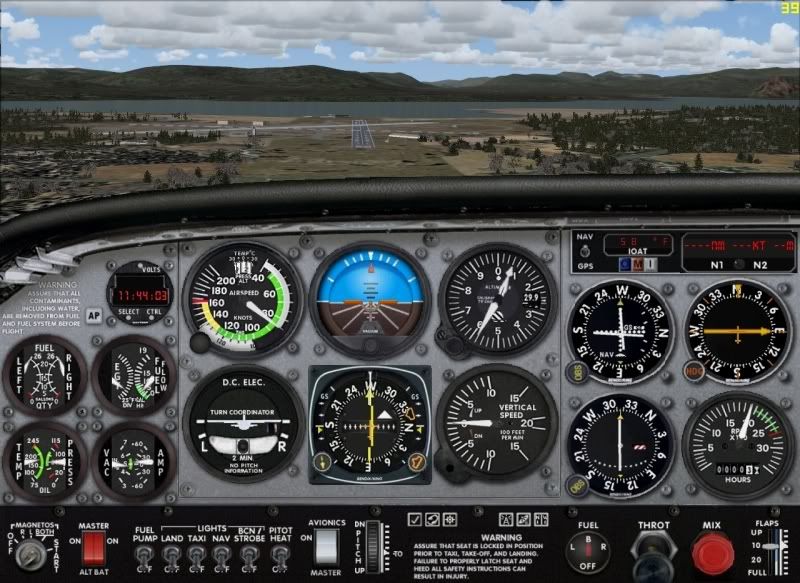
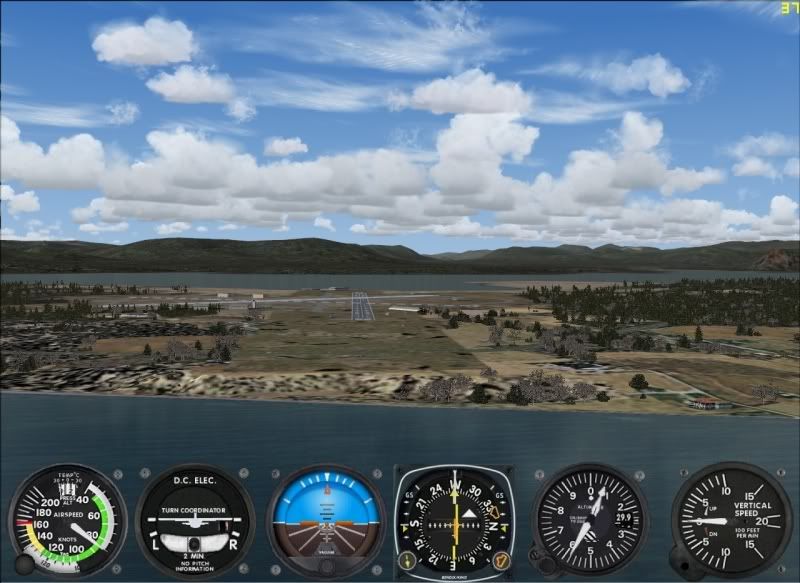
This should yield the following results:

2D Panel:


Mini Panel:


and the VC:


And it works well, too. In the shots above I'm lined up with the runway on an ILS approach and you can see the ILS path and glideslope indicators on the newly-installed HSI from the Beech agree perfectly with the glideslope and path path indicators on the VOR1 indicator.

Lastly, note that in the Cessna 172 folder, there is also a panel.ifr folder - this is a second, extended panel for the IFR-equipped version of the Cessna 172. The above mods were tested on the more standard (VFR-panel) C-172, you'd also have to edit the panel.cfg file in the panel.ifr folder the same way to make the same changes to the C-172 IFR panel version (which makes more sense to do anyway since you'd want the better instrumentation).

Just be sure to do this at night or choose a 'donor' Baron on the ramp that's equipped with window covers, so no one sees ya in there pryin' that high-dollar HSI out of the Beech panel with your screwdriver, and the doctor or dentist who owns it won't be none the wiser.....

Hope that helps!

_________________
"Once your reputation is ruined, you can live quite freely."
Back to top
View user's profile Visit poster's website Photo Gallery
Shadow_Bshwackr
Janitor

Offline Offline
Joined: Jan 21, 2005
Posts: 7019
Location: Central Illinois, USA
PostPosted: Sun Dec 09, 2007 12:11 pm
Post subject: Re: HSI Guage for C172??

Made sticky... Smile

Great job explaining that Stoopy and is a great tutorial for those 'tinkering' with panels... Wink
Back to top
View user's profile Visit poster's website Photo Gallery
JG300_Hunt
Power User

Offline Offline
Joined: Mar 08, 2006
Posts: 750
Location: WA State
PostPosted: Mon Dec 10, 2007 4:49 am
Post subject: Re: HSI Guage for C172??

WOW Stoopy - Wasn't expectin such a thorough writeup! This one seems to be a cinch! Think I'll re-package something for her and email it off as an early XMAS present! And believe me, if I lived back east, I would surely be buckin' for some freebies! She does however live in your neck of the woods! Perhaps I could pursuade a discount Mr. Green

Thanks again man, much obliged!


_________________
Back to top
View user's profile
JG300-Stoopy
Power User

Offline Offline
Joined: Jan 05, 2005
Posts: 5840
Location: Group W bench
PostPosted: Mon Dec 10, 2007 11:30 am
Post subject: Re: HSI Guage for C172??

Sure thing, it was no problem and a good question. Hey, if need be, we can make up a self-installer for her...brownie points still go to you though, for when you visit. Wink

Hopefully thats the HSI gauge she was lookin' for. There are fancier ones, but borrowing one from the cockpit of a Learjet didn't seem appropriate.

_________________
"Once your reputation is ruined, you can live quite freely."
Back to top
View user's profile Visit poster's website Photo Gallery
JG300_Hunt
Power User

Offline Offline
Joined: Mar 08, 2006
Posts: 750
Location: WA State
PostPosted: Sat Dec 15, 2007 5:06 am
Post subject: Re: HSI Guage for C172??

I had her take a look at the Baron on - loved it. Planned on modifying the files this weekend. What program do I use to make a self installer -- never had to make one to be quite honest! I planned on making a ZIP with the FS9 folder structure built in for a simple copy paste job.

_________________
Back to top
View user's profile
JG300-Stoopy
Power User

Offline Offline
Joined: Jan 05, 2005
Posts: 5840
Location: Group W bench
PostPosted: Sat Dec 15, 2007 1:19 pm
Post subject: Re: HSI Guage for C172??

I use a program called Install Creator (free version).

www.clickteam.com/eng/...reator.php

Nice tool!

You know, I meant to add, I've been doing some looking and also found a better AIR file available for the Cessna 172 that provides much more realistic flight responses, stalls, evens spins. It's from the payware RealAir Cessna 172 and they made it available as a freeware package that got very good feedback. So it's good.

So I meant to add, if you haven't done a self-installer and don't want to make a rush job, I can make it for you while you get Install Creator cooking...? Since I've gone ahead and updated my Cessna with the Baron HSI (both panels) as well as this ew air file. I can send you the project file for it when done and then you'll have a good reference to make others.... Wink

_________________
"Once your reputation is ruined, you can live quite freely."
Back to top
View user's profile Visit poster's website Photo Gallery
JG300_Hunt
Power User

Offline Offline
Joined: Mar 08, 2006
Posts: 750
Location: WA State
PostPosted: Sat Dec 15, 2007 6:38 pm
Post subject: Re: HSI Guage for C172??

That would be great Stoopy! Going to grab a copy of it and play around a bit. Much appreciated as always Smile

Going to take a look for the RealAir 172 - will post a link in the forum when I find her.

_________________
Back to top
View user's profile
JG300-Stoopy
Power User

Offline Offline
Joined: Jan 05, 2005
Posts: 5840
Location: Group W bench
PostPosted: Sat Dec 15, 2007 10:05 pm
Post subject: Re: HSI Guage for C172??

AvSim library is where I got it.....shoulda mentioned that. INstall is pretty easy, you make a copy of your existing C-172 folder and install the new air file and texture set. It uses the default FS9 C-172 model and other stuff.

So what you can do also is take the .air file fomr the RealAir version and put it in your default C-172 folder (renaming it to the same name after backing up the original of course) and bada binga boom, done.

I'll whip up the installer and PM you for details....we can make this custom for your stepmom (hey maybe a custom paint job to match any real one she flies?)....

_________________
"Once your reputation is ruined, you can live quite freely."
Back to top
View user's profile Visit poster's website Photo Gallery
JG300_Hunt
Power User

Offline Offline
Joined: Mar 08, 2006
Posts: 750
Location: WA State
PostPosted: Sun Dec 16, 2007 4:32 am
Post subject: Re: HSI Guage for C172??

I grabbed the one from AVSIM - wanted to keep the original C-172, so followed the instructions - pretty straight forward. A gem to fly compared to the default - I noticed a slight difference in flight for sure.

I appreciate you setting up the self-installer Stoopy! As far as a custom paint job, wow.. I don't know if I have a picture of the one she flys.. Would have to cash a rain check on that one..


_________________
Back to top
View user's profile
JG300-Stoopy
Power User

Offline Offline
Joined: Jan 05, 2005
Posts: 5840
Location: Group W bench
PostPosted: Sun Dec 16, 2007 3:52 pm
Post subject: Re: HSI Guage for C172??

Yep, sounds like a plan.....Done! Check your PM inbox and tell her Happy Holidays from the gang here at Com-C!!!


_________________
"Once your reputation is ruined, you can live quite freely."
Back to top
View user's profile Visit poster's website Photo Gallery
Display posts from previous:   
Post new topic    Revive this topic    Printer Friendly Page    Forum Index ›  FSXFS2004 :: Archives
Page 1 of 1
All times are GMT - 6 Hours

Archive Revive
Username:
This is an archived topic - your reply will not be appended here.
Instead, a new topic will be generated in the active forum.
The new topic will provide a reference link to this archived topic.