±Recent Visitors

Recent Visitors to Com-Central!

±User Info-big


Welcome Anonymous

Nickname
Password

Membership:
Latest: HighestAce
New Today: 0
New Yesterday: 0
Overall: 6648

People Online:
Members: 0
Visitors: 348
Total: 348
Who Is Where:
 Visitors:
01: Community Forums
02: Community Forums
03: Community Forums
04: Community Forums
05: News Archive
06: Photo Gallery
07: Community Forums
08: Home
09: Community Forums
10: Home
11: Community Forums
12: Member Screenshots
13: Community Forums
14: Home
15: News Archive
16: Photo Gallery
17: Community Forums
18: Community Forums
19: Community Forums
20: Community Forums
21: Community Forums
22: Community Forums
23: Home
24: Community Forums
25: Photo Gallery
26: Community Forums
27: Community Forums
28: Community Forums
29: Community Forums
30: Member Screenshots
31: Community Forums
32: Home
33: Community Forums
34: Home
35: Community Forums
36: Community Forums
37: Downloads
38: Community Forums
39: Community Forums
40: Community Forums
41: Community Forums
42: Community Forums
43: Community Forums
44: Downloads
45: Community Forums
46: Community Forums
47: Community Forums
48: Community Forums
49: Community Forums
50: Community Forums
51: Community Forums
52: Community Forums
53: Member Screenshots
54: Photo Gallery
55: Community Forums
56: Member Screenshots
57: News Archive
58: Community Forums
59: Community Forums
60: Home
61: News Archive
62: Member Screenshots
63: Downloads
64: Downloads
65: Community Forums
66: Community Forums
67: Community Forums
68: Community Forums
69: Community Forums
70: Photo Gallery
71: Community Forums
72: Home
73: Community Forums
74: Home
75: Home
76: Photo Gallery
77: Community Forums
78: Community Forums
79: Community Forums
80: Community Forums
81: Home
82: Home
83: Community Forums
84: Community Forums
85: Community Forums
86: Home
87: Home
88: Community Forums
89: Community Forums
90: Community Forums
91: News Archive
92: Downloads
93: Community Forums
94: Community Forums
95: Community Forums
96: Community Forums
97: Community Forums
98: News Archive
99: Downloads
100: Community Forums
101: Home
102: Home
103: Community Forums
104: Community Forums
105: Community Forums
106: News Archive
107: Member Screenshots
108: Community Forums
109: Downloads
110: Community Forums
111: Downloads
112: Community Forums
113: Downloads
114: Home
115: Community Forums
116: News Archive
117: Community Forums
118: Community Forums
119: Community Forums
120: Community Forums
121: Home
122: Community Forums
123: News Archive
124: Community Forums
125: Community Forums
126: Community Forums
127: Home
128: Home
129: Home
130: Home
131: Downloads
132: Community Forums
133: News
134: Photo Gallery
135: Community Forums
136: Home
137: Home
138: Home
139: Community Forums
140: Home
141: Community Forums
142: Community Forums
143: Member Screenshots
144: Downloads
145: Community Forums
146: Community Forums
147: Community Forums
148: News Archive
149: Community Forums
150: Photo Gallery
151: Community Forums
152: Community Forums
153: Community Forums
154: Home
155: Community Forums
156: Home
157: Community Forums
158: News Archive
159: Community Forums
160: Photo Gallery
161: Community Forums
162: Community Forums
163: Downloads
164: Community Forums
165: Community Forums
166: Community Forums
167: News Archive
168: News Archive
169: Community Forums
170: Community Forums
171: Community Forums
172: Downloads
173: Community Forums
174: Community Forums
175: Community Forums
176: Community Forums
177: Community Forums
178: Community Forums
179: Community Forums
180: News Archive
181: Community Forums
182: Community Forums
183: Home
184: Community Forums
185: Community Forums
186: Community Forums
187: Home
188: Community Forums
189: Downloads
190: Photo Gallery
191: Your Account
192: Photo Gallery
193: News
194: Community Forums
195: Community Forums
196: Home
197: Community Forums
198: Community Forums
199: Community Forums
200: Community Forums
201: Community Forums
202: Community Forums
203: Community Forums
204: Community Forums
205: Member Screenshots
206: Home
207: Community Forums
208: Community Forums
209: Community Forums
210: Home
211: News Archive
212: Downloads
213: Photo Gallery
214: Community Forums
215: Community Forums
216: Community Forums
217: Home
218: Home
219: Community Forums
220: News Archive
221: Home
222: Community Forums
223: Member Screenshots
224: Member Screenshots
225: Home
226: Community Forums
227: Home
228: Community Forums
229: Photo Gallery
230: Community Forums
231: News
232: Community Forums
233: Home
234: Home
235: Home
236: Home
237: Community Forums
238: Photo Gallery
239: Community Forums
240: Home
241: Home
242: Community Forums
243: Community Forums
244: Community Forums
245: Your Account
246: Home
247: Community Forums
248: Downloads
249: Home
250: Home
251: Home
252: Community Forums
253: Community Forums
254: Home
255: Community Forums
256: Community Forums
257: Photo Gallery
258: Community Forums
259: Community Forums
260: Home
261: Community Forums
262: Community Forums
263: Home
264: Community Forums
265: Community Forums
266: Photo Gallery
267: Community Forums
268: Community Forums
269: Downloads
270: Community Forums
271: Community Forums
272: Community Forums
273: Photo Gallery
274: Community Forums
275: Community Forums
276: Community Forums
277: News Archive
278: Home
279: Member Screenshots
280: Community Forums
281: Community Forums
282: Home
283: Community Forums
284: News
285: Community Forums
286: Community Forums
287: Community Forums
288: Community Forums
289: Community Forums
290: Community Forums
291: Member Screenshots
292: Photo Gallery
293: Community Forums
294: Community Forums
295: News Archive
296: Home
297: Community Forums
298: Home
299: Photo Gallery
300: News Archive
301: Home
302: News Archive
303: Downloads
304: Community Forums
305: Home
306: Community Forums
307: Photo Gallery
308: News
309: Home
310: Community Forums
311: Home
312: Community Forums
313: Community Forums
314: Photo Gallery
315: Community Forums
316: Community Forums
317: Home
318: Home
319: Community Forums
320: Home
321: Home
322: News Archive
323: Photo Gallery
324: Photo Gallery
325: Photo Gallery
326: Photo Gallery
327: Photo Gallery
328: Photo Gallery
329: Downloads
330: Community Forums
331: Home
332: Photo Gallery
333: Community Forums
334: Photo Gallery
335: Home
336: Community Forums
337: Community Forums
338: Community Forums
339: Home
340: Community Forums
341: Community Forums
342: Community Forums
343: Community Forums
344: Home
345: Community Forums
346: Home
347: Home
348: Community Forums

Staff Online:

No staff members are online!
"Phu Bai Redux" is ready for testing.... :: Archived
Discussions about the FS2004 game.
Go to page Previous  1, 2, 3, ... 12, 13, 14  Next
Post new topic    Revive this topic    Printer Friendly Page     Forum Index ›  FSXFS2004 :: Archives

Topic Archived View previous topic :: View next topic  
Author Message
JG300-fr8ycat
Power User

Offline Offline
Joined: Mar 13, 2005
Posts: 1530
Location: Los Angeles
PostPosted: Sun Jul 30, 2006 8:06 pm
Post subject: Re: "Phu Bai Redux" is ready for testing....

Should I be putting the tree's somewhere other than the Phu Bai folder they are in?

Re-downloaded the file from the CC server, maybe I got the old one before the new one was ready.

_________________
Back to top
View user's profile MSN Messenger Photo Gallery
JG300-fr8ycat
Power User

Offline Offline
Joined: Mar 13, 2005
Posts: 1530
Location: Los Angeles
PostPosted: Sun Jul 30, 2006 8:22 pm
Post subject: Re: "Phu Bai Redux" is ready for testing....

never mind. I take it you actually need the "Trees" update installed.

I found it in my DL folder and re-installed and it works.

_________________
Back to top
View user's profile MSN Messenger Photo Gallery
JG300-fr8ycat
Power User

Offline Offline
Joined: Mar 13, 2005
Posts: 1530
Location: Los Angeles
PostPosted: Sun Jul 30, 2006 10:02 pm
Post subject: Re: "Phu Bai Redux" is ready for testing....

Looks Excellent Ascout!

So far no probs detected...............well, with the exception of this guy shading a skid.

Back to top
View user's profile MSN Messenger Photo Gallery
JG300-Stoopy
Power User

Offline Offline
Joined: Jan 05, 2005
Posts: 5840
Location: Group W bench
PostPosted: Sun Jul 30, 2006 10:32 pm
Post subject: Re: "Phu Bai Redux" is ready for testing....

OK Hints please.....these trees come from where? Are they the "Gerrish Grey's trees" I remember from a while back?

_________________
"Once your reputation is ruined, you can live quite freely."
Back to top
View user's profile Visit poster's website Photo Gallery
JG300-Ascout
Power User

Offline Offline
Joined: Jan 05, 2005
Posts: 6258
Location: Cyberspace
PostPosted: Sun Jul 30, 2006 10:40 pm
Post subject: Re: "Phu Bai Redux" is ready for testing....

- JG300-fr8ycat


OK, reports coming in here and privately (and the pics) suggest that:

1: Fr8ycat has the api's but not the textures for Gerrish's trees. Those white boxes are all where trees are. Since no one else sees this, it must mean you have Gerrish's "Trees" installed, probably in your FS9 tex files....OR...

2. Some of you have the FS9 environmental pack installed...your ground looks a bit different from mine (I don't have it). BUT, as you have the trees, maybe the "Trees" was part of the Environmental Pack (isn't this Fled's? Maybe he can confirm that).

3. Wingnut reported the guy on the tower and the C130 were both "floating", as in, too high. I have checked it with and without Baptistes' mesh and (to my amazement) neither floated in stock scenery (which is about 40' below the mesh level). The guy I understand, but the C130 was 10' in the air, he said. Wingnut, what, if any mesh do you have installed?
Anyone else seen this?

I'd like more pics from around the terminal, the radio research station, and the MACV camp NW of the airfield...all have trees installed...

This is VERY helpful guys. I'm trying to decide if I need to have two uploads available...one for stock, and one for mesh. This also has a bearing on the Hill 180 ridgeline I have installed (isn't needed with mesh).


_________________
"All facts go to clearly prove that Shades is a thrice-cursed traitor & mentally deranged person steeped in inveterate enmity toward mankind"
Back to top
View user's profile Photo Gallery
JG300-Ascout
Power User

Offline Offline
Joined: Jan 05, 2005
Posts: 6258
Location: Cyberspace
PostPosted: Sun Jul 30, 2006 10:44 pm
Post subject: Re: "Phu Bai Redux" is ready for testing....

- JG300-fr8ycat
Looks Excellent Ascout!

So far no probs detected...............well, with the exception of this guy shading a skid.


Gawd, he's handsome! I could almost make a hard left turn and start batting for the other team for that studmuffin! I think I'm in love... Shocked

Good news about the "Trees"...actually, there is a readme for those not included with the gamma version yet.....

_________________
"All facts go to clearly prove that Shades is a thrice-cursed traitor & mentally deranged person steeped in inveterate enmity toward mankind"


Last edited by JG300-Ascout on Sun Jul 30, 2006 11:17 pm; edited 1 time in total
Back to top
View user's profile Photo Gallery
JG300-Ascout
Power User

Offline Offline
Joined: Jan 05, 2005
Posts: 6258
Location: Cyberspace
PostPosted: Sun Jul 30, 2006 10:46 pm
Post subject: Re: "Phu Bai Redux" is ready for testing....

- JG300-Stoopy
OK Hints please.....these trees come from where? Are they the "Gerrish Grey's trees" I remember from a while back?


Yes, you should find in the second upload I did today about 12:45...not in the one I emailed you. See Fr8ycat's post. Wink

_________________
"All facts go to clearly prove that Shades is a thrice-cursed traitor & mentally deranged person steeped in inveterate enmity toward mankind"
Back to top
View user's profile Photo Gallery
JG300-Ascout
Power User

Offline Offline
Joined: Jan 05, 2005
Posts: 6258
Location: Cyberspace
PostPosted: Sun Jul 30, 2006 10:49 pm
Post subject: Re: "Phu Bai Redux" is ready for testing....

How are your framerates, Guys? I have a low and medium res version of that terminal in additon to the High Res version you have now. I really like the high res, and Al told me it did not make a profound difference on frames to switch....

Be honest, I know there's a hit, but one I can live with on my middle-of-the-road 3 year old system....

_________________
"All facts go to clearly prove that Shades is a thrice-cursed traitor & mentally deranged person steeped in inveterate enmity toward mankind"
Back to top
View user's profile Photo Gallery
JG300-Ascout
Power User

Offline Offline
Joined: Jan 05, 2005
Posts: 6258
Location: Cyberspace
PostPosted: Sun Jul 30, 2006 11:03 pm
Post subject: Re: "Phu Bai Redux" is ready for testing....

Also, I see bright white wires on the C130 and Stoopy reported this too. The ones on mine are a subdued realistic color. Stoopy painted this bird for me, but did it 2-3 times, so I'm really puzzled why mine looks different from youse guys. I thought maybe Stoop had the old one installed in the tex files or sumthin', but since Fled is showing it, something isn't coming over. OR, I have the C130 tex files in my FS9 somewheres that overrides the white ones in the upload. This should be fixable with the different tex files. I used that bird in a couple of other sceneries, like Secret Base, but I think it's AF grey in that one.

_________________
"All facts go to clearly prove that Shades is a thrice-cursed traitor & mentally deranged person steeped in inveterate enmity toward mankind"
Back to top
View user's profile Photo Gallery
JG300-Stoopy
Power User

Offline Offline
Joined: Jan 05, 2005
Posts: 5840
Location: Group W bench
PostPosted: Sun Jul 30, 2006 11:03 pm
Post subject: Re: "Phu Bai Redux" is ready for testing....

OK I have the new version and now have the same white box-trees that fr8ycat had before installing Gerrish Grey's trees.....I'll search for where I can find them and install. Any chance we can include what's needed to begin with?

I don't have anyone floating in the terminal, the soldier on the upper deck and the local "tour guide" inside the entrance have their feet firmly on the floor. Also the C-130 is on the ramp firmly...hey that's nice camo, who did that? Maybe they can check those white wires....

There's a CH-47 levitating about 30 feet up, but I think it's intentional...just looks a little odd becuase the macro seems to be casting a shadow at wheel level, not on the ground. You only notice it when close up tho.

My FSP average around 15 and dip down into single-digits, but I have pretty much everything cranked up 100%. My max FPS is set to 25 for PROPS racing. I suspect the FPS hits are from a combined hit from many small objects all over and in the distance, my FPS rates don't seem to be impacted by the terminal itself, actually when facing it and hovering, it's surprisingly smooth. On my system, the real "hit" seems to come when viewing all the helos and Skyraiders in the revetments on the north side of the runway.

Frankly, although I can see some people griping, I'm finding so much of interest in this scenery, and it's so unique, I really have no problem with it, all things considered. I've done many many low and slow circuits around it in fr8ycat's OH-6 with no problems setting it down wherever I want to. But those with lower-end systems may find otherwise.

Oh, the second red "El Alamo" hooch is immediately WEST of the Phu Bai terminal building, next to 3 blue hooches and a small tan building....about 100 yards from the terminal.

_________________
"Once your reputation is ruined, you can live quite freely."


Last edited by JG300-Stoopy on Sun Jul 30, 2006 11:16 pm; edited 1 time in total
Back to top
View user's profile Visit poster's website Photo Gallery
JG300-Ascout
Power User

Offline Offline
Joined: Jan 05, 2005
Posts: 6258
Location: Cyberspace
PostPosted: Sun Jul 30, 2006 11:15 pm
Post subject: Re: "Phu Bai Redux" is ready for testing....

- JG300-Stoopy
OK I have the new version and now have the same white box-trees that fr8ycat had before installing Gerrish Grey's trees.....I'll search for where I can find them and install. Any chance we can include what's needed to begin with?


Yes, I did this in my first version years ago and forgot they have to be loaded in separately when I zipped this one up. You're missing the texture files. Easily fixed, I just have to read my own dang readme files again.

I don't have anyone floating in the terminal, the soldier on the upper deck and the local "tour guide" inside have their feet firmly on the floor. Also the C-130 is on the ramp firmly...hey that's nice camo, who did that?


OK, that's good news, did you check with mesh enabled and off? I need feedback on both. So far, only Wingnut reports an anomaly with the guy and the Herc floating. We've seen how different meshs and addons can corrupt stuff like that (from and early test you did for me on Eagle's Nest) so I need to know if it's isolated or if anyone else sees this.

That painter was a shy guy who didn't want to take the blame (errr...credit) for anything he did. Tough nuggies, he'll be in the readme along with his home telephone number.

My FSP average around 15 and dip down into single-digits, but I have pretty much everything cranked up 100%. My max FPS is set to 25 for PROPS racing. I suspect the FPS hits are from a combined hit from many small objects all over and in the distance, my FPS rates don't seem to be impacted by the terminal itself, actually when facing it and hovering, it's surprisingly smooth.


Yes, that's my impression also. I've flown all over, around, and in that terminal and it has almost no frame effects associated with it. I think it's from the "many small objects" dealie. Trust me, if I was obsessive, there'd be about 8 times more buildings in the area or more. I cut it to a minimum. It's a "high end computer" oriented scenery, but I'm loath to take anything else out. I'd have to start with sacrificing the CCN camp, but don't know if it would help that much.

Oh, the second red "El Alamo" hooch is immediately WEST of the Phu Bai terminal building, next to 3 blue hooches and a small tan building....about 100 yards from the terminal.


Already fixed, but not uploaded.

_________________
"All facts go to clearly prove that Shades is a thrice-cursed traitor & mentally deranged person steeped in inveterate enmity toward mankind"
Back to top
View user's profile Photo Gallery
JG300-Stoopy
Power User

Offline Offline
Joined: Jan 05, 2005
Posts: 5840
Location: Group W bench
PostPosted: Sun Jul 30, 2006 11:19 pm
Post subject: Re: "Phu Bai Redux" is ready for testing....

Right now I'm flying with the terrain mesh disabled, and had it enabled on my first thorough checkout where I was scoping the terminal out real good....didn't see any floaters then also. I'll re-enable mesh but I believe the results will definitely be the same.

_________________
"Once your reputation is ruined, you can live quite freely."
Back to top
View user's profile Visit poster's website Photo Gallery
JG300-Ascout
Power User

Offline Offline
Joined: Jan 05, 2005
Posts: 6258
Location: Cyberspace
PostPosted: Sun Jul 30, 2006 11:38 pm
Post subject: Re: "Phu Bai Redux" is ready for testing....

Stoopy,
I just uploaded it to the server again to include trees and texture files needed...it should fix it all. I'd ask that you delete your old files and see if you get complete trees now (would help if Fr8ycat did the same, I know he fixed his, but he went "outside the package" to get there). I need to know the Trees thing is integral to my upload without outside help.

Also, I don't have three blue hootches near where the extra red one was...they's all green. I do have some of the blue-ish long barracks in there though, are these what you mean...two story barracks? We repainted the only "blue hootch" macro, so anything of that design should be red...and there should only be one ("El Alamo").

There is a readme file in the upload now, but it's a work-in-progress, so don't worry, Richard...I'll get Lynn Rogers in there before release. Wink

_________________
"All facts go to clearly prove that Shades is a thrice-cursed traitor & mentally deranged person steeped in inveterate enmity toward mankind"
Back to top
View user's profile Photo Gallery
JG300-Stoopy
Power User

Offline Offline
Joined: Jan 05, 2005
Posts: 5840
Location: Group W bench
PostPosted: Sun Jul 30, 2006 11:45 pm
Post subject: Re: "Phu Bai Redux" is ready for testing....

No sweat. I just tracked down the trees and installed, but will wipe 'em and reinstall your new zip. I see that the trees_0.bgl file was included. it was just the texture bitmaps ("conifer_xxx" and whatnots) that were missing.

I'll get ya a screeenie of that elusive second red hooch.....if it's still there after a reinstall.

_________________
"Once your reputation is ruined, you can live quite freely."
Back to top
View user's profile Visit poster's website Photo Gallery
JG300-Stoopy
Power User

Offline Offline
Joined: Jan 05, 2005
Posts: 5840
Location: Group W bench
PostPosted: Mon Jul 31, 2006 12:44 am
Post subject: Re: "Phu Bai Redux" is ready for testing....

LOOKS GOOD!!!

I deleted BOTH the "Phu Bai Redux" and original "Phu Bai" folder I had, although it wasn't activated in my scenery library (I don't think)...and the second red hooch is gone. Voila!

I gots trees galore!

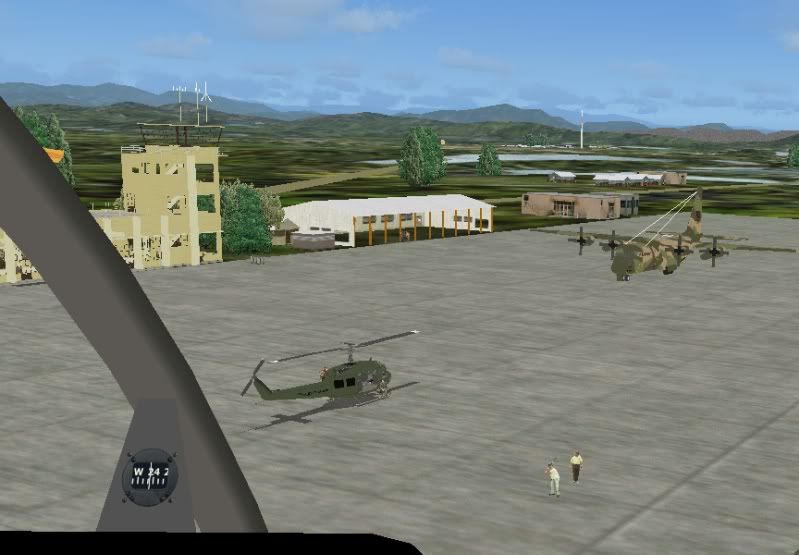
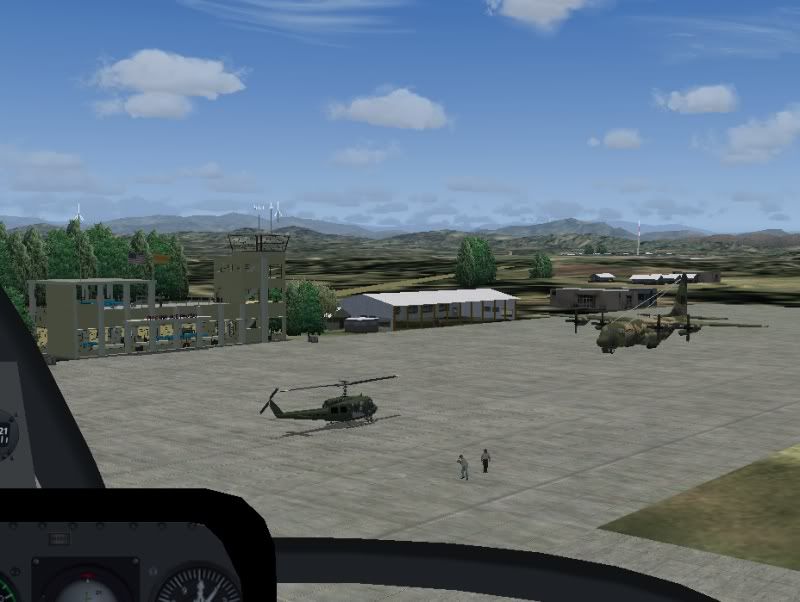
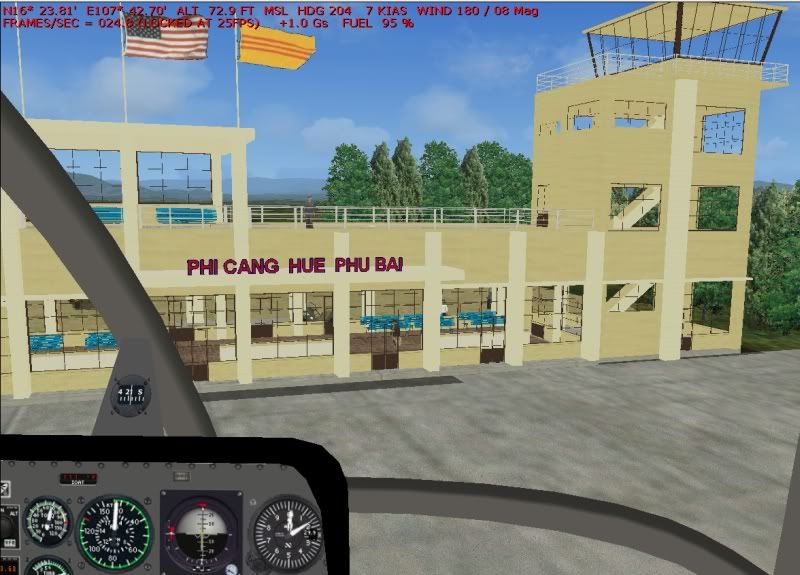
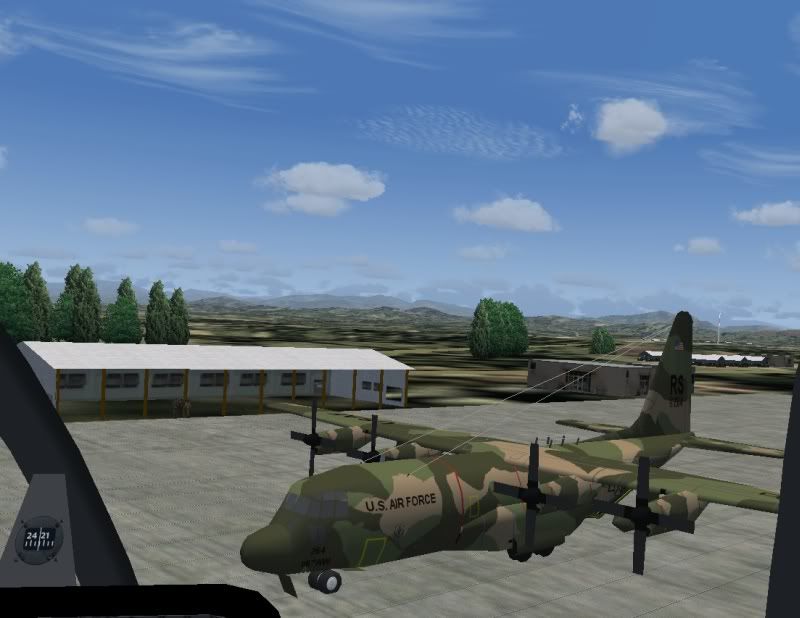
And, the mystery of the white aerial wires on the C-130 is solved. Becuase I have a slick little gizmo that turns the Environment Pack on and off with a click, I was able to see that its definitely related to that. The wires don't change color, but one thing the Envi Pack does that has an effect is it "brightens" everything (even when setting it to run with the stock 43K "envmap.bmp" file in the default texture folder, which I did a while back to make everything less "glossy"). NO OFFENSE TO FLED'S GREAT WORK HERE THOUGH! I only found this out when switching back and forth between Envi Pack and default textures for PROPS racing. The pylons are MUCH brighter and more visible with the Envi Pack, but at the cost of some stutters, so I run with it turned off, and it's smoother and more competitive for racing, but I've almost missed pylons becuase I didn't see them as well as when practicing with it turned on.

So the gray aerial wires are sufficiently brightened by the Envi Pack to make them look white - there's no texture to modify, I looked through all the texture files for the C-130 and everything is gray, no white, except for the center of the wheels. For this scenery, I believe that the darker colors look better, more dull and "military".

Some shots:

First, with the Envi Pack enabled:

Note the white aerial wires on the C-130 and the light almost-yellowish color of the terminal.....


And, without:


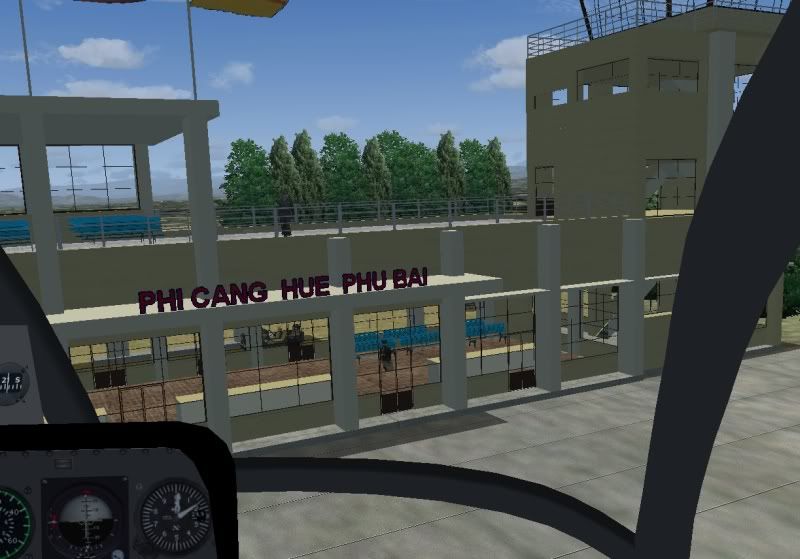
With EnviPack on, a close up of the terminal, no floating people.....either with terrain mesh on or off...but DO note the color of the terminal:


Now, with Envi Pack disabled and running stock textures.....note the aerial wires are now gray:


And note the more subdued color of the terminal (these are all taken with a flight saved at the same time of day, too, if you're wondering):


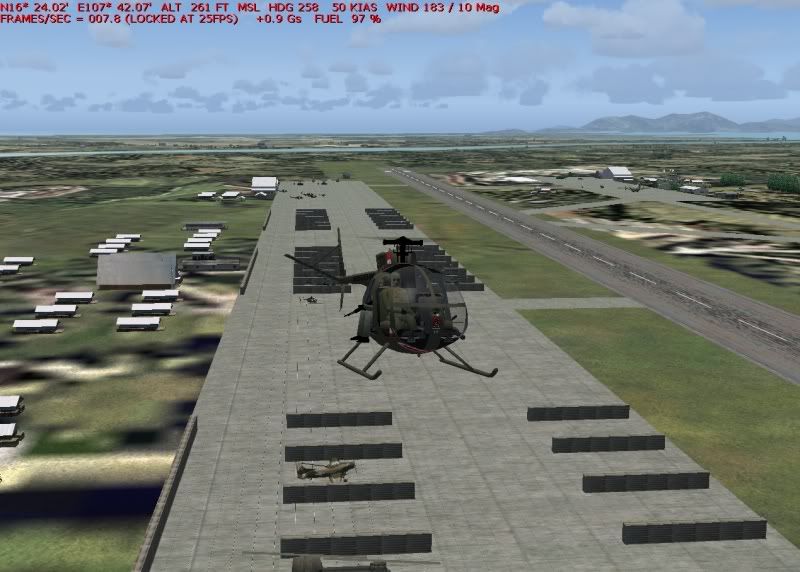
And an overview shot..note FPS in upper right. To be honest, that is NOT representative of what I get most of the time with this scenery, usually it's in the teens, this is a worst-case scenarion and a momentary hit at that. It's still very flyable for me (I started out with Sublogic Flight Simulator on a Commodore 64 back in the mid-eighties though.... 2 to 4 FPS max on that thing.....)


In my experience here, the noted (and relatively small) anomalies are just results of various add-ons which don't see eye to eye with each other, but don't outright ruin the experience, based on preference. Certainly, no offense meant to Fled's great Environment Pack at all, it's just how FS9 is dealing with multiple ideas of how things should look.

I don't see anything here that prevents it from being called a wrap...nice work!


_________________
"Once your reputation is ruined, you can live quite freely."


Last edited by JG300-Stoopy on Mon Jul 31, 2006 1:00 am; edited 3 times in total
Back to top
View user's profile Visit poster's website Photo Gallery
Display posts from previous:   
Post new topic    Revive this topic    Printer Friendly Page    Forum Index ›  FSXFS2004 :: Archives
Page 2 of 14
All times are GMT - 6 Hours
Go to page Previous  1, 2, 3, ... 12, 13, 14  Next

Archive Revive
Username:
This is an archived topic - your reply will not be appended here.
Instead, a new topic will be generated in the active forum.
The new topic will provide a reference link to this archived topic.