±Recent Visitors

Recent Visitors to Com-Central!

±User Info-big


Welcome Anonymous

Nickname
Password

Membership:
Latest: HighestAce
New Today: 0
New Yesterday: 0
Overall: 6648

People Online:
Members: 0
Visitors: 268
Total: 268
Who Is Where:
 Visitors:
01: Photo Gallery
02: Downloads
03: Home
04: Community Forums
05: Tell a Friend
06: Home
07: Photo Gallery
08: Community Forums
09: Your Account
10: Member Screenshots
11: Community Forums
12: Home
13: Community Forums
14: Community Forums
15: Home
16: Community Forums
17: Community Forums
18: Community Forums
19: Photo Gallery
20: Community Forums
21: Member Screenshots
22: Community Forums
23: Community Forums
24: Community Forums
25: Community Forums
26: Community Forums
27: Member Screenshots
28: Downloads
29: News Archive
30: Community Forums
31: News Archive
32: Home
33: Community Forums
34: Your Account
35: Photo Gallery
36: Home
37: Home
38: Community Forums
39: Member Screenshots
40: Downloads
41: Community Forums
42: Home
43: Downloads
44: Downloads
45: Community Forums
46: Community Forums
47: Your Account
48: Community Forums
49: Community Forums
50: Community Forums
51: Community Forums
52: Community Forums
53: Home
54: Home
55: Community Forums
56: Community Forums
57: Home
58: Community Forums
59: Community Forums
60: Member Screenshots
61: Community Forums
62: Community Forums
63: Community Forums
64: Community Forums
65: Community Forums
66: Community Forums
67: Downloads
68: Community Forums
69: Community Forums
70: Home
71: Community Forums
72: Community Forums
73: Your Account
74: Community Forums
75: Community Forums
76: Community Forums
77: Your Account
78: Community Forums
79: Photo Gallery
80: Community Forums
81: Community Forums
82: Home
83: News
84: Community Forums
85: Home
86: Home
87: Downloads
88: Community Forums
89: Community Forums
90: Community Forums
91: Community Forums
92: Home
93: Community Forums
94: Community Forums
95: Community Forums
96: Community Forums
97: Photo Gallery
98: Home
99: Downloads
100: Community Forums
101: Community Forums
102: Community Forums
103: Downloads
104: Home
105: Community Forums
106: Community Forums
107: Community Forums
108: Community Forums
109: Community Forums
110: Home
111: Your Account
112: Home
113: Community Forums
114: Community Forums
115: Treasury
116: News
117: Community Forums
118: Community Forums
119: Community Forums
120: Community Forums
121: Your Account
122: Home
123: Photo Gallery
124: Home
125: Community Forums
126: Community Forums
127: Community Forums
128: Your Account
129: Community Forums
130: Your Account
131: Photo Gallery
132: Home
133: Photo Gallery
134: Community Forums
135: Community Forums
136: Your Account
137: Community Forums
138: Home
139: Community Forums
140: Home
141: Photo Gallery
142: Community Forums
143: Community Forums
144: Community Forums
145: Community Forums
146: Home
147: Home
148: Home
149: Your Account
150: Downloads
151: Community Forums
152: Photo Gallery
153: Community Forums
154: Community Forums
155: Community Forums
156: News Archive
157: Community Forums
158: Downloads
159: Community Forums
160: Community Forums
161: Community Forums
162: Home
163: Community Forums
164: Member Screenshots
165: Your Account
166: Photo Gallery
167: Community Forums
168: Community Forums
169: Community Forums
170: Downloads
171: Community Forums
172: Community Forums
173: Community Forums
174: Community Forums
175: Home
176: Community Forums
177: Community Forums
178: Member Screenshots
179: Your Account
180: Home
181: Community Forums
182: Community Forums
183: Home
184: Home
185: Community Forums
186: Community Forums
187: Member Screenshots
188: Community Forums
189: Home
190: Community Forums
191: Downloads
192: Downloads
193: Community Forums
194: Downloads
195: Community Forums
196: Home
197: Community Forums
198: Community Forums
199: Community Forums
200: Community Forums
201: Community Forums
202: Your Account
203: Home
204: Community Forums
205: Community Forums
206: Community Forums
207: Home
208: Home
209: Community Forums
210: Community Forums
211: Community Forums
212: Community Forums
213: Community Forums
214: Community Forums
215: Community Forums
216: Community Forums
217: Photo Gallery
218: Home
219: Community Forums
220: Community Forums
221: Community Forums
222: Community Forums
223: Community Forums
224: Community Forums
225: Downloads
226: Home
227: Community Forums
228: Home
229: Your Account
230: Community Forums
231: Your Account
232: Community Forums
233: Home
234: Community Forums
235: Home
236: Your Account
237: Community Forums
238: LinkToUs
239: Home
240: Community Forums
241: Home
242: Community Forums
243: Community Forums
244: Photo Gallery
245: Community Forums
246: Home
247: Community Forums
248: Community Forums
249: Member Screenshots
250: Downloads
251: Community Forums
252: Community Forums
253: Community Forums
254: Home
255: Community Forums
256: Home
257: Home
258: Your Account
259: Photo Gallery
260: Community Forums
261: Community Forums
262: Community Forums
263: Community Forums
264: Community Forums
265: Home
266: Community Forums
267: Home
268: Community Forums

Staff Online:

No staff members are online!
Addon Scenery in FSX... :: Archived
A forum for Microsoft's Flight Simulator X
Go to page 1, 2  Next
Post new topic    Revive this topic    Printer Friendly Page     Forum Index ›  FSX

Topic Archived View previous topic :: View next topic  
Author Message
Doug_Kibbey
Power User

Offline Offline
Joined: Jan 23, 2006
Posts: 4678
Location: The Great Satan
PostPosted: Mon Oct 16, 2006 5:43 pm
Post subject: Addon Scenery in FSX...

I'm rather desperate to know how "Phu_Bai_Redux" (avalable here at Com-Central... com-central.net/index....ils&id=273 ) performs in FSX. Well, I'm curious about addon scenery generally (particularly mine, or that Ascout feller's) but especially about Phu Bai!

It's a fully stand alone, complete package that doesn't require adding anything to the FSX folder itself, so there's no risk involved in trying it. I'd like to know how it looks and any screenies would be ultra-appreciated.

Thanks in advance!

D.

com-central.net/index....ils&id=273
Back to top
View user's profile Visit poster's website Photo Gallery
JG300-Stoopy
Power User

Offline Offline
Joined: Jan 05, 2005
Posts: 5840
Location: Group W bench
PostPosted: Mon Oct 16, 2006 7:26 pm
Post subject: Re: Addon Scenery in FSX...

Dangit I'd love to answer this one...but I can't, not until my free (well, free with $25.00 pre-registration for the Avsim convention) copy of FSX Deluxe gets here....not expecting it until the end of the month or so. Until then, I'm relgated to using the demo and the lil' islands around St. Martin or whatever it is...

Maybe one of the lucky individuals who's got it can say....golly even just the Com-Central Wilderness at CBB7 would be very worthwhile for anyone with a Com-C membership to install Smile

_________________
"Once your reputation is ruined, you can live quite freely."
Back to top
View user's profile Visit poster's website Photo Gallery
JG300-Ascout
Power User

Offline Offline
Joined: Jan 05, 2005
Posts: 6257
Location: Cyberspace
PostPosted: Mon Oct 16, 2006 9:12 pm
Post subject: Re: Addon Scenery in FSX...

Awww, Stoopy...by cheaping out on the man, you're delaying important decisions and maybe development work, if applicable. C'mon, somebody that ain't such a tightwad check this out for the Installation Commander over at Phu Bai...it's a matter of National Security!

_________________
"All facts go to clearly prove that Shades is a thrice-cursed traitor & mentally deranged person steeped in inveterate enmity toward mankind"
Back to top
View user's profile Photo Gallery
Adrian_Wainer
Power User

Offline Offline
Joined: Jun 03, 2006
Posts: 255

PostPosted: Tue Oct 24, 2006 3:38 pm
Post subject: Re: Addon Scenery in FSX...

I have this package installed in FS 9

MegaScenery USA 2005 Volume 4
MegaScenery Pacific Northwest
Seattle & Surrounding Areas
For Microsoft Flight Simulator 2004

www.megascenery.com/vol4-us.htm

and the company is promiseing to provide instructions to allow one manually to load it in to FS X and later a patch to allow to automaticaly load in to FS X, so I will be able to see if FS X provides better images with this add on.


www.megascenery.com/order.htm


Flight Simulator X Compatibility Guarantee
We are pleased to be able to guarantee you that all current versions of MegaScenery are compatible with FSX! We will shortly be producing a FREE installer however you can manually add MegaScenery to FSX (a simple procedure) without the need for the installer. A document will be published shortly outlining how to accomplish this. So you can order and use MegaScenery titles now with FS2004 and FSX and you can obtain the free downloadable installer when it is made available.


Saludos Amigos
Adrian Wainer
Back to top
View user's profile
Adrian_Wainer
Power User

Offline Offline
Joined: Jun 03, 2006
Posts: 255

PostPosted: Tue Oct 24, 2006 4:01 pm
Post subject: Re: Addon Scenery in FSX...

This looks like it is going to be something special!

www.horizonsimulation....cts_id=209

Saludos Amigos
Adrian Wainer
Back to top
View user's profile
Adrian_Wainer
Power User

Offline Offline
Joined: Jun 03, 2006
Posts: 255

PostPosted: Tue Oct 24, 2006 4:31 pm
Post subject: Re: Addon Scenery in FSX...

English lake district photographic scenery available for FS X as a free download

A demo (110Mb) is now available and a full-length video will be available shortly - in the meantime click here for a short video of the area featured in the demo.


www.justflight.com/pro...p?pid=200#

Saludos Amigos
Adrian Wainer
Back to top
View user's profile
Uhu_Fledermaus
Aircraft Demolition Expert

Offline Offline
Joined: Nov 28, 2004
Posts: 4369
Location: Blaricum, The Netherlands ~GMT+1
PostPosted: Wed Oct 25, 2006 8:24 am
Post subject: Re: Addon Scenery in FSX...

Doug,

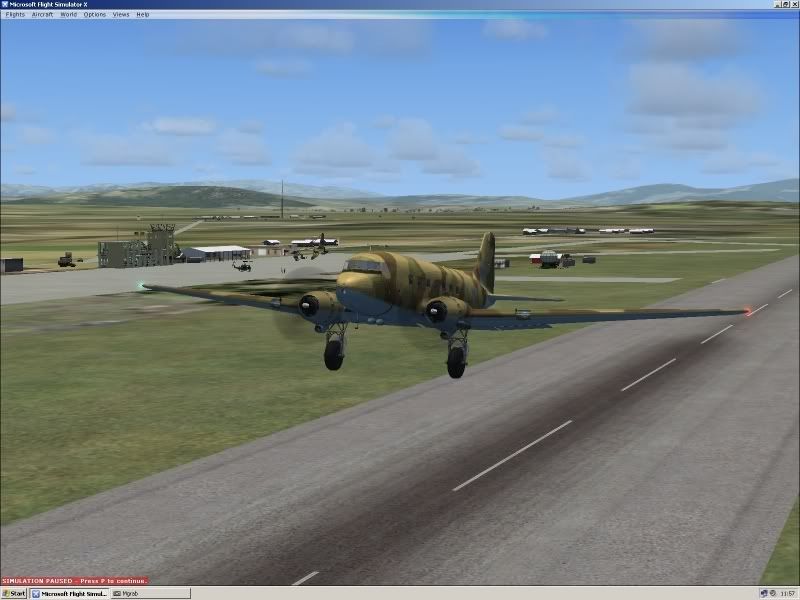
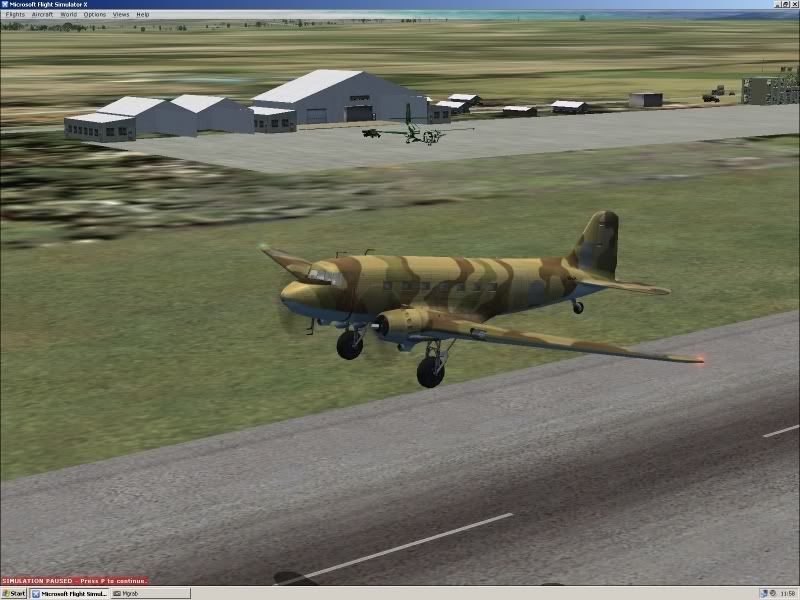
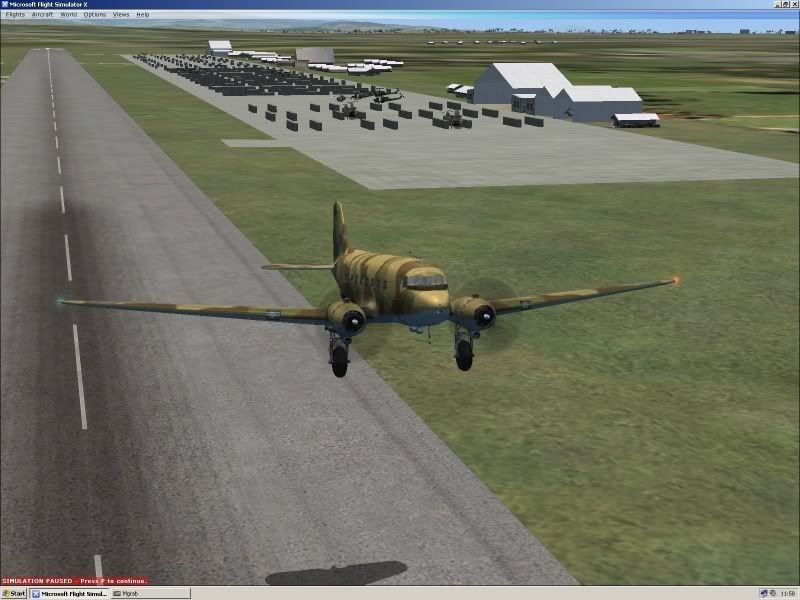
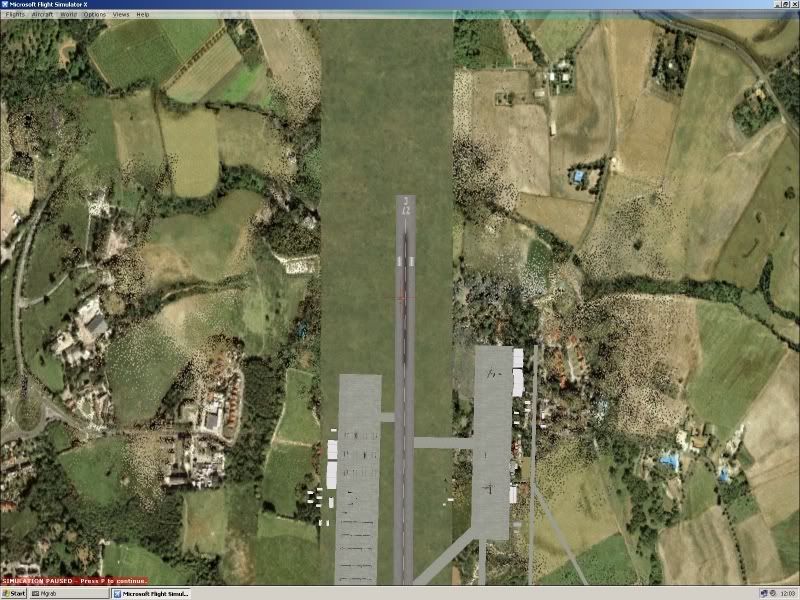
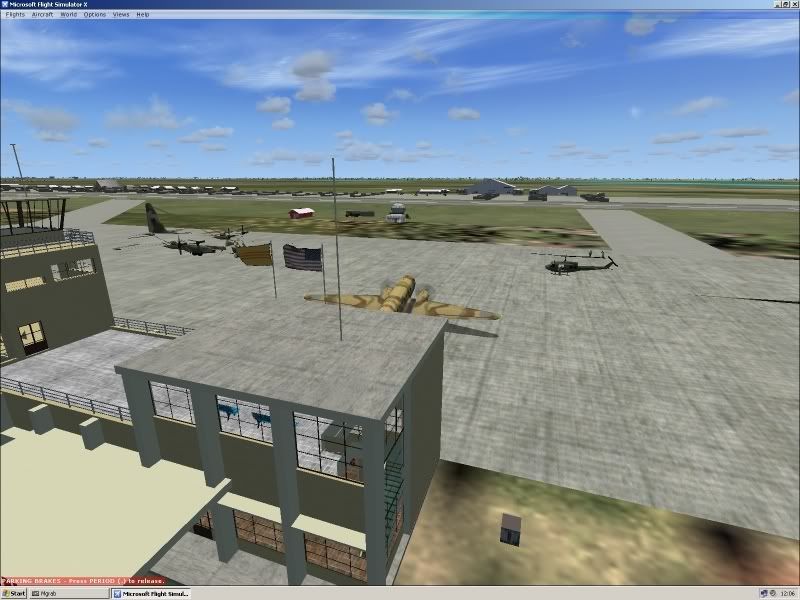
here a dl for ya with some screenies I took at VVPB in fsX

fsX pic's


fled
Cool

p.s. I added the AFCAD file, only difference it took longer to load , but the good news, all parking spots showed up and available in the selection menu
Back to top
View user's profile ICQ Number MSN Messenger Photo Gallery
JG300-Stoopy
Power User

Offline Offline
Joined: Jan 05, 2005
Posts: 5840
Location: Group W bench
PostPosted: Wed Oct 25, 2006 9:20 am
Post subject: Re: Addon Scenery in FSX...

Thank you Fled!! Since The Man is on travel and may not be able to open the Zip file, I'll post some of your shots for him to view now if that's OK?

From what I can see it looks all OK except for some transparent texture issues on two of the parked aircraft, and those doggone trees disapeared again. Both items are hopefully not difficult to deal with, I'd bet at least the aircraft textures simply need to be converted to another format with DXTBMP and that would do it.

Here are 5 of the 14 shots you provided (THANKS!):


_________________
"Once your reputation is ruined, you can live quite freely."
Back to top
View user's profile Visit poster's website Photo Gallery
Shadow_Bshwackr
Janitor

Offline Offline
Joined: Jan 21, 2005
Posts: 7019
Location: Central Illinois, USA
PostPosted: Wed Oct 25, 2006 10:30 am
Post subject: Re: Addon Scenery in FSX...

Looks as if the file has a couple of bugs in the changeover, but overall, it looks great!

Thanks Fled, I can cross that off my list...lol

Back to top
View user's profile Visit poster's website Photo Gallery
Doug_Kibbey
Power User

Offline Offline
Joined: Jan 23, 2006
Posts: 4678
Location: The Great Satan
PostPosted: Fri Oct 27, 2006 10:43 am
Post subject: Re: Addon Scenery in FSX...

Thanks, Guys....I was away in Berlin. Maybe a texture guru can fix the parked aircraft for me...(a certain Stoopy already has the files, I think...or I can send).

My "Trees" were "old school"...from Gerrish. I am given to understand that there are more advanced (current) tree addons available so I'll look into that. If it's only those two things, we're lookin' fixable...

So, no phenomena with the parked helicopters or terminal, eh? Excellent!

Back to top
View user's profile Visit poster's website Photo Gallery
JG300-Stoopy
Power User

Offline Offline
Joined: Jan 05, 2005
Posts: 5840
Location: Group W bench
PostPosted: Fri Oct 27, 2006 4:02 pm
Post subject: Re: Addon Scenery in FSX...

I've got the fiels and all that. I've aso been doing some research in the various FSX development forums to try to get a head start on what the fixes could involve to the textures. The only thing I'm missing is the sim itself so far to try to view results. Hopefully, based on what I've read, the transparnecies aren't caused by the macro types being used. I have the Deluxe version coming which will include the SDK documentation that should go into those details and hopefully lead to workarounds. I'm all set to pursue it, just waiting on the "platform". Checking mail for it every stinkin' day.

_________________
"Once your reputation is ruined, you can live quite freely."
Back to top
View user's profile Visit poster's website Photo Gallery
Doug_Kibbey
Power User

Offline Offline
Joined: Jan 23, 2006
Posts: 4678
Location: The Great Satan
PostPosted: Fri Oct 27, 2006 4:35 pm
Post subject: Re: Addon Scenery in FSX...

...an I'm gonna' need some mo' betta' trees. Wink
Back to top
View user's profile Visit poster's website Photo Gallery
JG300-fr8ycat
Power User

Offline Offline
Joined: Mar 13, 2005
Posts: 1528
Location: Los Angeles
PostPosted: Fri Oct 27, 2006 5:21 pm
Post subject: Re: Addon Scenery in FSX...

If the window texture probs are with my macros/helos I'm not sure if there is an easy fix since I always used the built in transparencies in FSDS. I'm pretty sure other designers like Jordan use external textures for their window transparencies.

Might require tweaking the model in FSDS and re-creating.

_________________
Back to top
View user's profile MSN Messenger Photo Gallery
Doug_Kibbey
Power User

Offline Offline
Joined: Jan 23, 2006
Posts: 4678
Location: The Great Satan
PostPosted: Fri Oct 27, 2006 5:39 pm
Post subject: Re: Addon Scenery in FSX...

- JG300-fr8ycat
If the window texture probs are with my macros/helos I'm not sure if there is an easy fix since I always used the built in transparencies in FSDS. I'm pretty sure other designers like Jordan use external textures for their window transparencies.

Might require tweaking the model in FSDS and re-creating.


Richard,
From what I can see (I don't have FSX) it appears only to be the C-130 and the C-7.
Back to top
View user's profile Visit poster's website Photo Gallery
JG300-Stoopy
Power User

Offline Offline
Joined: Jan 05, 2005
Posts: 5840
Location: Group W bench
PostPosted: Mon Dec 18, 2006 9:18 pm
Post subject: Re: Addon Scenery in FSX...

- JG300-Ascout
Awww, Stoopy...by cheaping out on the man, you're delaying important decisions and maybe development work, if applicable. C'mon, somebody that ain't such a tightwad check this out for the Installation Commander over at Phu Bai...it's a matter of National Security!


OK well, ain't gonna be waiting any longer just so's I can cheap out on the man. Although....I'd like to!

Pretty disgustimipated about how this has been handled...or NOT handled, I should say......as are over 300 other loyal users of the series who attended and have been waiting for somethign promised to show up....

http://forums.avsim.net/dcboard.php?az=show_topic&forum=157&topic_id=1685&mode=full

_________________
"Once your reputation is ruined, you can live quite freely."
Back to top
View user's profile Visit poster's website Photo Gallery
Display posts from previous:   
Post new topic    Revive this topic    Printer Friendly Page    Forum Index ›  FSX
Page 1 of 2
All times are GMT - 6 Hours
Go to page 1, 2  Next

Archive Revive
Username:
This is an archived topic - your reply will not be appended here.
Instead, a new topic will be generated in the active forum.
The new topic will provide a reference link to this archived topic.