±Recent Visitors

Recent Visitors to Com-Central!

±User Info-big


Welcome Anonymous

Nickname
Password

Membership:
Latest: HighestAce
New Today: 0
New Yesterday: 0
Overall: 6648

People Online:
Members: 0
Visitors: 193
Total: 193
Who Is Where:
 Visitors:
01: Photo Gallery
02: Community Forums
03: Community Forums
04: Home
05: Community Forums
06: Home
07: Home
08: Photo Gallery
09: Community Forums
10: Home
11: Home
12: Community Forums
13: Community Forums
14: Community Forums
15: Your Account
16: Home
17: Member Screenshots
18: Community Forums
19: Your Account
20: Home
21: Home
22: Home
23: Home
24: Downloads
25: News Archive
26: Home
27: Home
28: Community Forums
29: Photo Gallery
30: Your Account
31: Home
32: Community Forums
33: Home
34: News Archive
35: Community Forums
36: Community Forums
37: Home
38: Community Forums
39: Home
40: Home
41: Community Forums
42: Home
43: Member Screenshots
44: Treasury
45: Home
46: Community Forums
47: Home
48: Community Forums
49: Home
50: Home
51: Home
52: Community Forums
53: Your Account
54: Home
55: Home
56: News Archive
57: Community Forums
58: Home
59: Home
60: News Archive
61: News Archive
62: Home
63: Home
64: Member Screenshots
65: Community Forums
66: Home
67: Community Forums
68: Home
69: Home
70: Downloads
71: Home
72: Home
73: Community Forums
74: Home
75: Home
76: Home
77: Home
78: Member Screenshots
79: Home
80: Home
81: Home
82: Home
83: News Archive
84: Home
85: Home
86: Community Forums
87: Home
88: Community Forums
89: Home
90: Photo Gallery
91: Home
92: Home
93: Home
94: Home
95: Home
96: Member Screenshots
97: Home
98: Home
99: Home
100: News Archive
101: News Archive
102: Home
103: Home
104: Home
105: News Archive
106: Home
107: Home
108: Home
109: Community Forums
110: Home
111: Home
112: Member Screenshots
113: Community Forums
114: Home
115: Community Forums
116: News Archive
117: Community Forums
118: Community Forums
119: Community Forums
120: Home
121: Home
122: Community Forums
123: Home
124: Community Forums
125: News Archive
126: Home
127: Community Forums
128: Community Forums
129: Downloads
130: Community Forums
131: Community Forums
132: Home
133: News Archive
134: Community Forums
135: Home
136: Home
137: Home
138: Community Forums
139: News Archive
140: Community Forums
141: Home
142: Home
143: Home
144: Your Account
145: Home
146: Community Forums
147: Home
148: Home
149: Member Screenshots
150: Photo Gallery
151: Home
152: Downloads
153: Home
154: News Archive
155: Home
156: Home
157: Home
158: Community Forums
159: Member Screenshots
160: Community Forums
161: Home
162: Home
163: Member Screenshots
164: Home
165: Community Forums
166: News Archive
167: News Archive
168: Community Forums
169: Member Screenshots
170: Home
171: Home
172: News Archive
173: Community Forums
174: Community Forums
175: Home
176: Home
177: Home
178: Home
179: News Archive
180: Home
181: News
182: Home
183: Community Forums
184: Downloads
185: Member Screenshots
186: Home
187: Home
188: Home
189: Home
190: Home
191: Community Forums
192: Home
193: Photo Gallery

Staff Online:

No staff members are online!
HOLY MOLEY!!!!! What a GREAT FREE Utility for FS9!!!!!
A public forum for the JG300 Wild Sau Gruppe!
Go to page Previous  1, 2, 3, 4, 5  Next
Post new topic    Reply to topic    Printer Friendly Page     Forum Index ›  JG300 Wild Sau Gruppe Public Forum

View previous topic :: View next topic  
Author Message
JG300-Stoopy
Power User

Offline Offline
Joined: Jan 05, 2005
Posts: 5840
Location: Group W bench
PostPosted: Sat Dec 09, 2006 1:44 am
Post subject: Re: HOLY MOLEY!!!!! What a GREAT FREE Utility for FS9!!!!!

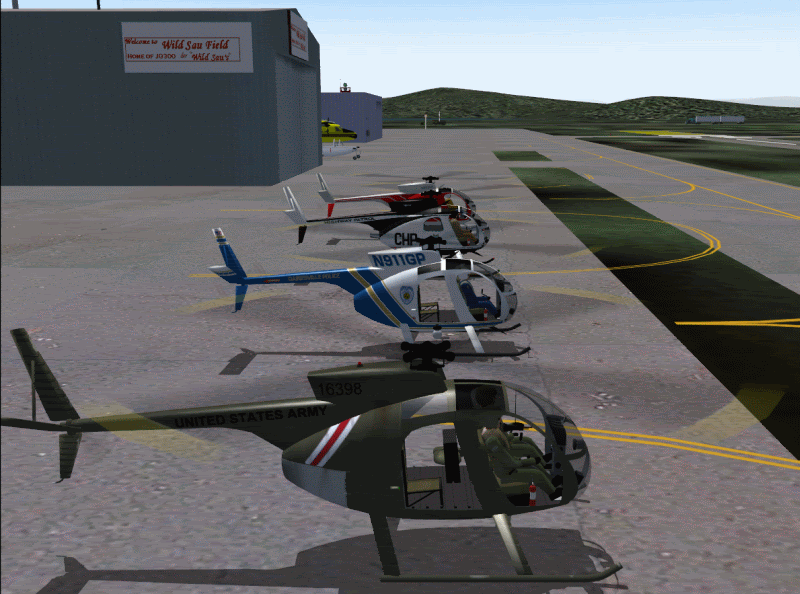
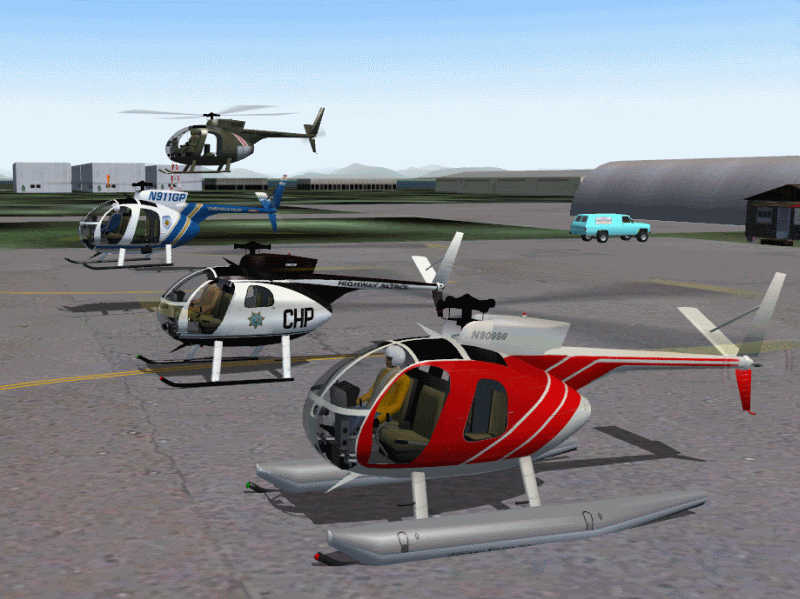
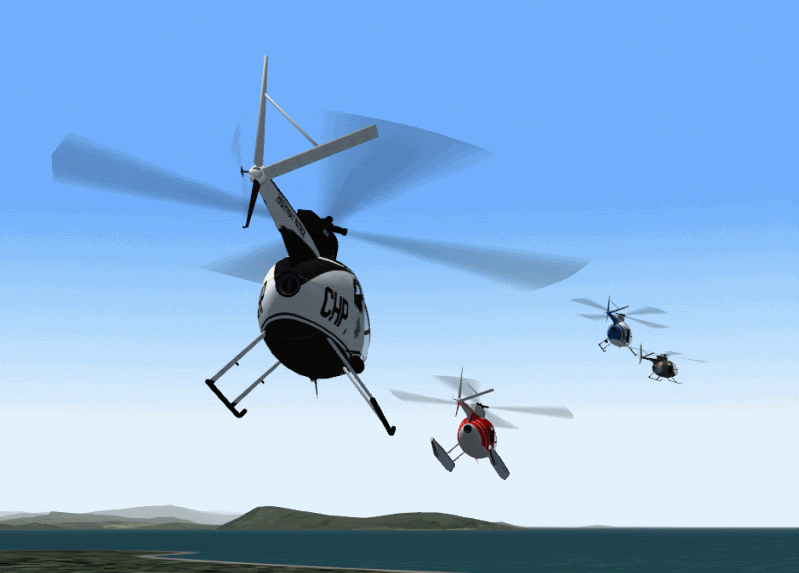
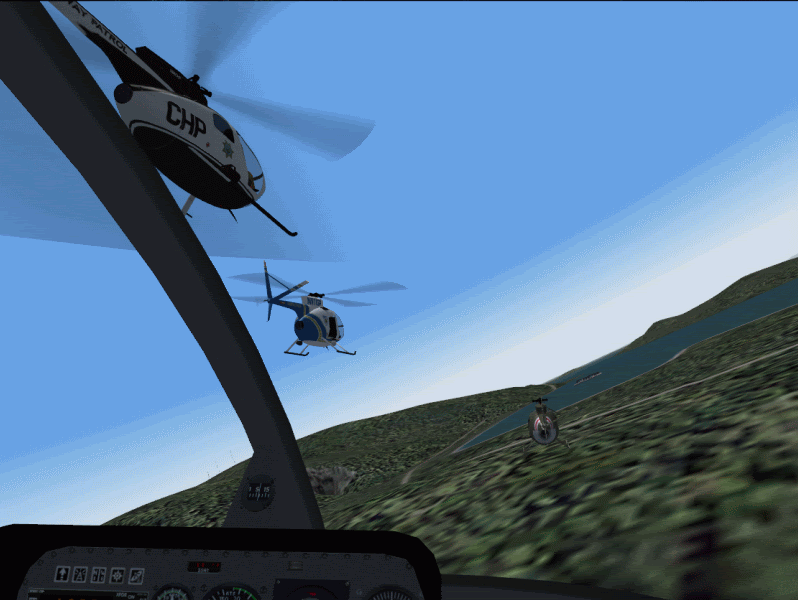
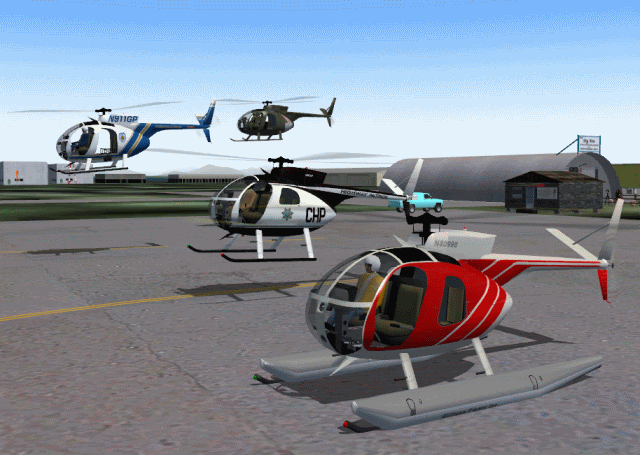
OK testing is done and I am now gonna be writing up the how-to on doin' this. It will take me a couple hours easily so here's some screenies from my first succesful formation flight to tide ya over...


Oh, and fr8ycat:

- JG300-fr8ycat
Wasn't quite what I was expecting but heck, I'll take it.............give Sweets a run for her money. Laughing


That's Ali Landry (google image search for more)....The Cayuse covergirl if ya remember them promo pictures I made up for the first Loach release...and she's got sweets beat all to shame I'd say.... plus real women, too!!!

_________________
"Once your reputation is ruined, you can live quite freely."
Back to top
View user's profile Visit poster's website Photo Gallery
JG300-fr8ycat
Power User

Offline Offline
Joined: Mar 13, 2005
Posts: 1528
Location: Los Angeles
PostPosted: Sat Dec 09, 2006 1:55 am
Post subject: Re: HOLY MOLEY!!!!! What a GREAT FREE Utility for FS9!!!!!

AAAAAAAAAAWWWWWWWWWWWWWWWWWW!

Knew it was Ali, sorry forgot about her being the Cayuse covergirl. Laughing

This is awesome Stoopy, cant wait.
Back to top
View user's profile MSN Messenger Photo Gallery
JG300-fr8ycat
Power User

Offline Offline
Joined: Mar 13, 2005
Posts: 1528
Location: Los Angeles
PostPosted: Sat Dec 09, 2006 2:04 am
Post subject: Re: HOLY MOLEY!!!!! What a GREAT FREE Utility for FS9!!!!!

Now.........this works as a movie also, like fraps? If so will be a great tool for a certain Blood and guts movie......right?

_________________
Back to top
View user's profile MSN Messenger Photo Gallery
JG300-Stoopy
Power User

Offline Offline
Joined: Jan 05, 2005
Posts: 5840
Location: Group W bench
PostPosted: Sat Dec 09, 2006 2:18 am
Post subject: Re: HOLY MOLEY!!!!! What a GREAT FREE Utility for FS9!!!!!

Well, in a way, You would still use FRAPS to record the video of whatever is going on in FS9, and Windows Moviemaker to edit & put together the scenes and soundtrack. FS Recorder allows you to record your flights and play them back within FS9, in real-time, including playback of multiple recordings at once. I thoroughly recommend:

1) Making sure you're updated to version 1.3 or 1.31 of FS Recorder (from the website). Version 1.2 does not support playback of multiple recordings.

2) Record a few flights from at the pigsty or wherever and experiment with playing them back singly, and together. There's a few things to get used to on how that is done.

3) Looking into Active Camera if you don't already have it, as it goes with this tool really well. For one thing, it provides a constantly-updating "flyby" view of your plane(s) and there's nothing more rewarding than seeing your formation of recorded planes go whizzin' by with the doppler-effect sounds filling the speakers. It's payware, but cheap, and the demo works in a fully-featured way as long as you stay within the KSEA area. If you decide you like it, you just purchase it online and it's activated to work all over the FS 'world'.

Make sense? Use FS9 and FS Recorder to put the airplanes where you want, doing what you want them to do, recording each one at a time. Then play them all back together with FS Recorder while recording the result with FRAPS. Edit the FRAPS video with Windows Moviemaker for the finished product.

Gotta get back to writin'.....

_________________
"Once your reputation is ruined, you can live quite freely."


Last edited by JG300-Stoopy on Sat Dec 09, 2006 2:24 am; edited 1 time in total
Back to top
View user's profile Visit poster's website Photo Gallery
JG300-fr8ycat
Power User

Offline Offline
Joined: Mar 13, 2005
Posts: 1528
Location: Los Angeles
PostPosted: Sat Dec 09, 2006 2:23 am
Post subject: Re: HOLY MOLEY!!!!! What a GREAT FREE Utility for FS9!!!!!

Got it.

_________________
Back to top
View user's profile MSN Messenger Photo Gallery
JG300-Stoopy
Power User

Offline Offline
Joined: Jan 05, 2005
Posts: 5840
Location: Group W bench
PostPosted: Sat Dec 09, 2006 3:18 am
Post subject: Re: HOLY MOLEY!!!!! What a GREAT FREE Utility for FS9!!!!!

OK, the writeup isn't going to be finished tonight simply because my eyes are killin' me. However, I did do one more experiment and found that one fairly complex part of the process isn't necessary...this is real good news! So I'll have it tomorrow for sure!

_________________
"Once your reputation is ruined, you can live quite freely."
Back to top
View user's profile Visit poster's website Photo Gallery
JG300-Stoopy
Power User

Offline Offline
Joined: Jan 05, 2005
Posts: 5840
Location: Group W bench
PostPosted: Sat Dec 09, 2006 1:50 pm
Post subject: Re: HOLY MOLEY!!!!! What a GREAT FREE Utility for FS9!!!!!

Alrighty Gents.....here it is, it may need some changes and tweaking based on comments, so bear with me, Bottom line is, it's not as hard as it may look, but - I get wordy becuase sometimes it's better to have too much info than not enough. I will re-edit this based on your comments and results.

Also: The example shows this being done to the stock Bell 206. Well, turned out to be a bad idea, since that helo has a problem showing animations as a recording. ALL other helos (except the Robinson) seemed to work great, although that doesn't include everything out there. So this example is only an example, you can follow it and apply to a "real", quality downloaded helo and it should work great, or follow it explicitly and experiment with the Bell....but the rotors won't turn in the recording of that one. Anyway here you go:

Recording and playing back Helicopters with FS Recorder

As we know, making a recording of a helicopter with FS Recorder is very possible - it's just playing it back that causes the simulator to crash. This is due to the fact the FS9's (and FSX's) lack of capability to use Helicopters as AI (computer-generated) traffic, and the dependancy FS Recorder has on using the AI routines of the simulator. So the trick is, to make a duplicate "Kind-of" AI Helicopter that the sim can use without crashing, and that FS Recorder can thus use as well. This is done by "cloning" the entire folder of the helo you want to use, then modifying the files slightly to make a tweaked "AI Helo" that is dedicated for that purpose. This only has to be done once per helicopter type you want to use. The second part is, since you use the REAL non-tweaked helo to record your flight, and FS Recorder 1.3 or 1.31 embeds the aircraft type into the the recording file, you must "tweak" the recording file to use the AI helo instead. This last part is a temporary workaround until version 1.4 of Matthias Neusinger's FS Recorder is released, which will allow much easier modification of the recorded aircraft name (THANK YOU MATTHIAS!)

Now for the caveat: It ain't real simple but also ain't impossible, obviously. If you're determined to to do it, you can...but it's not user-friendly at this point and requires a certain level of tech savviness, because the "tweaking" requires some small but specific changes. And remember, for now at least, you need to "massage" each recording file before you can play it back, or the sim will crash when you try to replay a real helo recording. The good news is, you don't have to go through all the trouble of making a true AI helo, which can be an involved subject - just a few tricks have to be employed so it works with FS Recorder.

To review the steps, they are:

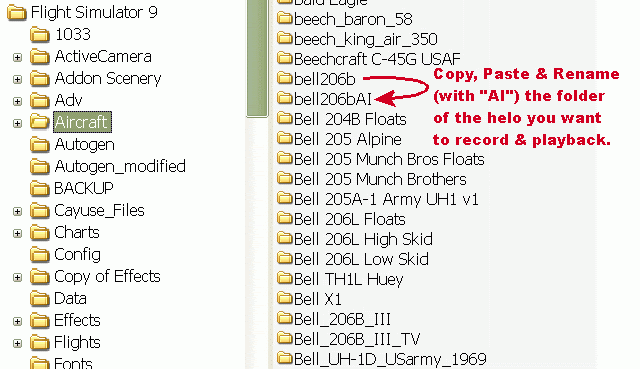
1) Duplicate or "clone" the helo you want to use...this is as simple as copying and pasting it's folder in the FS aircraft folder, and renaming it.
2) Replace the .air file for it with one for a fixed-wing non-helo aircraft, and also make some minor changes to the aircraft.cfg file
3) Fly the REAL (original, non-tweaked) helo in the sim, and record the flight with FS Recorder.
4) Modify the FS Recorder .frc file you created, substituting the original "real" helo name with the dedicated-AI helo name.

Lather, rinse, repeat steps 3 and 4 for any additional recordings you want to make with your helo. If you want to use another, different helo as well, then perform steps 1 & 2 for it to "prep" an AI version for use.

Tools required: "Stranger's" cool "Rename It" tool to modify the Recorder files just slightly after recording them:

www.fs-recorder.net/do...d=renameit

Download and install, and create a shortcut to it somewhere very convenient becuase you'l be using it quite a bit (once per helo recording).

Step 1: Make a duplicate folder of the helicopter you want to use with FS Recorder:

Easy enough. Navigate to your FS9 "Aircraft" folder (or SimObjects\Rotorcraft" in FSX), right-click on the the folder of the helo you want to use, choose "copy", then right-click again, choose "paste", then right-click one more time on the new folder name and rename it to exactly the same name as the original except put the letters "AI" at the end.

As an example, we'll use the stock Bell 206b. Copy the Bell206b folder, then paste it, then rename it, getting rid of the "Copy of " at the beginnging, and adding "AI" at the end, so it appears as shown here:


The contents of both the folders should be identical at this point.

Step 2: Modify the files of the AI version for FS Recorder:

Two files need to be changed: First, the .air file needs to be replaced with a suitable one. Then, the aircraft.cfg file need to be modified slightly to make this a new AI helo with a name and other parameters that indicate that.

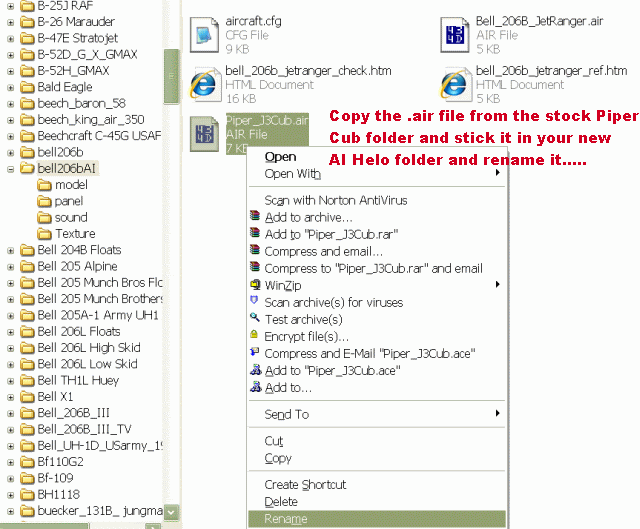
It turns out that any .air file from a regular prop plane should do the trick. Let's go grab one from a plane that doesn't fly too fast and that everyone should have...the Piper Cub! Go to the "Piper_J3Cub" folder in the "Aircraft" folder, right-click on the file " Piper_J3Cub.air", and choose "copy". Then navigate back into the folder of your new AI helo, right click, and choose "paste".

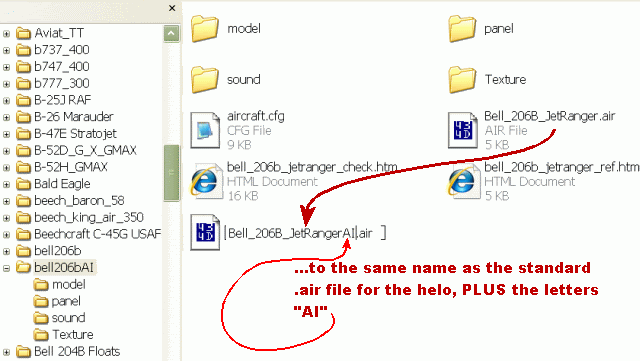
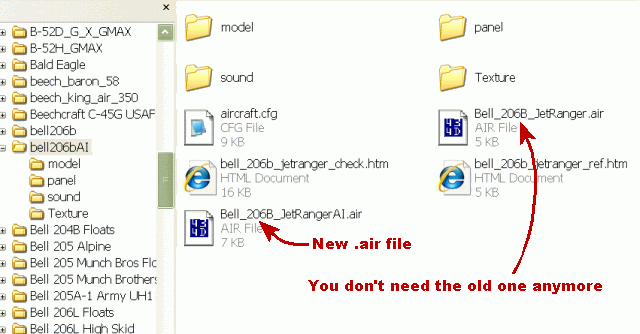
Now, rename that .air file to the correct name of the helo .air file (which is still in the AI helo folder) but also add the letters "AI" just before the period and filename extension (don't add it to the very end of the whole filename, just add it at the end of the first part of the filename, as shown below. Simple!


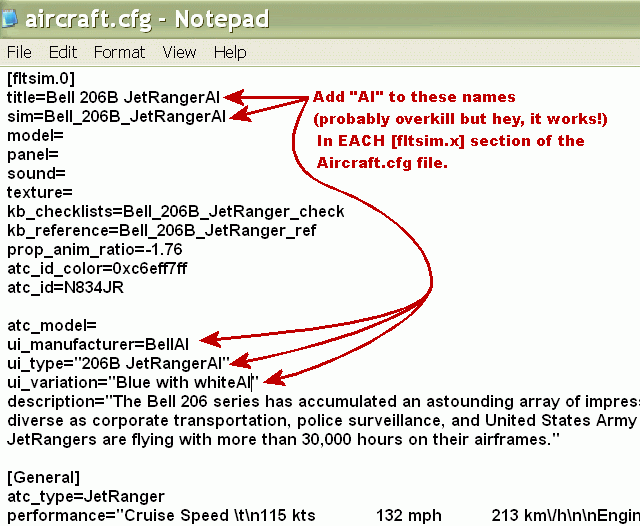
Next: Double-click on the aircraft.cfg file to edit it and change the entry values in all of the [flightsim.x] sections to correspond to the AI naming you will need. For the Bell, the new entries look like this (and maybe I changed more than I needed to, so this perhaps can be trimmed don - but it works):

(note that we're adding the letters "AI " just at the very END of entries such as "title", "sim", "ui_manufacturer" "ui_type" and "ui_variation")


For helos with multiple repaints and additional [fltsim.2], [fltsim.3], [fltsim4] etc.entries, the same changes wil need to be applied in those sections as well.

Save the file and that should do it.

Step 3: Go record the file and "tweak" it for use!

Load the REGULAR, unmodifed version of the helo (NOT the new AI version if it shows up in the aircraft menu, unless you want weird results and a helo that might fly like a Piper Cub) and record a short flight with FS Recorder...save the recording as usual.

Step 4: Now, change the recording slightly before playing back so it uses the fake "AI" helo instead:

The objective here is to open the recording file you just created and change the name of the REAL helicopter you just recorded, and, just like the edits for the AI helo, simply add the letters "AI" to the end to trick FS9 and the recorder into playing back the helo recording with the fake AI helo so FS9 won't lockup! Easy huh? Well, let's start:

Fire up Stranger's "Rename It" tool that you downloaded from the link way above and installed. Navigate to the folder where you store your FS Recorder files, click on the file for the recording you just created, and the name of the original aircraft you recorded it with wil be shown in the entry field toward the ottom of the applet window.


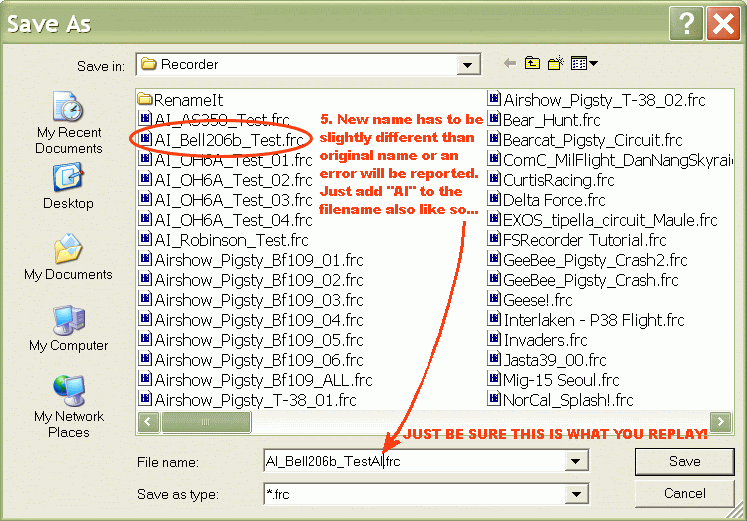
Modify the aircraft name to represent the name of the new "AI Helo" we made - in our example, we go to the end of the filename and simply add the letters A and I so the name is now exactly conforming to everything else we've been doing ("AI" at the end).


That's it....save the file using "Save As", give it a slightly new name (since the tool protects the original recording file by not allowing it to be overwritten) and you're done. Actually pretty easy huh?

After you verify it works, you can delete the original recording file that still has the original helo name in it.

Step 4: Go back to FS9 (or FSX) and play the tweaked FS Recorder file as either "Play as Traffic" or "Play"!

Oooops...one more word on that. This seems to work with every single downloaded helo I've tried it on, but for whatever reason, in proofing the above with the STOCK helos, I found an odd thing having to do just with the stock Bell 206b OR the stock Robinson R22. For whatever reason, the rotors don't turn and the sound is not right on the Bell, and the Robinson just don't work...it still crashes. This does not happen with any other helos this has been done with. Don't know why yet (suggestions are appreciated). Since it's just the stock Bell 206 anyway, chances are any real helo nut won't care about this, but it's a concern. So far this seems to work with everything else.

There is some good information out there on the topic of AI Helos, check Hovercontrol.com, and odds are that playing with different variants of modified .air files (such as the ones from Holger Sandmann for AI helos) may resolve specific issues with any individual helis, but the topic isn't simple and goes somewhat beyond the scope of this how-to for FS Recorder.

Comments and questions appreciated, I'll update with clarity when and where possible.


_________________
"Once your reputation is ruined, you can live quite freely."


Last edited by JG300-Stoopy on Sun Dec 17, 2006 8:32 pm; edited 1 time in total
Back to top
View user's profile Visit poster's website Photo Gallery
JG300-Stoopy
Power User

Offline Offline
Joined: Jan 05, 2005
Posts: 5840
Location: Group W bench
PostPosted: Sun Dec 10, 2006 5:22 pm
Post subject: Re: HOLY MOLEY!!!!! What a GREAT FREE Utility for FS9!!!!!

And an update, for anyone still interested....

Binary editing using a hex editor as shown in step 3 above is now no longer necessary, thanks to a gent named Stranger working up a nice little tool to open up the recording files and replace the name inside with whatever you specify.

The full info and link to download is at the FS Recorder forum where we've been discussing this:

http://fs-recorder.net/forum/viewtopic.php?t=102

This is still all temporary until version 1.4 of the recorder comes out which will implement this capability, but is a nice alternative to the hex editor for anyone who doesn't want to deal with it.

_________________
"Once your reputation is ruined, you can live quite freely."
Back to top
View user's profile Visit poster's website Photo Gallery
JG300-fr8ycat
Power User

Offline Offline
Joined: Mar 13, 2005
Posts: 1528
Location: Los Angeles
PostPosted: Sun Dec 10, 2006 10:07 pm
Post subject: Re: HOLY MOLEY!!!!! What a GREAT FREE Utility for FS9!!!!!

Well this will is very cool.............when I get it to work LOL.

So I followed the directions and get the loach to record and playback.........now how do I fly with my recording? When I hit "play as traffic" and select my recorded file I end up in the recorded files helo.

_________________
Back to top
View user's profile MSN Messenger Photo Gallery
JG300-Stoopy
Power User

Offline Offline
Joined: Jan 05, 2005
Posts: 5840
Location: Group W bench
PostPosted: Sun Dec 10, 2006 10:47 pm
Post subject: Re: HOLY MOLEY!!!!! What a GREAT FREE Utility for FS9!!!!!

??? That's odd. That would happen if you hit "Play" as opposed to "Play as traffic".

When I am sitting on the ramp in my loach and select "Play as traffic" the other Loach shows up and goes through it's whole flight. If I select more than one file for "Play as traffic", they all show up. And I'm still in the loach I started out with.

Are you usingg any special views?

Also, does the same thing happen if you just make a recording and play back a regular fixed-wing?

Maybe if you can upload your recording, I can take a look at it and tell you if my experience is the same.

_________________
"Once your reputation is ruined, you can live quite freely."
Back to top
View user's profile Visit poster's website Photo Gallery
JG300-fr8ycat
Power User

Offline Offline
Joined: Mar 13, 2005
Posts: 1528
Location: Los Angeles
PostPosted: Sun Dec 10, 2006 11:15 pm
Post subject: Re: HOLY MOLEY!!!!! What a GREAT FREE Utility for FS9!!!!!

If I hit play it plays the recording with my view being in the recorded helicopter.

If I hit play as traffic I'm sitting there in my helo but nothing els shows even though the play as traffic window is counring in the lower right hand corner.


The file is only 18kb let me see if I can get it on the server. I'll PM you when complete.

_________________
Back to top
View user's profile MSN Messenger Photo Gallery
JG300-Stoopy
Power User

Offline Offline
Joined: Jan 05, 2005
Posts: 5840
Location: Group W bench
PostPosted: Sun Dec 10, 2006 11:55 pm
Post subject: Re: HOLY MOLEY!!!!! What a GREAT FREE Utility for FS9!!!!!

OK, Do me a flavor and also upload the aircraft.cfg file and the .ar file for the AI version of the loach you created too? The description of the problem is something I've seen and fixed before on my end and I'd like to confirm before I waste your time walking through something that may not be the problem.

_________________
"Once your reputation is ruined, you can live quite freely."
Back to top
View user's profile Visit poster's website Photo Gallery
JG300-fr8ycat
Power User

Offline Offline
Joined: Mar 13, 2005
Posts: 1528
Location: Los Angeles
PostPosted: Mon Dec 11, 2006 1:37 am
Post subject: Re: HOLY MOLEY!!!!! What a GREAT FREE Utility for FS9!!!!!

Still playing with and getting the hang of it. Just have to remember to change them files. Very cool stuff.


One thing I did and don't know if it's any big deal was played back a recording with the Loach, and went into the change aircraft function in FS9, changed aircraft to the UH1C and the recording finished playing back with the UH1C no probs......This was before I even made the AI folder for the UH1C.
Back to top
View user's profile MSN Messenger Photo Gallery
JG300-Stoopy
Power User

Offline Offline
Joined: Jan 05, 2005
Posts: 5840
Location: Group W bench
PostPosted: Mon Dec 11, 2006 1:50 am
Post subject: Re: HOLY MOLEY!!!!! What a GREAT FREE Utility for FS9!!!!!

CoooOOOOoooOOOOL!!!! Oh man that's a beautiful pic.

Glad to see you got it goin'!!!

Yep, the playback option has a quirk in that it will play the recording but will use whatever visual model YOU are in when you start the playback. You switched to the UH-1 and then told it to play back the Loach recording, it said "okay" and grabbed the loach recording, the AI loach .air file, but used the UH-1 model and textures. It's just a weird quirk.

If you play back multiple recordings at once (by holding down the CTRL key to select more than one in the file load menu) it will do this with only one recording, and it wil be the LAST recording you pick.

It's something you'll get used to. I just stay in the aircraft I want it to use and when playback starts, I hit pause and then switch to another aircraft that I want to be in.

This is great progress!!! I also tried Stranger's little tool to avoid the hex editing and it seems to be real simple and effective. I may stay with the hex editing just becuase I'm comfortable with it, but it's a great option.

Nicely done!


For the record, what was it? Do I need to add anything to the instructions?

_________________
"Once your reputation is ruined, you can live quite freely."
Back to top
View user's profile Visit poster's website Photo Gallery
JG300-1Bullet
Power User

Offline Offline
Joined: Jan 05, 2005
Posts: 1117
Location: Odessa, Texas
PostPosted: Mon Dec 11, 2006 3:43 am
Post subject: Re: HOLY MOLEY!!!!! What a GREAT FREE Utility for FS9!!!!!

Gee Boss .......Do you ever sleep????
Just thougt I would say THANKS for all you work for all the community

_________________

You've never been lost until you've been lost at Mach 3
Back to top
View user's profile Visit poster's website Photo Gallery
Display posts from previous:   
Post new topic    Reply to topic    Printer Friendly Page    Forum Index ›  JG300 Wild Sau Gruppe Public Forum
Page 4 of 5
All times are GMT - 6 Hours
Go to page Previous  1, 2, 3, 4, 5  Next


Jump to:  


You cannot post new topics in this forum
You cannot reply to topics in this forum
You cannot edit your posts in this forum
You cannot delete your posts in this forum
You cannot vote in polls in this forum
You cannot attach files in this forum
You can download files in this forum