±Recent Visitors

Recent Visitors to Com-Central!

±User Info-big


Welcome Anonymous

Nickname
Password

Membership:
Latest: HighestAce
New Today: 0
New Yesterday: 0
Overall: 6648

People Online:
Members: 0
Visitors: 919
Total: 919
Who Is Where:
 Visitors:
01: Community Forums
02: Community Forums
03: Community Forums
04: Community Forums
05: Home
06: Photo Gallery
07: Photo Gallery
08: Community Forums
09: Home
10: Community Forums
11: News Archive
12: Community Forums
13: Home
14: Downloads
15: Photo Gallery
16: Downloads
17: Community Forums
18: Community Forums
19: Member Screenshots
20: Community Forums
21: Member Screenshots
22: Community Forums
23: Community Forums
24: Photo Gallery
25: Community Forums
26: Home
27: Community Forums
28: Community Forums
29: Member Screenshots
30: Community Forums
31: Community Forums
32: Home
33: Photo Gallery
34: Community Forums
35: Member Screenshots
36: Community Forums
37: Downloads
38: Community Forums
39: Community Forums
40: Downloads
41: Community Forums
42: Community Forums
43: Home
44: Community Forums
45: Home
46: Home
47: Community Forums
48: Community Forums
49: Community Forums
50: Community Forums
51: Statistics
52: Community Forums
53: Community Forums
54: Community Forums
55: Home
56: Member Screenshots
57: News
58: Home
59: Home
60: Home
61: Home
62: Home
63: Home
64: Home
65: Community Forums
66: Photo Gallery
67: Community Forums
68: Community Forums
69: Member Screenshots
70: Photo Gallery
71: Community Forums
72: Photo Gallery
73: Community Forums
74: Home
75: Member Screenshots
76: Community Forums
77: Home
78: Community Forums
79: Community Forums
80: Photo Gallery
81: Community Forums
82: Photo Gallery
83: Community Forums
84: Downloads
85: Member Screenshots
86: Home
87: Community Forums
88: Community Forums
89: Member Screenshots
90: Community Forums
91: Photo Gallery
92: Community Forums
93: Member Screenshots
94: News Archive
95: Community Forums
96: Community Forums
97: Community Forums
98: Community Forums
99: Community Forums
100: Photo Gallery
101: Community Forums
102: Community Forums
103: Community Forums
104: Home
105: Community Forums
106: Community Forums
107: Downloads
108: Community Forums
109: Community Forums
110: Home
111: Statistics
112: Downloads
113: Photo Gallery
114: Community Forums
115: Photo Gallery
116: Home
117: Home
118: Home
119: Photo Gallery
120: Home
121: Home
122: Community Forums
123: Home
124: Member Screenshots
125: Community Forums
126: Community Forums
127: Community Forums
128: Home
129: Community Forums
130: Photo Gallery
131: Community Forums
132: Home
133: Home
134: Photo Gallery
135: Member Screenshots
136: Photo Gallery
137: Home
138: Community Forums
139: Home
140: Community Forums
141: Statistics
142: Community Forums
143: Community Forums
144: Home
145: Statistics
146: Community Forums
147: Community Forums
148: Community Forums
149: Community Forums
150: Community Forums
151: Community Forums
152: Community Forums
153: Home
154: Member Screenshots
155: Home
156: Home
157: Community Forums
158: Home
159: Home
160: Community Forums
161: Home
162: Community Forums
163: Home
164: Home
165: Community Forums
166: Community Forums
167: Home
168: Community Forums
169: Home
170: Community Forums
171: Community Forums
172: Member Screenshots
173: Member Screenshots
174: Home
175: Community Forums
176: Downloads
177: Community Forums
178: Community Forums
179: Community Forums
180: Community Forums
181: Home
182: Community Forums
183: Home
184: Home
185: Member Screenshots
186: Home
187: Home
188: Community Forums
189: Home
190: Home
191: Member Screenshots
192: Home
193: Community Forums
194: Community Forums
195: Home
196: Home
197: Community Forums
198: Photo Gallery
199: Home
200: Community Forums
201: Home
202: Downloads
203: Photo Gallery
204: Community Forums
205: Home
206: Member Screenshots
207: Home
208: Home
209: Community Forums
210: Home
211: Home
212: Photo Gallery
213: Member Screenshots
214: Home
215: Home
216: Home
217: Home
218: Home
219: Home
220: Home
221: Home
222: Home
223: Home
224: Home
225: Home
226: Community Forums
227: Photo Gallery
228: Home
229: Home
230: Home
231: Photo Gallery
232: Community Forums
233: Community Forums
234: Community Forums
235: Home
236: Home
237: Home
238: Home
239: Member Screenshots
240: Home
241: Community Forums
242: Community Forums
243: Community Forums
244: Home
245: Downloads
246: Community Forums
247: Home
248: Member Screenshots
249: Community Forums
250: Community Forums
251: Community Forums
252: News Archive
253: Photo Gallery
254: Home
255: Community Forums
256: Community Forums
257: Community Forums
258: Member Screenshots
259: Community Forums
260: Member Screenshots
261: Member Screenshots
262: Home
263: Community Forums
264: Community Forums
265: Photo Gallery
266: Community Forums
267: Community Forums
268: Home
269: Community Forums
270: Home
271: Community Forums
272: Search
273: Community Forums
274: News Archive
275: Community Forums
276: Community Forums
277: Statistics
278: Community Forums
279: Member Screenshots
280: Community Forums
281: Community Forums
282: Member Screenshots
283: Home
284: Community Forums
285: Community Forums
286: Community Forums
287: Home
288: Community Forums
289: Home
290: Home
291: Community Forums
292: Home
293: Community Forums
294: Home
295: Community Forums
296: Community Forums
297: Community Forums
298: Home
299: Home
300: Community Forums
301: Community Forums
302: Community Forums
303: Home
304: Community Forums
305: Community Forums
306: Community Forums
307: Home
308: Community Forums
309: Community Forums
310: Community Forums
311: Community Forums
312: Photo Gallery
313: Community Forums
314: Community Forums
315: Photo Gallery
316: Home
317: Community Forums
318: Community Forums
319: Community Forums
320: Community Forums
321: Community Forums
322: Community Forums
323: Community Forums
324: Community Forums
325: Home
326: Community Forums
327: Community Forums
328: Community Forums
329: Community Forums
330: Community Forums
331: Community Forums
332: Photo Gallery
333: Community Forums
334: Community Forums
335: Community Forums
336: Community Forums
337: Member Screenshots
338: Your Account
339: Photo Gallery
340: Community Forums
341: Community Forums
342: Community Forums
343: Community Forums
344: Community Forums
345: Community Forums
346: Community Forums
347: Home
348: Community Forums
349: Community Forums
350: Home
351: Community Forums
352: Community Forums
353: Community Forums
354: Home
355: Community Forums
356: Community Forums
357: Community Forums
358: Community Forums
359: Community Forums
360: Community Forums
361: Home
362: Community Forums
363: Member Screenshots
364: Community Forums
365: Community Forums
366: Member Screenshots
367: Member Screenshots
368: Community Forums
369: Community Forums
370: Community Forums
371: Community Forums
372: Community Forums
373: Community Forums
374: Community Forums
375: Home
376: Community Forums
377: News Archive
378: Community Forums
379: Photo Gallery
380: Community Forums
381: Community Forums
382: Home
383: Community Forums
384: Home
385: Community Forums
386: Community Forums
387: Community Forums
388: Member Screenshots
389: Member Screenshots
390: Community Forums
391: Community Forums
392: Home
393: Home
394: Home
395: Home
396: Home
397: Home
398: Home
399: Home
400: Home
401: Home
402: Home
403: Home
404: Home
405: Home
406: Home
407: Home
408: Home
409: Home
410: Home
411: Home
412: Community Forums
413: Community Forums
414: Community Forums
415: Photo Gallery
416: Home
417: Community Forums
418: Photo Gallery
419: Community Forums
420: Community Forums
421: Community Forums
422: Photo Gallery
423: Community Forums
424: Home
425: Community Forums
426: Community Forums
427: Community Forums
428: Photo Gallery
429: Statistics
430: Home
431: Home
432: Member Screenshots
433: Community Forums
434: Community Forums
435: Community Forums
436: Home
437: Community Forums
438: Community Forums
439: Community Forums
440: Downloads
441: Community Forums
442: Community Forums
443: News Archive
444: Community Forums
445: Photo Gallery
446: Community Forums
447: Community Forums
448: Community Forums
449: Member Screenshots
450: Community Forums
451: Community Forums
452: Community Forums
453: Community Forums
454: Community Forums
455: Community Forums
456: Home
457: Community Forums
458: Community Forums
459: Community Forums
460: Photo Gallery
461: Community Forums
462: Photo Gallery
463: Member Screenshots
464: Community Forums
465: Photo Gallery
466: Home
467: Community Forums
468: Community Forums
469: Home
470: Community Forums
471: Home
472: Community Forums
473: Photo Gallery
474: Community Forums
475: Downloads
476: Community Forums
477: Photo Gallery
478: Community Forums
479: Member Screenshots
480: Downloads
481: Community Forums
482: Community Forums
483: Home
484: Community Forums
485: Home
486: Community Forums
487: Community Forums
488: Home
489: Community Forums
490: Community Forums
491: Community Forums
492: Community Forums
493: Community Forums
494: Community Forums
495: Community Forums
496: Photo Gallery
497: Home
498: Home
499: Community Forums
500: Member Screenshots
501: Community Forums
502: Community Forums
503: Community Forums
504: Downloads
505: Community Forums
506: Community Forums
507: Community Forums
508: Community Forums
509: Community Forums
510: Home
511: Community Forums
512: Community Forums
513: Community Forums
514: Community Forums
515: Community Forums
516: Community Forums
517: Home
518: Community Forums
519: Community Forums
520: Community Forums
521: Community Forums
522: Community Forums
523: Community Forums
524: Community Forums
525: Community Forums
526: Community Forums
527: Photo Gallery
528: Community Forums
529: Photo Gallery
530: Community Forums
531: Home
532: Downloads
533: Home
534: Member Screenshots
535: Photo Gallery
536: Community Forums
537: Community Forums
538: Home
539: Community Forums
540: Community Forums
541: Photo Gallery
542: Community Forums
543: Community Forums
544: Community Forums
545: Home
546: Community Forums
547: Home
548: Downloads
549: Member Screenshots
550: Photo Gallery
551: Downloads
552: Member Screenshots
553: Community Forums
554: Photo Gallery
555: Community Forums
556: Community Forums
557: Community Forums
558: Photo Gallery
559: Home
560: Community Forums
561: Community Forums
562: Community Forums
563: Home
564: Community Forums
565: Community Forums
566: Home
567: Community Forums
568: Community Forums
569: Community Forums
570: Community Forums
571: Community Forums
572: Community Forums
573: Community Forums
574: Community Forums
575: Community Forums
576: Photo Gallery
577: Community Forums
578: Community Forums
579: Community Forums
580: Community Forums
581: Home
582: Home
583: Home
584: Community Forums
585: Community Forums
586: Community Forums
587: Member Screenshots
588: Community Forums
589: Community Forums
590: Photo Gallery
591: Home
592: Community Forums
593: Community Forums
594: Home
595: Home
596: Home
597: Home
598: Home
599: Home
600: Community Forums
601: Community Forums
602: Community Forums
603: Home
604: Home
605: Community Forums
606: Community Forums
607: Community Forums
608: Home
609: Community Forums
610: Community Forums
611: Community Forums
612: Community Forums
613: Community Forums
614: Home
615: Home
616: Photo Gallery
617: Community Forums
618: Home
619: Member Screenshots
620: Community Forums
621: Community Forums
622: Home
623: Home
624: Home
625: Home
626: Community Forums
627: Home
628: Home
629: Member Screenshots
630: Home
631: Home
632: Community Forums
633: Home
634: Community Forums
635: News Archive
636: Home
637: Community Forums
638: Community Forums
639: Home
640: Community Forums
641: Photo Gallery
642: Community Forums
643: Community Forums
644: Community Forums
645: Member Screenshots
646: Community Forums
647: Community Forums
648: Community Forums
649: Home
650: Home
651: Photo Gallery
652: Photo Gallery
653: Community Forums
654: Community Forums
655: Home
656: Member Screenshots
657: Community Forums
658: Community Forums
659: Home
660: Community Forums
661: Community Forums
662: Home
663: Community Forums
664: Photo Gallery
665: Downloads
666: Home
667: Home
668: Community Forums
669: Community Forums
670: Member Screenshots
671: Home
672: Community Forums
673: Community Forums
674: Community Forums
675: Home
676: Photo Gallery
677: Community Forums
678: Community Forums
679: Community Forums
680: Community Forums
681: Community Forums
682: Community Forums
683: Community Forums
684: Community Forums
685: Home
686: Community Forums
687: Community Forums
688: Home
689: Community Forums
690: Community Forums
691: Photo Gallery
692: Community Forums
693: Community Forums
694: Community Forums
695: Home
696: Community Forums
697: Community Forums
698: Community Forums
699: Home
700: Community Forums
701: Home
702: Community Forums
703: Community Forums
704: Community Forums
705: Home
706: Home
707: Home
708: Home
709: Home
710: Statistics
711: Community Forums
712: Home
713: Photo Gallery
714: Photo Gallery
715: Home
716: Home
717: Community Forums
718: Community Forums
719: Community Forums
720: Home
721: Community Forums
722: Community Forums
723: Community Forums
724: Community Forums
725: Community Forums
726: Member Screenshots
727: Home
728: Downloads
729: Member Screenshots
730: Community Forums
731: Home
732: Community Forums
733: Home
734: Community Forums
735: Home
736: Community Forums
737: Community Forums
738: Community Forums
739: Community Forums
740: Home
741: Community Forums
742: Community Forums
743: Community Forums
744: Home
745: Community Forums
746: Community Forums
747: Community Forums
748: Photo Gallery
749: Home
750: Community Forums
751: Member Screenshots
752: Community Forums
753: Community Forums
754: Home
755: Home
756: Community Forums
757: Community Forums
758: Community Forums
759: Home
760: Community Forums
761: Statistics
762: Community Forums
763: Photo Gallery
764: Community Forums
765: Community Forums
766: Community Forums
767: Community Forums
768: Community Forums
769: Member Screenshots
770: Member Screenshots
771: Community Forums
772: Community Forums
773: Home
774: Community Forums
775: Community Forums
776: Home
777: Home
778: Community Forums
779: Community Forums
780: Home
781: Home
782: Home
783: Home
784: Community Forums
785: Home
786: Home
787: Home
788: Home
789: Home
790: Home
791: Home
792: Home
793: Home
794: Home
795: Home
796: Home
797: Home
798: News Archive
799: Home
800: Home
801: Community Forums
802: Community Forums
803: Community Forums
804: Member Screenshots
805: Downloads
806: Home
807: Community Forums
808: Community Forums
809: Community Forums
810: Community Forums
811: Home
812: News
813: Community Forums
814: Community Forums
815: Home
816: Community Forums
817: Community Forums
818: Community Forums
819: Photo Gallery
820: Community Forums
821: Community Forums
822: Community Forums
823: Community Forums
824: Community Forums
825: Community Forums
826: Member Screenshots
827: Photo Gallery
828: Photo Gallery
829: Home
830: News Archive
831: Community Forums
832: Community Forums
833: Community Forums
834: Community Forums
835: Photo Gallery
836: Community Forums
837: Community Forums
838: Community Forums
839: Community Forums
840: Statistics
841: Community Forums
842: Community Forums
843: Home
844: Community Forums
845: Statistics
846: Community Forums
847: Community Forums
848: Home
849: News Archive
850: Home
851: Community Forums
852: Community Forums
853: Community Forums
854: Community Forums
855: Home
856: Member Screenshots
857: Community Forums
858: Downloads
859: Community Forums
860: Community Forums
861: Home
862: Community Forums
863: Member Screenshots
864: Community Forums
865: Photo Gallery
866: Member Screenshots
867: News Archive
868: Community Forums
869: Photo Gallery
870: Home
871: Home
872: Community Forums
873: Home
874: Community Forums
875: Community Forums
876: Community Forums
877: Community Forums
878: Community Forums
879: Community Forums
880: Home
881: Home
882: Community Forums
883: Member Screenshots
884: Community Forums
885: Community Forums
886: Community Forums
887: Home
888: Community Forums
889: Home
890: Home
891: Community Forums
892: Community Forums
893: Community Forums
894: Photo Gallery
895: Community Forums
896: Community Forums
897: Community Forums
898: Home
899: Community Forums
900: Member Screenshots
901: Member Screenshots
902: Community Forums
903: Community Forums
904: Community Forums
905: Community Forums
906: Statistics
907: Community Forums
908: Photo Gallery
909: Member Screenshots
910: Photo Gallery
911: Community Forums
912: Statistics
913: Downloads
914: Community Forums
915: Photo Gallery
916: Home
917: Community Forums
918: Community Forums
919: Community Forums

Staff Online:

No staff members are online!
Short course, need laptop, no Vista, what to do....? :: Archived
Resolve issues with your computer problems here or read about the latest computer parts and information.
Go to page Previous  1, 2
Post new topic    Revive this topic    Printer Friendly Page     Forum Index ›  Hardware

Topic Archived View previous topic :: View next topic  
Author Message
Shades
Forum Tree-Rat

Offline Offline
Joined: Mar 07, 2005
Posts: 6481
Location: 3rd Branch up, 'Ye Olde Oak', Green Wood.
PostPosted: Sun Feb 25, 2007 8:06 pm
Post subject: Re: Short course, need laptop, no Vista, what to do....?

- JG300-Ascout
if it has wireless, what do you need to take advantage of that at home?
Uh oh!
LOL
If it's configured properly, it shouldn't present any security problems to you or your neighbours.
Actually it should be more secure having a hardware firewall (via router) than software, although you could have both.

[Don't run two software firewalls, but you can run one hardware and one software firewall side-by-side]

_________________
Skwerl's place.

Com-Central's cutest, fluffiest, twitchiest, tail.
CPU > Intel i9-9900k (o/c 4.9GHz); COOLING > BeQuiet! Dark Rock Pro 4;
MOBO > ASUS PRIME Z390-A; RAM > 2x32GB Corsair LPX 2666MHz;
GPU > Gigabyte GEFORCE GTX650Ti PCI-e 3.0 2Gb GDDR5;
AUDIO > Creative X-Fi Xtreme Music (plus - Universal Audio UAD2 Quad Custom accelerator);
HDD > 3x1TB+ M.2. SSDs; LCD > DELL - S2419HGF (1920x1080);
PSU > 650W be quiet Straight Power 11 - 80+ Gold;
CASE > BeQuiet! SILENT BASE 601; OS > Windows 11 Home Advanced (64-bit).
Back to top
View user's profile Visit poster's website ICQ Number
JG300-Ascout
Power User

Offline Offline
Joined: Jan 05, 2005
Posts: 6258
Location: Cyberspace
PostPosted: Sun Feb 25, 2007 8:08 pm
Post subject: Re: Short course, need laptop, no Vista, what to do....?

- JG300-Stoopy
Hmmm..okay: From what I know of your preferences, you want to walk into a store somewhere and just get the stuff, rather than buy online. And also keep it simple, and not spend more than you need to. So here's what I think I'd do (as a matter of fact I think I'll go get the first item myself soon).

Go with the Office 2007 products rather than the 2003 products, becuase you'll get MS Word 2007 and won't have to deal with the trouble in the future of having MS Word 2003 which won't be able to open documents made with Word 2007.

In that light, youcan go right to Best Buy if you want and pick up Office Home and Student 2007, which wil give you 2007 versions of Excel, PowerPoint, Word, and OneNote (note-taking thingamajig). So you have Word Processing, Spreadsheet, and presentations:

http://www.bestbuy.com/site/olspage.jsp?skuId=8129447&type=product&productCategoryId=cat01083&id=1158320998618

That's $149.99

Then for $98.99 grab MS Outlook 2007 off the same shelf....and you have your fancy new latest & greatest email program.

http://www.bestbuy.com/site/olspage.jsp?skuId=8168323&type=product&productCategoryId=cat01083&id=1162593933838

Total $250 so far. Dell wants $275 for Office 2007 Small Business Edition which is about the same thing with a sales contact manager thing if you need that....

BUT, the nice thing about buying these seperately and not packaged with the Dell, is you will have a legal end user license agreement to install these on two seperate systems - say, one desktop and one laptop system.
And while you're there, go to the other aisle and pick up your router (Dell wants too much for the same thing, $120)....for about seventy bucks:

http://www.bestbuy.com/site/olspage.jsp?id=pcmcat25300050001&type=category&parentCatID=false&initialize=false&initialize=true&_requestid=53561

So that's $320 in add-ons, plus the price of the D820 with 1Gig of RAM which is $1149, gets you to $1470 and tax......pretty close to your upper limit but about all you're gonna need.

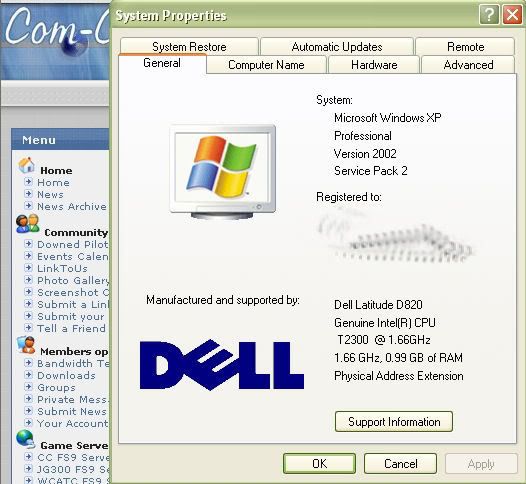
If it makes you feel more confident, I wrote all that while sitting here by the fireplace on my exact similar laptop:


I LIKE that plan...because I DO plan an upgrade at home and want that flexibility for the desktop as well!

Say...this leads me to another question....

Should I even buy another desktop for me, or just a strong laptop with a big-a$$ accessory monitor and keyboard for gaming purposes? Can I get enough USBs and ports and stuff for accessories or is the desktop not dead yet?

_________________
"All facts go to clearly prove that Shades is a thrice-cursed traitor & mentally deranged person steeped in inveterate enmity toward mankind"
Back to top
View user's profile Photo Gallery
JG300-Stoopy
Power User

Offline Offline
Joined: Jan 05, 2005
Posts: 5840
Location: Group W bench
PostPosted: Sun Feb 25, 2007 8:26 pm
Post subject: Re: Short course, need laptop, no Vista, what to do....?

- JG300-Ascout
Stoop...the first one you got linked there is actually for 2007, which is what is pretty much what is for sale via Dell anyway...and who wants do a bunch of upgrades for 4-5 year old software anywho? I'd get the '07 variety. Mainly, I'm wondering what's the diff between "Home and Student" and the "Office Standard"...both seem to offer Word, Excel, Powerpoint and like that there...and that's the main thing. We both have email so Outlook is no biggie. She just needs to do her biochemist thang. Presentations and so on... Data stuff.

And her MP3 Stuff (so I can get it the heck off my computer!) and her pics an' stuff, cuz' gawd knows, I got enough of those cluttering up my own system now.

Mainly, we have a "competition" for the computer issue at home that we need to relieve, and the smaller unit will be nice for using elsewhere in the house.

Hey, if it has wireless, what do you need to take advantage of that at home? (I'm not sure I want to go that way at home...I've heard of security issues with neighbors and stuff).


Yup, as mentioned above, the 2007 products make the most sense and the "Best Buy" strategy seems solid. Specifically, it will get you MS Powerpoint, and that's something to be careful of, becuase there are versions of Office that don't come with it, and then you're sunk as far as working on presentations goes.

Windows XP, to my knowledge, won't come with an email prgram, it's easy to think it would, becuase it comes with Internet Explorer for web surfing and also our systems probably came with some form of MS Office on them (I know mine did) which gave us Outloook. But if you're excluding MS Office as being bundled with the system, I am fairly certain you'll need to make sure you get MS Outlook for your email, one way or the other...if you want to do email from the laptop, which at some point you likely will.

I truly appreciate the contention at home over one system. I've had to hunker down with my laptop to keep the peace many times, and also added another desktop system to the house. It truly keeps the peace!!!

To take advantage of wireless, all you'll need is the router. Yep, there can be security issues becuase your nearby neighbors can have wireless devices that will "see" your wireless router. The router provides some different options to prevent anyone accessing it, and setting that up is fairly straigthforward as long as you have someone to give you some tips.

I have one neighbor with an unprotected router and have actually, accidentally, connected to the internet through it while sitting in the breakfast nook!

On the other hand, my router is set up to recognize the actual hardware ID's of the systems in our house and let nothing else connect to it. This is the way to go in my opinion (wireless MAC filter).

_________________
"Once your reputation is ruined, you can live quite freely."
Back to top
View user's profile Visit poster's website Photo Gallery
JG300-Stoopy
Power User

Offline Offline
Joined: Jan 05, 2005
Posts: 5840
Location: Group W bench
PostPosted: Sun Feb 25, 2007 8:40 pm
Post subject: Re: Short course, need laptop, no Vista, what to do....?

- JG300-Ascout

I LIKE that plan...because I DO plan an upgrade at home and want that flexibility for the desktop as well!

Say...this leads me to another question....

Should I even buy another desktop for me, or just a strong laptop with a big-a$$ accessory monitor and keyboard for gaming purposes? Can I get enough USBs and ports and stuff for accessories or is the desktop not dead yet?


The desktop is WAY far from dead buddy! I would, absolutely, never ever ever ever ever buy a laptop for any simming purposes. Case in point - look what you've done to your dekstop since buying it - added RAM and a vid card (admittedly, a long time ago, but still). Man, try doing that to a laptop and you're looking at huge bucks IF you can get the components designed specifically for it by the time you realize you want to buy them a couple years later. Upgrading laptops is a SUCKY proposition compared to a desktop, so - while I have nothing against them for practicality - my opinion is get what you're gonna need in it to begin with (hence, the additional RAM) and be done with it.

When you go get your new rig, you wanna get a desktop to be sure, bud. You pay less for what you get because you don't need the miniaturization and packaging of a laptop, nor a new screen. And they're EASY to upgrade.

Shades and others will (rightly, for most) give you advice on building your own, but the thing to stress is that, if I may say, I know you are not the type and don't wanna mess with it. I'm the same way these days, although I have built all my own systems up until buying a Dell, then a Gateway.

The Dell stank to upgrade the motherboard on, but the Gateway uses common components so it's my last PC for a long while. The strategy that worked for me was to find one with:
a) Fastest processor I could find,
b) Enough RAM to keep me happy for a while (2 Gigabytes, seriously, for simming these days)
c) a LOUSY video card!!!

Why the lousy vid card? Simple......because even the nicer ones that come with a system will stink for simming about 6-12 months later. So, save money on the base system, and go over to the Video Card aisle and grab yourself a really nice card that's so new it's not packages with any systems yet, and has 512MB RAM and stuff.

Yep!!!!!!! THEN you go home and install that bad boy in the new-but-not-expensive system, and you're crankin!

Oh, and yes, the new desktops will come with USB ports a-plenty on the front and back.....no lack of ability to plug stuff in to 'em.

Thing is, and it's overlooked these days but still true, there is no other kind of applciation you'll commonly find that absolutley stresses the CPU, memory and video card hardware more than a flight simulator program will. It's always been true since the early days. Tons and tons of calculations and math going on just to do the flight dynamics, not to mention the scenery and visual presentaion data going to the vid card, and the complex textures we have these days that demand more and more RAM. That right there spells lots of trouble for simmingon a laptop, although they are GREAT for Office applciations that only have to work as fast as human fingers can type. Smile

Hey my flight is cancelled so I'll be aorund but I gotta go chop wood for the fire.....hope that gets most of your questions for now!

_________________
"Once your reputation is ruined, you can live quite freely."
Back to top
View user's profile Visit poster's website Photo Gallery
JG300-Ascout
Power User

Offline Offline
Joined: Jan 05, 2005
Posts: 6258
Location: Cyberspace
PostPosted: Sun Feb 25, 2007 8:52 pm
Post subject: Re: Short course, need laptop, no Vista, what to do....?

'Kay...so, like, all I need is wifey's laptop...software an' stuff...then, since Ascout is OK with his monitor and keyboard and printer an' stuff...all he really needs is a new system unit (Gateway, I guess, since that's what I have, with all the drivers from my first purchase) and presumably I can get one without Vista? ...an' stuff? Ain't looked yet.

Sounds like a plan.... Wink

_________________
"All facts go to clearly prove that Shades is a thrice-cursed traitor & mentally deranged person steeped in inveterate enmity toward mankind"
Back to top
View user's profile Photo Gallery
JG300-Stoopy
Power User

Offline Offline
Joined: Jan 05, 2005
Posts: 5840
Location: Group W bench
PostPosted: Sun Feb 25, 2007 10:50 pm
Post subject: Re: Short course, need laptop, no Vista, what to do....?

Yup, your monitor and keyboard can make the trip over to the new system, no sweat. New keyboard will come with the new one even if ya don't want it.

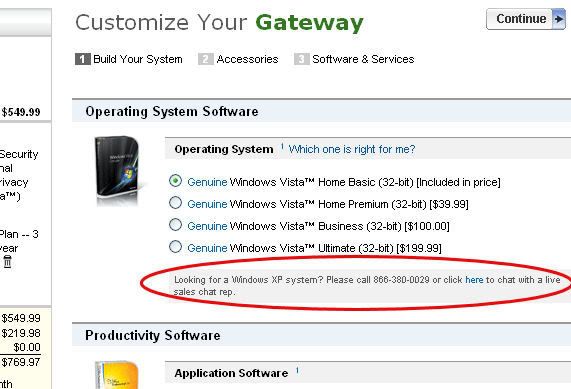
The trick might be getting a WIndows XP system.....just for fun I went to Gateway's website and saw that all systems are offered with Vista now. I won't question your reasons for not wanting it.

Anyway, I did notice that in teeny tiny print below the Vista selections it said "Looking for a Windows XP system? Click here to talk to live sales rep"......hopefully, this might be because MS is pushing vendors to list only VISTA on the options list, but the vendor doesn't want to loose sales to XP fans and so will configure an XP system in a discreet manner. I mean, I hope the rep's job isn't just to try to convice everyone to go with Vista.

It's a tough time to buy a new PC because those really FAST Core 2 Duo Intel systems (2.8Ghz) have a big price delta right now. I think the best I did was about $1500 for a desktop rig with 2Gig RAM, a 2.66Ghz Intel Core 2 Duo CPU, and a pukey ATI 1300X vid card with 128MB.

Then you'd wanna rip that card out and go hit the local retailer and get a NICE vid card for whatever else you can add to the total price.....personally I made the switch from Nvidia to ATI (running an ATI 1650 PRO with 512MB RAM right now and pretty happy) and really like ATI's driver setup and control software, but there's lots of advice you can get here on that route. Two or even three bills if you can, will get you going in style.

Just make sure to accidentally bump the software shelf when you walk by so that FSX falls into the shopping cart...

Hopefully maybe, manufacturers are going to continue to offer XP even if discrettly, and then it's just a game of how long you can hold off while you wait for the faster CPU's to slowly come down into the sweet spot pricing range. The Intel Core 2 Duo's are supposed to be nice but still I wouldn't want to consider anything less than 2.4Ghz.

_________________
"Once your reputation is ruined, you can live quite freely."
Back to top
View user's profile Visit poster's website Photo Gallery
JG300-Ascout
Power User

Offline Offline
Joined: Jan 05, 2005
Posts: 6258
Location: Cyberspace
PostPosted: Sun Feb 25, 2007 11:07 pm
Post subject: Re: Short course, need laptop, no Vista, what to do....?

Wink
- JG300-Stoopy

The trick might be getting a WIndows XP system.....just for fun I went to Gateway's website and saw that all systems are offered with Vista now. I won't question your reasons for not wanting it.

Anyway, I did notice that in teeny tiny print below the Vista selections it said "Looking for a Windows XP system? Click here to talk to live sales rep"......hopefully, this might be because MS is pushing vendors to list only VISTA on the options list, but the vendor doesn't want to loose sales to XP fans and so will configure an XP system in a discreet manner. I mean, I hope the rep's job isn't just to try to convice everyone to go with Vista.
.


'Cuz three out of four website forums that I frequent have brisk threads just full of fulminant posts bristling with mucho annoyed users that are hyper PO'ed about their systems that have it. From constant popups about "are you sure you want to do this" to existing software that suddenly is no longer compatible. Lots of unprintable lanugage is being used.

Where on the Gateway site is that "footnote"...I can't find it?

_________________
"All facts go to clearly prove that Shades is a thrice-cursed traitor & mentally deranged person steeped in inveterate enmity toward mankind"
Back to top
View user's profile Photo Gallery
JG300-Stoopy
Power User

Offline Offline
Joined: Jan 05, 2005
Posts: 5840
Location: Group W bench
PostPosted: Sun Feb 25, 2007 11:26 pm
Post subject: Re: Short course, need laptop, no Vista, what to do....?

Yeah, like I said I won't question your reasons. I bought a Gateway for the kid this last Christmas (for the same reasons you need a second 'puter in the house, and now I can FLY again!!) and it came with XP but with a upgrade coupon for a free Vista O/S upgrade which will be arriving shortly. I'm gonna let the kid test drive it for me.....

Go to Gateway.com, select a Desktop, select "View Details" then select "Customize and Buy" (after you de-select the MCAfee Security and 3-year warranty stuff).....you'll see the note under the OS selection choices:


Here's something I whipped up, and note the 500GB hard drive, which is about the best price/performance option I saw, and worth it.....you'll wonder how you lived so long with 40 Gigs!!!!

System
Gateway® DX420B

Base Price $549.99
Additional Items:

500GB 7200rpm Serial ATA II/ 300 hard drive w/ 16MB cache [$159.00]

2048MB 667MHz PC5300 Dual-Channel DDR2 SDRAM (2-1024MB modules) [$229.00]

Intel® Core™ 2 Duo Processor E6700 (2.66GHz, 1066MHz FSB, 4MB cache, non-HT) [$550.00]2

Removed Items:


Base Price $549.99
Instant Discount
Additional Items $938.00
Removed Items $0.00

Total $1,487.99

Then, here's the part where whipping out the credit card and calling NewEgg or someone pays off......ya order up this bad boy to replace that pukey lil' 128MB card it has in it:

http://www.newegg.com/Product/Product.asp?Item=N82E16814103022

Of course there are other choices along that line and NVidia makes a fine card as well.

Anyway, that card is shown at $250 so for like $1750 you'd end up with a pretty healthy system that has some guts (LOTSA guts for the sims you have now) and is way better than stock with just a touch of wrenching and personalization.....kinda like that nasty lil' black Moostang with the Hurst shifter ya bolted in. Wink

_________________
"Once your reputation is ruined, you can live quite freely."
Back to top
View user's profile Visit poster's website Photo Gallery
JG300-fr8ycat
Power User

Offline Offline
Joined: Mar 13, 2005
Posts: 1530
Location: Los Angeles
PostPosted: Mon Feb 26, 2007 9:13 pm
Post subject: Re: Short course, need laptop, no Vista, what to do....?

Dang it I guess I'm to late to offer your misus one heck of a deal.

For an In 'n' Out DD/W cheese/animal style she can have it.

Dell inspiron 3200 notebook
233Mhz w/512Mb ram (smokin fast)
Came with Windows 95 but has been upgraded to 98 (want charge ya for that upgrade bud)
4G HD
56K ext. PC Card modem

_________________
Back to top
View user's profile MSN Messenger Photo Gallery
JG300-fr8ycat
Power User

Offline Offline
Joined: Mar 13, 2005
Posts: 1530
Location: Los Angeles
PostPosted: Mon Feb 26, 2007 9:56 pm
Post subject: Re: Short course, need laptop, no Vista, what to do....?

Alright already. 3 Del Taco hard shell tacos with Del Scorcho sauce....... but that's as low as I go!

_________________
Back to top
View user's profile MSN Messenger Photo Gallery
JG300-Ascout
Power User

Offline Offline
Joined: Jan 05, 2005
Posts: 6258
Location: Cyberspace
PostPosted: Mon Feb 26, 2007 10:23 pm
Post subject: Re: Short course, need laptop, no Vista, what to do....?

- JG300-fr8ycat
Dang it I guess I'm to late to offer your misus one heck of a deal.

For an In 'n' Out DD/W cheese/animal style she can have it.

Dell inspiron 3200 notebook
233Mhz w/512Mb ram (smokin fast)
Came with Windows 95 but has been upgraded to 98 (want charge ya for that upgrade bud)
4G HD
56K ext. PC Card modem


Dude!....she's already got picture folders of our godchild bigger than that.

Nice try though, 'preciate the offer! Laughing

_________________
"All facts go to clearly prove that Shades is a thrice-cursed traitor & mentally deranged person steeped in inveterate enmity toward mankind"
Back to top
View user's profile Photo Gallery
JG300-Stoopy
Power User

Offline Offline
Joined: Jan 05, 2005
Posts: 5840
Location: Group W bench
PostPosted: Tue Feb 27, 2007 5:25 am
Post subject: Re: Short course, need laptop, no Vista, what to do....?

Over 2,000 miles from In-N-Out here.....about ready to ship you out MY Lattitude D820 for one of those Double-Doubles with cheese.......throw in the fries and the choco shake and I'll overnight it....


_________________
"Once your reputation is ruined, you can live quite freely."
Back to top
View user's profile Visit poster's website Photo Gallery
JG300-Ascout
Power User

Offline Offline
Joined: Jan 05, 2005
Posts: 6258
Location: Cyberspace
PostPosted: Mon Mar 19, 2007 1:10 pm
Post subject: Re: Short course, need laptop, no Vista, what to do....?

The saga of the great notebook buy!

So, last nite, The Ascout and esposa call le' Dell and try to buy ze D820 Latitude "better"...but ze business dept....she is a-clos-ed so we are shunted to home computers. Where they really don't want to sell me a "latitude". In fact, they refuse. Like, "you're not a small business...you don't have a tax I.D. number...but I can sell you an "Inspiron" or "XPS"(very expensive) and all with "Vista". "But I don't want Vista."

Much BS ensues. I'm emphatic. I want XP, I go to "hold". Forever. I hang up.

Eventually, I go to Gateway. I price out a system. It's cheaper, but not by much. I'm ready to buy this morning, BUT.....


....just on a hoot, I call the Dell business center, NOW that they're at work (finally). "Hey, no problem, we'll happily sell you the Latitude for your wife's Biochemistry work, doesn't matter if she's not a "business" or hasn't a tax I.D. number...oh, you don't want Vista? Well we get a LOT of calls like that, no problem. XP Professional it is!"

So, on or about March 26 they will ship the D820 with the 1Gg mem, 80Gg HD, 15.4" screen, wireless equipped, with three years ON SITE service for $1,352.

Ascout's tip of the day. Call in the daytime. Rolling Eyes

_________________
"All facts go to clearly prove that Shades is a thrice-cursed traitor & mentally deranged person steeped in inveterate enmity toward mankind"
Back to top
View user's profile Photo Gallery
Shades
Forum Tree-Rat

Offline Offline
Joined: Mar 07, 2005
Posts: 6481
Location: 3rd Branch up, 'Ye Olde Oak', Green Wood.
PostPosted: Mon Mar 19, 2007 1:52 pm
Post subject: Re: Short course, need laptop, no Vista, what to do....?

- JG300-Ascout
you don't want Vista? Well we get a LOT of calls like that
lmao

_________________
Skwerl's place.

Com-Central's cutest, fluffiest, twitchiest, tail.
CPU > Intel i9-9900k (o/c 4.9GHz); COOLING > BeQuiet! Dark Rock Pro 4;
MOBO > ASUS PRIME Z390-A; RAM > 2x32GB Corsair LPX 2666MHz;
GPU > Gigabyte GEFORCE GTX650Ti PCI-e 3.0 2Gb GDDR5;
AUDIO > Creative X-Fi Xtreme Music (plus - Universal Audio UAD2 Quad Custom accelerator);
HDD > 3x1TB+ M.2. SSDs; LCD > DELL - S2419HGF (1920x1080);
PSU > 650W be quiet Straight Power 11 - 80+ Gold;
CASE > BeQuiet! SILENT BASE 601; OS > Windows 11 Home Advanced (64-bit).
Back to top
View user's profile Visit poster's website ICQ Number
JG300-Stoopy
Power User

Offline Offline
Joined: Jan 05, 2005
Posts: 5840
Location: Group W bench
PostPosted: Mon Mar 19, 2007 1:58 pm
Post subject: Re: Short course, need laptop, no Vista, what to do....?

Dontchya love it when a plan works out?! You're not gonna get back from your trip at the end of the month soon enough!

And hey! By sheer coinky-dink, I just purchased MS Office 2007 "Home and Student" version yesterday......paid $122 and change for it at Costco (we just became members there and saw it offered). Word, Excel, Powerpoint, and this "OneNote" thingy, all the latest and greatest versions which actually have a brand new newfangled look to the interface, different but not bad.

There was NO "qualification" needed or paperwork to fill out, etc. Buy it, walk out, install it, say "yes" to the licensing agreement, let it validate itself via the internet connection after punching in the key code, and bam, that's it. Also, the licensing agreement states it's allowed to be installed on up to THREE devices per household. Hardest thing was figuring how to open the odd-shaped packaging. Th'kid then proceeded to whip up an excellent presentation for his school project within a coupla hours.

You might even have basic Outlook email installed on the thing as part of XP (you should at least get Internet Explorer and they're kinda tied together or so I thought), and if so then all ya need besides Office is that wireless router and you're good to go!

_________________
"Once your reputation is ruined, you can live quite freely."
Back to top
View user's profile Visit poster's website Photo Gallery
Display posts from previous:   
Post new topic    Revive this topic    Printer Friendly Page    Forum Index ›  Hardware
Page 2 of 2
All times are GMT - 6 Hours
Go to page Previous  1, 2

Archive Revive
Username:
This is an archived topic - your reply will not be appended here.
Instead, a new topic will be generated in the active forum.
The new topic will provide a reference link to this archived topic.