±Recent Visitors

Recent Visitors to Com-Central!

±User Info-big


Welcome Anonymous

Nickname
Password

Membership:
Latest: HighestAce
New Today: 0
New Yesterday: 0
Overall: 6648

People Online:
Members: 0
Visitors: 616
Total: 616
Who Is Where:
 Visitors:
01: Home
02: Statistics
03: Member Screenshots
04: Photo Gallery
05: Member Screenshots
06: Home
07: News Archive
08: Community Forums
09: Community Forums
10: Community Forums
11: Home
12: News Archive
13: Home
14: Home
15: Home
16: Community Forums
17: Member Screenshots
18: Photo Gallery
19: Home
20: Home
21: Member Screenshots
22: Your Account
23: News Archive
24: Community Forums
25: Member Screenshots
26: Home
27: Your Account
28: Downloads
29: Downloads
30: Home
31: Community Forums
32: Community Forums
33: Community Forums
34: News Archive
35: Supporters
36: Member Screenshots
37: Home
38: News Archive
39: Member Screenshots
40: Community Forums
41: Member Screenshots
42: Community Forums
43: Downloads
44: Member Screenshots
45: Home
46: Photo Gallery
47: Community Forums
48: Community Forums
49: Community Forums
50: Photo Gallery
51: Photo Gallery
52: Member Screenshots
53: Member Screenshots
54: Member Screenshots
55: Photo Gallery
56: Downloads
57: Photo Gallery
58: Member Screenshots
59: Photo Gallery
60: Member Screenshots
61: Photo Gallery
62: Home
63: Home
64: Home
65: Community Forums
66: Photo Gallery
67: Downloads
68: Home
69: Your Account
70: Home
71: Home
72: Home
73: Home
74: Community Forums
75: Member Screenshots
76: Photo Gallery
77: Home
78: Community Forums
79: Community Forums
80: Home
81: Home
82: Home
83: Member Screenshots
84: Home
85: Member Screenshots
86: Photo Gallery
87: Member Screenshots
88: Community Forums
89: Community Forums
90: Photo Gallery
91: Community Forums
92: Community Forums
93: Home
94: Home
95: Home
96: Home
97: Member Screenshots
98: Member Screenshots
99: Downloads
100: Photo Gallery
101: Downloads
102: Home
103: Photo Gallery
104: Home
105: Member Screenshots
106: News Archive
107: Member Screenshots
108: Home
109: Your Account
110: Downloads
111: Community Forums
112: Community Forums
113: Member Screenshots
114: Community Forums
115: Downloads
116: Community Forums
117: Home
118: Photo Gallery
119: Community Forums
120: Home
121: Member Screenshots
122: Community Forums
123: Member Screenshots
124: Photo Gallery
125: Member Screenshots
126: Photo Gallery
127: Member Screenshots
128: Home
129: News Archive
130: Home
131: Home
132: Member Screenshots
133: Home
134: Photo Gallery
135: Community Forums
136: Member Screenshots
137: Downloads
138: Home
139: Home
140: Home
141: Community Forums
142: Member Screenshots
143: Member Screenshots
144: Community Forums
145: Downloads
146: Home
147: Home
148: Your Account
149: Member Screenshots
150: Home
151: Photo Gallery
152: Community Forums
153: Member Screenshots
154: Photo Gallery
155: Member Screenshots
156: Photo Gallery
157: Member Screenshots
158: Member Screenshots
159: News Archive
160: Member Screenshots
161: Photo Gallery
162: Community Forums
163: Member Screenshots
164: Member Screenshots
165: Community Forums
166: Member Screenshots
167: Member Screenshots
168: Community Forums
169: Photo Gallery
170: Community Forums
171: Statistics
172: Home
173: Community Forums
174: Downloads
175: Community Forums
176: News Archive
177: Community Forums
178: Community Forums
179: Community Forums
180: Community Forums
181: Photo Gallery
182: Photo Gallery
183: Photo Gallery
184: Member Screenshots
185: Photo Gallery
186: Community Forums
187: Home
188: Statistics
189: Home
190: Downloads
191: Member Screenshots
192: Photo Gallery
193: Photo Gallery
194: Home
195: Member Screenshots
196: Statistics
197: Home
198: Your Account
199: Photo Gallery
200: Member Screenshots
201: Home
202: Photo Gallery
203: Member Screenshots
204: Community Forums
205: Community Forums
206: Home
207: Community Forums
208: Home
209: Community Forums
210: Home
211: Downloads
212: Home
213: Photo Gallery
214: Photo Gallery
215: Home
216: Home
217: Community Forums
218: Photo Gallery
219: Photo Gallery
220: News
221: Home
222: News Archive
223: Community Forums
224: Photo Gallery
225: Home
226: Photo Gallery
227: Downloads
228: Member Screenshots
229: Your Account
230: Home
231: Home
232: Home
233: Home
234: Community Forums
235: Community Forums
236: Community Forums
237: Photo Gallery
238: Member Screenshots
239: News Archive
240: Community Forums
241: Community Forums
242: News Archive
243: Photo Gallery
244: Downloads
245: Photo Gallery
246: Photo Gallery
247: Community Forums
248: Your Account
249: Home
250: Downloads
251: Home
252: Downloads
253: Home
254: Photo Gallery
255: Home
256: Member Screenshots
257: Home
258: Member Screenshots
259: Downloads
260: Home
261: Home
262: Home
263: Home
264: Community Forums
265: Community Forums
266: Downloads
267: Home
268: Your Account
269: Community Forums
270: Home
271: Home
272: Photo Gallery
273: Home
274: Community Forums
275: Home
276: Downloads
277: Community Forums
278: Community Forums
279: Photo Gallery
280: Photo Gallery
281: Community Forums
282: Member Screenshots
283: Community Forums
284: Member Screenshots
285: Member Screenshots
286: Home
287: Home
288: Member Screenshots
289: Downloads
290: Home
291: Member Screenshots
292: Member Screenshots
293: Home
294: Photo Gallery
295: Community Forums
296: Home
297: Member Screenshots
298: Home
299: Member Screenshots
300: News Archive
301: Photo Gallery
302: Home
303: Home
304: Member Screenshots
305: Downloads
306: Community Forums
307: Community Forums
308: Your Account
309: Home
310: Member Screenshots
311: Home
312: Home
313: Home
314: Photo Gallery
315: Member Screenshots
316: Community Forums
317: Home
318: Home
319: Member Screenshots
320: Photo Gallery
321: Community Forums
322: News Archive
323: Community Forums
324: Member Screenshots
325: Community Forums
326: Member Screenshots
327: Downloads
328: Member Screenshots
329: Member Screenshots
330: Photo Gallery
331: Community Forums
332: News Archive
333: Community Forums
334: Member Screenshots
335: Photo Gallery
336: Community Forums
337: Member Screenshots
338: Community Forums
339: Community Forums
340: News Archive
341: Community Forums
342: Member Screenshots
343: Community Forums
344: Community Forums
345: Community Forums
346: Member Screenshots
347: News Archive
348: Member Screenshots
349: Photo Gallery
350: Member Screenshots
351: Downloads
352: Member Screenshots
353: Community Forums
354: Photo Gallery
355: Home
356: Home
357: Downloads
358: Downloads
359: Downloads
360: Home
361: Community Forums
362: Member Screenshots
363: Member Screenshots
364: Downloads
365: Community Forums
366: Community Forums
367: Community Forums
368: Community Forums
369: Photo Gallery
370: Home
371: Downloads
372: Home
373: Member Screenshots
374: Home
375: Member Screenshots
376: Member Screenshots
377: Community Forums
378: Community Forums
379: Member Screenshots
380: Member Screenshots
381: Downloads
382: Statistics
383: News Archive
384: Member Screenshots
385: Home
386: Home
387: Home
388: Photo Gallery
389: Member Screenshots
390: Member Screenshots
391: Home
392: Downloads
393: Photo Gallery
394: Home
395: Home
396: Member Screenshots
397: Member Screenshots
398: Home
399: Community Forums
400: News Archive
401: Photo Gallery
402: Home
403: Community Forums
404: Home
405: Home
406: News Archive
407: Home
408: Home
409: Member Screenshots
410: Home
411: Downloads
412: Photo Gallery
413: Photo Gallery
414: Community Forums
415: Member Screenshots
416: Member Screenshots
417: Home
418: Home
419: Home
420: Member Screenshots
421: Home
422: Member Screenshots
423: Member Screenshots
424: Photo Gallery
425: News Archive
426: Home
427: Downloads
428: Home
429: Downloads
430: Home
431: Treasury
432: Community Forums
433: Community Forums
434: Home
435: Member Screenshots
436: Home
437: Community Forums
438: Home
439: Photo Gallery
440: Home
441: Community Forums
442: Member Screenshots
443: Community Forums
444: Home
445: Photo Gallery
446: Photo Gallery
447: Member Screenshots
448: Statistics
449: Photo Gallery
450: Community Forums
451: Downloads
452: Community Forums
453: Member Screenshots
454: Home
455: Community Forums
456: Home
457: Community Forums
458: Home
459: Photo Gallery
460: Photo Gallery
461: Member Screenshots
462: Community Forums
463: Member Screenshots
464: Home
465: Photo Gallery
466: Your Account
467: Home
468: Community Forums
469: Community Forums
470: Community Forums
471: Downloads
472: Home
473: Downloads
474: Community Forums
475: Community Forums
476: Home
477: Home
478: Home
479: Statistics
480: Community Forums
481: Community Forums
482: Home
483: Home
484: Member Screenshots
485: Community Forums
486: Member Screenshots
487: Community Forums
488: Your Account
489: Member Screenshots
490: Member Screenshots
491: Community Forums
492: Member Screenshots
493: Member Screenshots
494: Member Screenshots
495: Photo Gallery
496: Member Screenshots
497: Photo Gallery
498: Member Screenshots
499: Member Screenshots
500: Member Screenshots
501: Home
502: News Archive
503: Photo Gallery
504: Home
505: Community Forums
506: Member Screenshots
507: Community Forums
508: Member Screenshots
509: Photo Gallery
510: News Archive
511: News
512: Photo Gallery
513: Member Screenshots
514: Member Screenshots
515: Member Screenshots
516: Community Forums
517: Downloads
518: Member Screenshots
519: Member Screenshots
520: Photo Gallery
521: Member Screenshots
522: Community Forums
523: Home
524: Community Forums
525: Statistics
526: Community Forums
527: Home
528: Community Forums
529: Photo Gallery
530: Community Forums
531: Home
532: Member Screenshots
533: Home
534: Member Screenshots
535: Community Forums
536: Photo Gallery
537: Downloads
538: Home
539: Home
540: Member Screenshots
541: Home
542: Community Forums
543: Member Screenshots
544: Home
545: Member Screenshots
546: Photo Gallery
547: Member Screenshots
548: Home
549: Home
550: Community Forums
551: Home
552: Home
553: News
554: Photo Gallery
555: Home
556: Home
557: Member Screenshots
558: Member Screenshots
559: News Archive
560: Community Forums
561: Community Forums
562: Home
563: Home
564: Home
565: Community Forums
566: Home
567: News Archive
568: Photo Gallery
569: Member Screenshots
570: Home
571: Photo Gallery
572: Home
573: Member Screenshots
574: Community Forums
575: Home
576: Community Forums
577: Community Forums
578: Community Forums
579: Community Forums
580: Home
581: Downloads
582: Photo Gallery
583: Home
584: Member Screenshots
585: Home
586: Home
587: Home
588: Home
589: Home
590: Home
591: Home
592: Community Forums
593: Community Forums
594: Photo Gallery
595: Home
596: Photo Gallery
597: Member Screenshots
598: Photo Gallery
599: Community Forums
600: Downloads
601: Community Forums
602: Home
603: Member Screenshots
604: Home
605: Member Screenshots
606: Home
607: Home
608: Photo Gallery
609: Photo Gallery
610: Member Screenshots
611: Home
612: Home
613: Home
614: Your Account
615: Photo Gallery
616: Community Forums

Staff Online:

No staff members are online!
Stoop :: Archived
A forum for Microsoft's Flight Simulator X
Post new topic    Revive this topic    Printer Friendly Page     Forum Index ›  FSX

Topic Archived View previous topic :: View next topic  
Author Message
401RCAF_Sly
Power User

Offline Offline
Joined: Jan 12, 2005
Posts: 223

PostPosted: Mon May 28, 2007 8:01 am
Post subject: Stoop

Hi Stoop

Interested in your tile proxy experiments

I am not up to speed with ground textures in FSX, but if I wanted to fly a particular route is it possible to change texures along that route and use satellite images?

What I mean is can I make replacement ground texture tiles from satellite images and then replace them in my FSX textures folder... yep each one would be specific so how big an area does a tile cover?

How would satellite imagery look on a night flight?

Is The ground still light?

If tiles were made and darkened in photoshop would that give an impression of nightime in your opinion?

Any other ideas on how to get a reaalistic set of nightime textures for a trip from UK to Dresden 1943 style would be most welcome

Sly
Back to top
View user's profile
JG300-Stoopy
Power User

Offline Offline
Joined: Jan 05, 2005
Posts: 5840
Location: Group W bench
PostPosted: Mon May 28, 2007 5:02 pm
Post subject: Re: Stoop

Hiya Sly,

Well let's see....for starters, TP creates it's replacement scenery automatically in add-on scenery folders it automatically creates and enables (as you normally would do through the Scenery Library). So, as you fly a particular route the first time, the new tiles which are created by gathering sat images along the way and "collected" by being added to the scenery folders that TP uses. This way, the second and third time you fly a route, it doesn't go out to the source and re-fetch them. So yes, you can re-use those satellite images in a sense. Since the whole process of continually grabbing new sat images and converting them on-the-fly is very network-intensive, you're realistically limited to ground speeds of about 100-150 Knots (depending on your bandwith and sim setup) in order not to "outrun" the process and have the scenery keep up. One strategy to counter this is to have a very slow-flying plane fly a particular course on autopilto and "collect" the images for your later, faster flight.

However, a drawback is that the auto-gen scenery (buildings and trees) are a function of the default, normal FS texture tile set and since the tiles are being replaced by new sat images which don't include the layer that FS uses to look at what kind of auto-gen scenery to add, you completely loos all your auto-gen buildings and trees - the ground is completely flat, which actually is fine at altitude but looks very uninteresting when close to, or sitting on, the ground.

There are THOUSANDS of tiles, the size is only a few miles by a few miles, so on a very long flight, mixing and matching the sat image tiles by hand with the default scenery is an absolute TON of work - someone already tried to start doing this and has a very small area of France done, I think, but man, that's more dedication (and time) than most people have.

As for how the images look at night, well, they don't look all that hot. The whole purpose and advantage of TP is to collect and display highly-detailed VFR scenery whihc can be very breathtaking during daylight hours and especially in rugged, mountain terrain or city areas whihc have high-resolution sat images available.

At night, that benefit is lost and also the result of how the tiles look can depend on which two sources you assign TP to use. The author of the project prefers they remain unnamed (by proper name) lest any search-bots draw undue negative attention to this project and get it killed off by blocking access by this tool, but they are either G**gle Erth (GE) or Micrusuft Vurtyal Erth (VE). The GE sat images can be very high detailed but coverage and performance is a bit finicky in my opinion, VE is more stable but the images are in black-and-white and colorized on the fly by TP - generally they look very good, and I hear that VE has just added hi-res images for all of Germany this week, but the coloring for nighttime is "iffy" at best and nowhere realistic as the default scenery.

I suppose you could take the tiles and modify them in photoshop or whatever if you were really diligent and had a lot of time, theoretically of course. I don't believe it would be well worth it - I mean especially since you loose so much detail at night anyway. And the thing is, if you use either GE or VE and look at the sat images they offer, you notice they load in seperate "stages" of resolution - low, med, high, higher, etc as you zoom in. The same thing happens when flying over them in FS - in the distance they are low-res and then the res increases as you get closer, becuase TP is fetching the higher-res images based on your location drawing closer to them. So for each scnery tile, you'd have to process the different resolution sets the same way.

The count of scenery texture files in just one of the 84 scenery/texture folders is 86,015 files. I don't know which area this is for, since the folder name is 0101 which corresponds to somewhere on the FS world map grid that I don't know but have obviously flown in. So thats a lotta images to process, brother.

Personally I'd stick with the default scenery and focus on the planes and the flight planning itself.

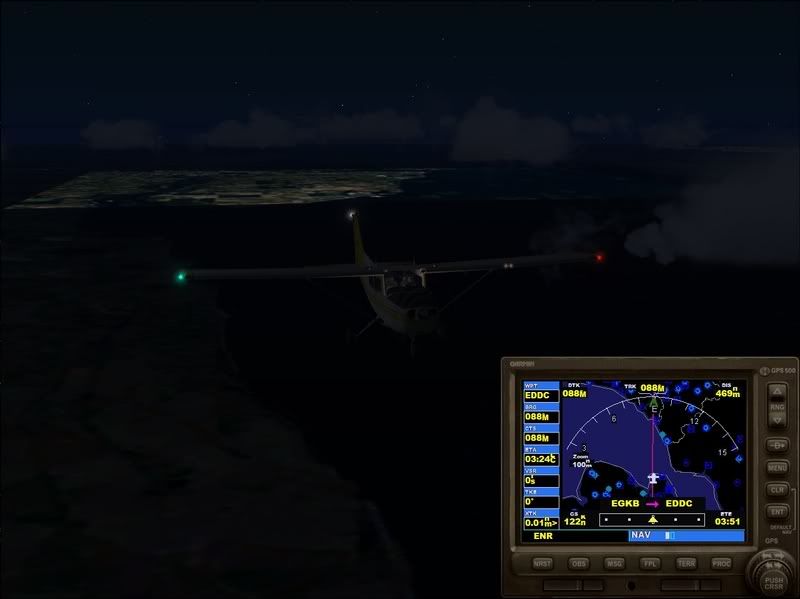
Anyway, here's a sample image of a flight I tried at night, taking off from Biggin Hill an hour after sunset and heading toward Dresden (where they just make innocent little cuckoo clocks and oughta be left alone anyways IMHO Wink ) and as you can see it's kinda...yucky.....of course my TP setup is having problems right now, since SP1 came out the latest beta version of TP has been flaky for me and has been dropping out, and I keep having to restart it to keep the connection for the sat images going.
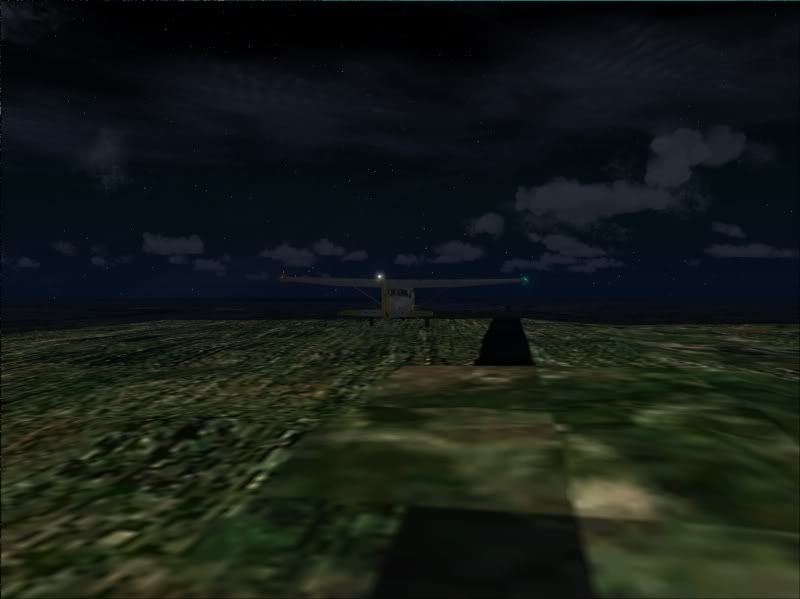
Oh yeah the other drawback is when starting a flight it can take 10 minutes or so just for TP to grab the initial sat images, at which point FS is displaying the "Loading Fllght" progress bar...so it's S L L O W W W w w w .....well worth the wait for daytime VFR in breathtaking places like Hawaii or whatever, but making it less worthwhile if the images are compromised by dark lighting.


_________________
"Once your reputation is ruined, you can live quite freely."
Back to top
View user's profile Visit poster's website Photo Gallery
401RCAF_Sly
Power User

Offline Offline
Joined: Jan 12, 2005
Posts: 223

PostPosted: Mon May 28, 2007 9:48 pm
Post subject: Re: Stoop

thanks Stoop... a ton of good info there


As you prolly guessed I want to fly a lanc to Dresden at around 15000ft and 200 knots at night Laughing

The nighttime textures are the problem and by the sounds of things there are gonna be an awful lot of em... but city lights didn't happen in Germany circa 1943... except by courtesy the RAF Laughing

Maybe the black and white textures from 15000 ft with some tweeking of the monitor luminesence might give a representative nightime scenario?.... because navigation would be attempted by dead reckoning its quite important to be able to pick out landmarks like rivers etc and adjustment of the FL to get the right level of detail / imagry would not be a problem..... neither would preflying the route..
the loss of autogen is not a problem,I have mine turned off anyways Laughing


One problem that I could forsee is that all participents would have to prefly the route.....
Is it viable to set up a full set of dummy texture folders in FSX, prefly the route which would then place the D/L textures into the dummies?....these could then possibly be redistibuted or at least I would know which textures were relevant to the route..

Will FSX load if there are no textures in the folders to start with?
Do the sat images require daata from the original textures to set the locale?.... I presume from scanning the avsim boards that it uses the aircraft position so hopefully that would not be an issue Laughing

Dunno if this will ever get off the ground but its an interesting concept...

Thanks again for your input

Catcha

Sly
Back to top
View user's profile
HF_SlowHand
Power User

Offline Offline
Joined: Aug 27, 2005
Posts: 767
Location: Meeechigan
PostPosted: Mon May 28, 2007 10:10 pm
Post subject: Re: Stoop

Sly,

You may want to see if Fled cant dream ya up some textures to remove the lights... he has done some very nice things in fs9 with enviro pak etc....

_________________
I deny everything
I lie about everything
And everything I deny
Is a lie!
Back to top
View user's profile Send e-mail Visit poster's website
JG300-Stoopy
Power User

Offline Offline
Joined: Jan 05, 2005
Posts: 5840
Location: Group W bench
PostPosted: Mon May 28, 2007 11:24 pm
Post subject: Re: Stoop

- 401RCAF_Sly

Maybe the black and white textures from 15000 ft with some tweeking of the monitor luminesence might give a representative nightime scenario?....


Actually.....you got me thinking here......there is a setting in TileProxy as to what level of 'colorization' it applies to the black & white VE-sourced images. Although it's a very simple control without any luminescence capability per se, but still maybe it might be possible to come up with something that approximates

- 401RCAF_Sly
Is it viable to set up a full set of dummy texture folders in FSX, prefly the route which would then place the D/L textures into the dummies?....these could then possibly be redistibuted or at least I would know which textures were relevant to the route..


You know, here's another idea on how it may be possible with the stock scenery.....in Phil Taylor's blog there's a tweak listed that has to do with dawn/dusk lighting and controlling at what phase it kicks in. Maybe, with luck, it's capable of turinging night lighting off completely? The tweak in question is this one:

For the dusk/dawn textures some people feel, subjectively, the result is too dark or too light. There are 2 items that allow the transition time to be changed:

[GRAPHICS]

DAY_THRESHOLD
NIGHT_THRESHOLD

acceptible values are 0 to 65535.

Defaults:

DAY: 32768
NIGHT: 4096

These represent the amount of 'ambient' light at the ends of the day/night blend threshold. Zero is perfect dark, 65535 is full day sun at noon in the summer.


Of course, this may apply only to the dawn/dusk threshhold and not the whole nighttime...haven't tried it.

- 401RCAF_Sly
Will FSX load if there are no textures in the folders to start with?


Oh yes, it certainly will! Trust me, I've had this happen when the connection to the sat image server gets dropped at the begtinning of the flight. Result is...YUCK, black empty square tiles. Your basic wartime blackout on steroids.

- 401RCAF_Sly
Do the sat images require data from the original textures to set the locale?.... I presume from scanning the avsim boards that it uses the aircraft position so hopefully that would not be an issue Laughing


The sat images don't require any data from the original textures insofar as I know. They act as complete replacements.

Pre-flying the route and collecting the images would be one way to go, then the question of sharing them with other users comes up since getting everyone to set up with TP isn't a likely proposition....but then, well, there's some questionable legality of sending the files to them since the images are really the "property" of the image source. Not to put a damper on the idea but it's something you'd want to be aware of.

I kinda like what Slowy suggests although it puts some pressure on Fled Wink ...maybe something along the lines of an altered envmap.bmp file might do tha trick.....not an expert there.

_________________
"Once your reputation is ruined, you can live quite freely."
Back to top
View user's profile Visit poster's website Photo Gallery
401RCAF_Sly
Power User

Offline Offline
Joined: Jan 12, 2005
Posts: 223

PostPosted: Tue May 29, 2007 7:10 am
Post subject: Re: Stoop

Thanks Slow N Stoop

I think I've gotta try this Tile proxy and or night textures thing on a small scale to start with... Laughing
Ive not tried the tile proxy because I don't have sufficient room on my drive.... time for a clear out Rolling Eyes

I will have a try with night threshold etc and see what happens.. dusk/dawn are too dark on my machine anyways so I may learn something there Wink

Yep redistributing could be a problem, Thinking about it it could open up comercial possibilities of companies producing routes Airport to Airport if a licence was available to them

Thanks again all good stuff... I will drag Fled in here too, the more brains the better Wink


Catcha Sly
Back to top
View user's profile
Display posts from previous:   
Post new topic    Revive this topic    Printer Friendly Page    Forum Index ›  FSX
Page 1 of 1
All times are GMT - 6 Hours

Archive Revive
Username:
This is an archived topic - your reply will not be appended here.
Instead, a new topic will be generated in the active forum.
The new topic will provide a reference link to this archived topic.