±Recent Visitors

Recent Visitors to Com-Central!

±User Info-big


Welcome Anonymous

Nickname
Password

Membership:
Latest: HighestAce
New Today: 0
New Yesterday: 0
Overall: 6648

People Online:
Members: 0
Visitors: 354
Total: 354
Who Is Where:
 Visitors:
01: Community Forums
02: Home
03: Community Forums
04: Community Forums
05: Home
06: Community Forums
07: Member Screenshots
08: Home
09: Community Forums
10: Downloads
11: Community Forums
12: Community Forums
13: Community Forums
14: Member Screenshots
15: Community Forums
16: Downloads
17: Community Forums
18: Community Forums
19: Community Forums
20: Downloads
21: Community Forums
22: Member Screenshots
23: Community Forums
24: Downloads
25: Community Forums
26: Community Forums
27: Community Forums
28: Community Forums
29: Member Screenshots
30: Home
31: Community Forums
32: Home
33: Photo Gallery
34: Home
35: Home
36: Community Forums
37: Community Forums
38: Member Screenshots
39: Member Screenshots
40: Photo Gallery
41: Community Forums
42: Home
43: Photo Gallery
44: Community Forums
45: Member Screenshots
46: Photo Gallery
47: Home
48: Community Forums
49: Community Forums
50: Community Forums
51: Home
52: Community Forums
53: Community Forums
54: Downloads
55: Member Screenshots
56: Community Forums
57: Member Screenshots
58: Member Screenshots
59: Community Forums
60: Community Forums
61: News Archive
62: Community Forums
63: Member Screenshots
64: Community Forums
65: Search
66: Member Screenshots
67: Community Forums
68: Downloads
69: Member Screenshots
70: Home
71: Community Forums
72: Home
73: Community Forums
74: Downloads
75: Downloads
76: News Archive
77: Photo Gallery
78: Community Forums
79: Community Forums
80: Member Screenshots
81: Community Forums
82: Member Screenshots
83: Home
84: News Archive
85: Community Forums
86: Member Screenshots
87: Community Forums
88: Home
89: Community Forums
90: Community Forums
91: Home
92: Home
93: Community Forums
94: Community Forums
95: Photo Gallery
96: Community Forums
97: Home
98: News Archive
99: Home
100: Home
101: Downloads
102: Member Screenshots
103: Home
104: Home
105: Community Forums
106: Home
107: Photo Gallery
108: Statistics
109: Photo Gallery
110: Community Forums
111: Home
112: Home
113: Home
114: Home
115: Downloads
116: Home
117: Home
118: Photo Gallery
119: Community Forums
120: Community Forums
121: Community Forums
122: Community Forums
123: Photo Gallery
124: Downloads
125: Home
126: Home
127: Home
128: Community Forums
129: Community Forums
130: Community Forums
131: Home
132: Photo Gallery
133: Home
134: Photo Gallery
135: Community Forums
136: Statistics
137: Downloads
138: Photo Gallery
139: Community Forums
140: Community Forums
141: Community Forums
142: Community Forums
143: Community Forums
144: Home
145: Home
146: Member Screenshots
147: Member Screenshots
148: Downloads
149: Members List
150: Downloads
151: Home
152: Community Forums
153: Member Screenshots
154: Member Screenshots
155: Photo Gallery
156: Community Forums
157: Community Forums
158: Community Forums
159: Community Forums
160: Community Forums
161: News Archive
162: Home
163: Downloads
164: Community Forums
165: Home
166: Home
167: Community Forums
168: Your Account
169: Photo Gallery
170: Community Forums
171: Home
172: Home
173: Home
174: News Archive
175: Community Forums
176: Community Forums
177: Your Account
178: Photo Gallery
179: Community Forums
180: Community Forums
181: Photo Gallery
182: Photo Gallery
183: Photo Gallery
184: Photo Gallery
185: Community Forums
186: Member Screenshots
187: Home
188: Community Forums
189: Photo Gallery
190: Community Forums
191: Community Forums
192: Community Forums
193: Community Forums
194: Member Screenshots
195: News Archive
196: Downloads
197: Home
198: Home
199: Member Screenshots
200: Community Forums
201: Photo Gallery
202: Community Forums
203: Member Screenshots
204: Downloads
205: Your Account
206: Statistics
207: News Archive
208: Home
209: Home
210: Community Forums
211: Community Forums
212: Home
213: Home
214: Community Forums
215: Downloads
216: Community Forums
217: Downloads
218: Photo Gallery
219: Member Screenshots
220: Home
221: Home
222: Member Screenshots
223: Community Forums
224: Community Forums
225: Home
226: Home
227: Home
228: Community Forums
229: Home
230: Community Forums
231: Community Forums
232: Community Forums
233: News Archive
234: Home
235: Home
236: Community Forums
237: Home
238: Home
239: Community Forums
240: Community Forums
241: Community Forums
242: Community Forums
243: Community Forums
244: Home
245: Community Forums
246: Home
247: Downloads
248: News Archive
249: Community Forums
250: Community Forums
251: Member Screenshots
252: Photo Gallery
253: Statistics
254: Photo Gallery
255: Photo Gallery
256: Member Screenshots
257: Home
258: Downloads
259: Member Screenshots
260: Downloads
261: Home
262: Downloads
263: Photo Gallery
264: Community Forums
265: Statistics
266: Community Forums
267: Community Forums
268: News Archive
269: Home
270: Member Screenshots
271: Member Screenshots
272: Community Forums
273: Member Screenshots
274: Community Forums
275: Downloads
276: Home
277: Member Screenshots
278: Community Forums
279: Photo Gallery
280: Community Forums
281: News Archive
282: Home
283: Community Forums
284: Community Forums
285: Photo Gallery
286: Photo Gallery
287: Photo Gallery
288: Member Screenshots
289: Community Forums
290: Home
291: Photo Gallery
292: Community Forums
293: Community Forums
294: Photo Gallery
295: Member Screenshots
296: Home
297: Home
298: Home
299: Community Forums
300: Member Screenshots
301: Community Forums
302: Downloads
303: Member Screenshots
304: Photo Gallery
305: Member Screenshots
306: Member Screenshots
307: Community Forums
308: Home
309: Home
310: Home
311: Community Forums
312: Community Forums
313: Member Screenshots
314: Downloads
315: Community Forums
316: Community Forums
317: Home
318: Community Forums
319: Community Forums
320: Home
321: Home
322: Community Forums
323: Member Screenshots
324: Home
325: Community Forums
326: Home
327: Home
328: Home
329: Community Forums
330: Home
331: Community Forums
332: Home
333: Community Forums
334: Community Forums
335: Home
336: Community Forums
337: Home
338: Member Screenshots
339: Community Forums
340: Home
341: Community Forums
342: Photo Gallery
343: Community Forums
344: Member Screenshots
345: Community Forums
346: Home
347: Home
348: Photo Gallery
349: Home
350: Community Forums
351: Home
352: Downloads
353: Your Account
354: Community Forums

Staff Online:

No staff members are online!
FSX runs like Crud :: Archived
A forum for Microsoft's Flight Simulator X
Post new topic    Revive this topic    Printer Friendly Page     Forum Index ›  FSX

Topic Archived View previous topic :: View next topic  
Author Message
401RCAF_HitMan
Power User

Offline Offline
Joined: Dec 26, 2004
Posts: 1470
Location: Ontario, CANADA (next to the beer store)
PostPosted: Mon Nov 09, 2009 10:22 pm
Post subject: FSX runs like Crud

Hey Guy's: I want to get back into this flying stuff...have FSX and SP1 and SP2 don't have Exceleration pack yet..my rig is

3.2 gig intel dual core
4 gig o ram PC2 5400
2 x BFG 9800GT in SLI
currently running XP 32 bit will be switching to windows 7..

I can run any game out there including Crysis fully cranked without any problems what so ever..but when I try FSX it runs like total crud..poor frame rates..the graphics suck (I start getting funny anomolies after 10 minutes)etc..I am using the latest Nvidia drivers. I have tried every FSX tweak out there with none of them really doing anything.... I need H E L L L L P P P P....... Sad

Btw FS9 runs smooth as silk but I want the eye candy that FSX apparently has...anyone got any ideas before I bin this DVD...
Back to top
View user's profile Visit poster's website
Uhu_Fledermaus
Aircraft Demolition Expert

Offline Offline
Joined: Nov 28, 2004
Posts: 4369
Location: Blaricum, The Netherlands ~GMT+1
PostPosted: Mon Nov 09, 2009 11:35 pm
Post subject: Re: FSX runs like Crud

Hey Hitman Wink

done that been there well the works Razz Wink

fsX is a complete different dog as fs9 is/was.

I could type here a lengthy book, but that would not bring you much as every system seems to have it's own idiosyncrosis.

for starters:

DO NOT use toolies like nHancer or other out of the box Graphiccard "tweaking toolies"

make sure your memory and CPU run at the same clockfrequency
xp doesn't swallow more than 3,25 G's of memory
SLI doesn't do diddly squid for fsX, in fact it is counterproductive
fsX is very sensible to defragmentation
also the number of installed Aircraft can have a negative effect on loading times
and so on
DELETE your fsX.cfg and let it rebuild a new one and add the tweaks below.
these are a few tweaks that have meaning and help to get things to run better=smoother:

[Main]
DisablePreload=1

[TERRAIN]
TERRAIN_MAX_AUTOGEN_TREES_PER_CELL=800
TERRAIN_MAX_AUTOGEN_BUILDINGS_PER_CELL=800
IMAGE_PIXELS_FOR_AUTOGEN_POLYGONS=512

one of the biggest framehogs is water, keep that at 2x.low or medium !

apron traffic is a killer set it to minimum
AI traffic 20%
boats20%
roadtraffic 10%

limit your fps to 24-30

I'll gladly talk you through it via TS when you have some time for it Wink

these are my crate's spec's :
QC9300 @ 3.0G | Asus Striker II NSE | 4G DDR3@1600MHz | EVGA GTX 285SSC 1GB | 195.39 BETA drivers | 4x 500G SATAII 2x RAID 0 | SB X-Fi Platinum Fatal1ty Champion | BeQuiet 700W | HP w2228h 22" 1680x1050x32 | W7RC1 64bit UK | fsX+Acc | FTX+REX
Back to top
View user's profile ICQ Number MSN Messenger Photo Gallery
401RCAF_HitMan
Power User

Offline Offline
Joined: Dec 26, 2004
Posts: 1470
Location: Ontario, CANADA (next to the beer store)
PostPosted: Tue Nov 10, 2009 12:48 am
Post subject: Re: FSX runs like Crud

Hey Fled: Thanks for the info bud..I will try those pointers and get with you on TS perhaps this weekend..I miss flying with all you ugly mugs but I have to get this working properly first. Mr. Green
Back to top
View user's profile Visit poster's website
HF_SlowHand
Power User

Offline Offline
Joined: Aug 27, 2005
Posts: 767
Location: Meeechigan
PostPosted: Tue Nov 10, 2009 2:43 am
Post subject: Re: FSX runs like Crud

try detuning ai car and boat traffic.... I have Commercial and civilian a/c at 50% and everything else under 30%

_________________
I deny everything
I lie about everything
And everything I deny
Is a lie!
Back to top
View user's profile Send e-mail Visit poster's website
401RCAF_HitMan
Power User

Offline Offline
Joined: Dec 26, 2004
Posts: 1470
Location: Ontario, CANADA (next to the beer store)
PostPosted: Thu Nov 12, 2009 2:42 am
Post subject: Re: FSX runs like Crud

Hey guy's: Thanks for the tips, they actually worked quite well....I am going to re-install FSX as I have tried every tweak on the net and I think my cfg file is probably hosed.. and do just the tweaks you guy's mentioned..do any of you know where I can purchase the Acceleration pack online and down load it?..can't find it in any of the stores.

Also what time on Sundays is the flights and what addons do I need to join in and show you what 3 years of being away from the stick can do.. Shocked ...I highly suggest that all of you park waaay in the back when I am taking off..lol
Back to top
View user's profile Visit poster's website
401RCAF_HitMan
Power User

Offline Offline
Joined: Dec 26, 2004
Posts: 1470
Location: Ontario, CANADA (next to the beer store)
PostPosted: Sat Nov 14, 2009 9:39 pm
Post subject: Re: FSX runs like Crud

Well...installed a clean Windows 7 Enterprise edition and then FSX and SP1 and SP2...enabled DX10 Preview and away she went running like a top...just going to do a few tweaks and I am ready to go... thanks guy's for all your input.
Back to top
View user's profile Visit poster's website
Uhu_Fledermaus
Aircraft Demolition Expert

Offline Offline
Joined: Nov 28, 2004
Posts: 4369
Location: Blaricum, The Netherlands ~GMT+1
PostPosted: Sun Nov 15, 2009 2:22 pm
Post subject: Re: FSX runs like Crud

for informational purposes,

KILL the so-called DX10 shite, it's a bloody annoyance and it doesn't bring diddly squid, as stated in the sim, it's a "preview", result will be all kind of odd goofball effects and AI without textures, just to name a few.

get the latest DX9 set and install it !

make sure you DEFRAG the whole lot, fsX is rather picky on fragmentation
Back to top
View user's profile ICQ Number MSN Messenger Photo Gallery
401RCAF_HitMan
Power User

Offline Offline
Joined: Dec 26, 2004
Posts: 1470
Location: Ontario, CANADA (next to the beer store)
PostPosted: Thu Nov 19, 2009 12:31 am
Post subject: Re: FSX runs like Crud

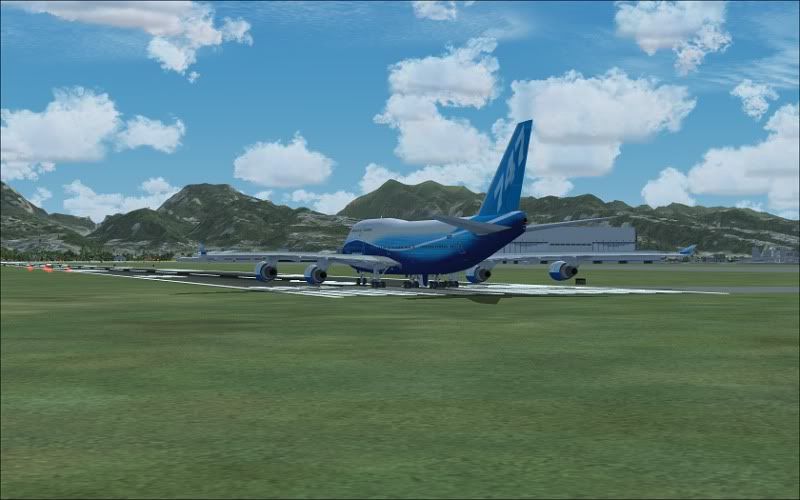
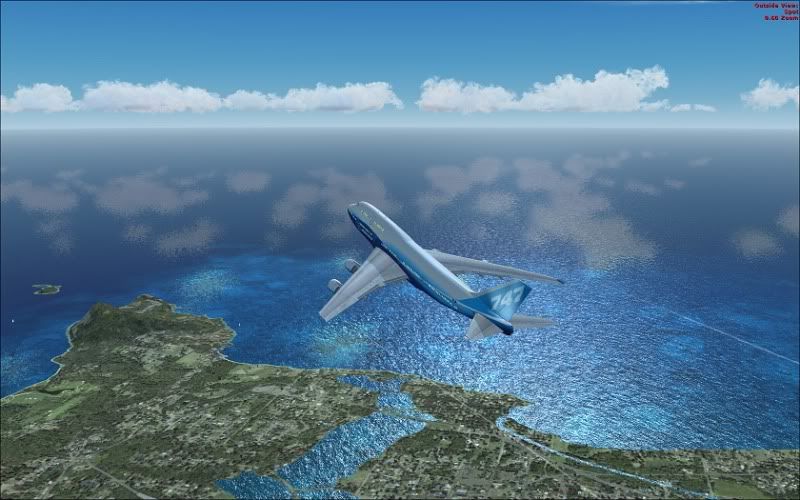
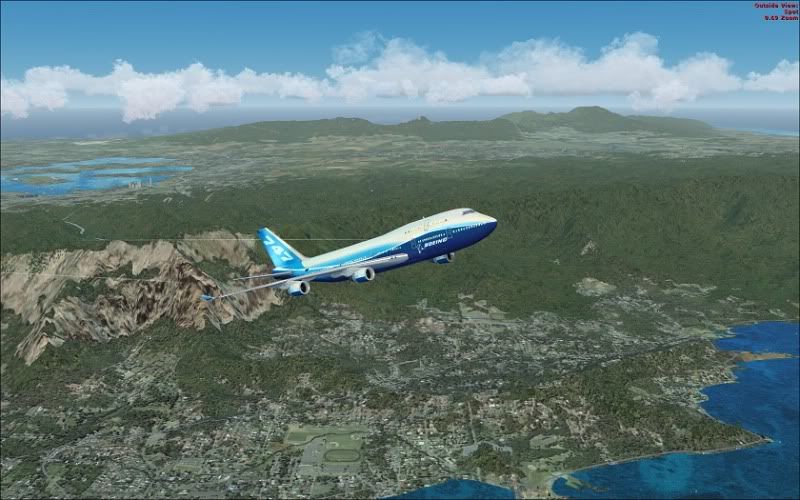
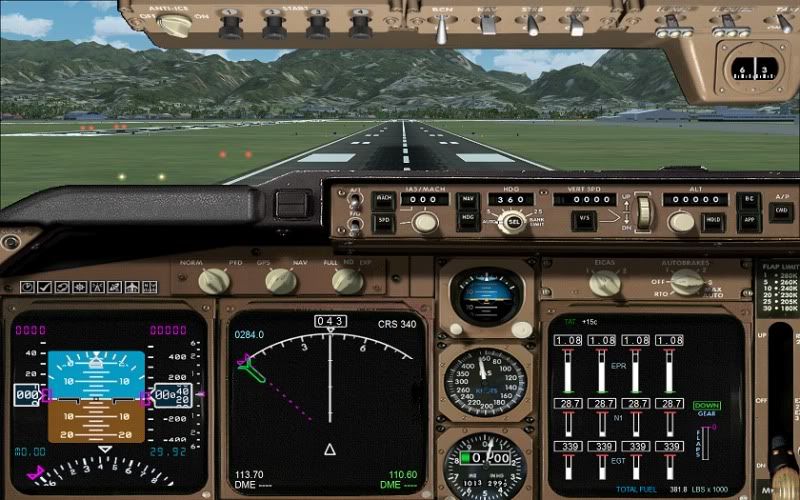
Fled..I beg to differ bud, I find that running FSX in DX10 preview and SLI with Windows 7 is amazing..the FSX settings are all maxed to ultra high and the graphics are amazing as well as the performance. I have the fps set to 25 and it never moves off of 25 fps...below are a few screenshots (resized from 1680 x 1050) taken from a flight out of Honululu international airport. I have done alot of flying the past week and cannot find anything to complain about with DX10 preview and SLI.


Back to top
View user's profile Visit poster's website
Uhu_Fledermaus
Aircraft Demolition Expert

Offline Offline
Joined: Nov 28, 2004
Posts: 4369
Location: Blaricum, The Netherlands ~GMT+1
PostPosted: Thu Nov 19, 2009 6:02 pm
Post subject: Re: FSX runs like Crud

no worries Hit,

you 'll find out in time when you get other addons Wink
Back to top
View user's profile ICQ Number MSN Messenger Photo Gallery
Shades
Forum Tree-Rat

Offline Offline
Joined: Mar 07, 2005
Posts: 6478
Location: 3rd Branch up, 'Ye Olde Oak', Green Wood.
PostPosted: Fri Nov 20, 2009 12:44 am
Post subject: Re: FSX runs like Crud

Hitty, did you do a 64-bit install of Win 7?
If not, you're still not using all your RAM:-

32-bit systems can only see a total of 4Gb RAM, but that includes the RAM on your graphics cards.
If you're running two 512mb cards in SLi, making 1Gb total, a 32-bit system will only have 3Gb of your system RAM to call on.
If you're running 2 x 1Gb cards, only 2Gb of system RAM.

A 64-bit system will allow the use of much more (not sure of the ceiling) so will easily give you all that 4Gb system RAM loveliness.

If your system will allow it, might be best to go for 64-bit Win 7.

Nice shots btw.

_________________
Skwerl's place.

Com-Central's cutest, fluffiest, twitchiest, tail.
CPU > Intel i9-9900k (o/c 4.9GHz); COOLING > BeQuiet! Dark Rock Pro 4;
MOBO > ASUS PRIME Z390-A; RAM > 2x32GB Corsair LPX 2666MHz;
GPU > Gigabyte GEFORCE GTX650Ti PCI-e 3.0 2Gb GDDR5;
AUDIO > Creative X-Fi Xtreme Music (plus - Universal Audio UAD2 Quad Custom accelerator);
HDD > 3x1TB+ M.2. SSDs; LCD > DELL - S2419HGF (1920x1080);
PSU > 650W be quiet Straight Power 11 - 80+ Gold;
CASE > BeQuiet! SILENT BASE 601; OS > Windows 11 Home Advanced (64-bit).
Back to top
View user's profile Visit poster's website ICQ Number
401RCAF_HitMan
Power User

Offline Offline
Joined: Dec 26, 2004
Posts: 1470
Location: Ontario, CANADA (next to the beer store)
PostPosted: Fri Nov 20, 2009 1:32 am
Post subject: Re: FSX runs like Crud

Hey Shades...funny you say that bud...I currently have windows 7 32 bit RTM installed but I went out and bought the 64 bit version (because I am soooo pleased with Windows 7 now) and will be installing it this weekend. I will then be able to use all 6 gig O ram. BTW 32 bit will only recognize 3 gig O ram and it also sees and uses the 1024 MB on each vid card and SLI...that might be a Windows 7 thing though. I have to find a store to buy the FSX ecceleration pack at so I can try that out too. Anyway..fingers crossed that the 64 bit install goes flawless like the 32 bit.
Back to top
View user's profile Visit poster's website
Uhu_Fledermaus
Aircraft Demolition Expert

Offline Offline
Joined: Nov 28, 2004
Posts: 4369
Location: Blaricum, The Netherlands ~GMT+1
PostPosted: Fri Nov 20, 2009 11:38 pm
Post subject: Re: FSX runs like Crud

Hit, not to burst your bubble but SLI doesn't do zilch for fsX, it will only use one card, make a lil test and take one out, you'd be surprised that the performance with fsX improves
Back to top
View user's profile ICQ Number MSN Messenger Photo Gallery
Shades
Forum Tree-Rat

Offline Offline
Joined: Mar 07, 2005
Posts: 6478
Location: 3rd Branch up, 'Ye Olde Oak', Green Wood.
PostPosted: Fri Nov 20, 2009 11:56 pm
Post subject: Re: FSX runs like Crud

Went smoother on my Dad's i5 than my i7 (annoyingly, lol).
Took 7 minutes from cd in to running.
On mine it took nearly half as long again.
I haven't connected him to the Interwebbything yet though.
Doing that Tuesday.

_________________
Skwerl's place.

Com-Central's cutest, fluffiest, twitchiest, tail.
CPU > Intel i9-9900k (o/c 4.9GHz); COOLING > BeQuiet! Dark Rock Pro 4;
MOBO > ASUS PRIME Z390-A; RAM > 2x32GB Corsair LPX 2666MHz;
GPU > Gigabyte GEFORCE GTX650Ti PCI-e 3.0 2Gb GDDR5;
AUDIO > Creative X-Fi Xtreme Music (plus - Universal Audio UAD2 Quad Custom accelerator);
HDD > 3x1TB+ M.2. SSDs; LCD > DELL - S2419HGF (1920x1080);
PSU > 650W be quiet Straight Power 11 - 80+ Gold;
CASE > BeQuiet! SILENT BASE 601; OS > Windows 11 Home Advanced (64-bit).
Back to top
View user's profile Visit poster's website ICQ Number
Display posts from previous:   
Post new topic    Revive this topic    Printer Friendly Page    Forum Index ›  FSX
Page 1 of 1
All times are GMT - 6 Hours

Archive Revive
Username:
This is an archived topic - your reply will not be appended here.
Instead, a new topic will be generated in the active forum.
The new topic will provide a reference link to this archived topic.