±Recent Visitors

Recent Visitors to Com-Central!

±User Info-big


Welcome Anonymous

Nickname
Password

Membership:
Latest: HighestAce
New Today: 0
New Yesterday: 0
Overall: 6648

People Online:
Members: 0
Visitors: 216
Total: 216
Who Is Where:
 Visitors:
01: Community Forums
02: Home
03: Home
04: Community Forums
05: Home
06: Home
07: Community Forums
08: Home
09: Photo Gallery
10: Home
11: Community Forums
12: Community Forums
13: Home
14: Home
15: Home
16: Community Forums
17: Home
18: Community Forums
19: Home
20: Home
21: Community Forums
22: Home
23: Community Forums
24: Photo Gallery
25: Community Forums
26: Community Forums
27: Home
28: Photo Gallery
29: Photo Gallery
30: News Archive
31: Community Forums
32: Community Forums
33: Community Forums
34: Photo Gallery
35: Community Forums
36: Home
37: Downloads
38: Community Forums
39: Community Forums
40: Community Forums
41: Home
42: Community Forums
43: Community Forums
44: Photo Gallery
45: Home
46: Community Forums
47: Photo Gallery
48: Community Forums
49: Community Forums
50: Member Screenshots
51: Photo Gallery
52: Community Forums
53: Community Forums
54: Member Screenshots
55: Community Forums
56: Photo Gallery
57: Home
58: Community Forums
59: Photo Gallery
60: Home
61: Community Forums
62: Community Forums
63: Home
64: Member Screenshots
65: Photo Gallery
66: Community Forums
67: Community Forums
68: Home
69: Photo Gallery
70: Home
71: Community Forums
72: Photo Gallery
73: Home
74: Photo Gallery
75: Home
76: Home
77: Community Forums
78: Community Forums
79: Community Forums
80: Home
81: Community Forums
82: Member Screenshots
83: Home
84: Home
85: Home
86: Community Forums
87: Community Forums
88: Home
89: Community Forums
90: Community Forums
91: Photo Gallery
92: Downloads
93: Home
94: Community Forums
95: Home
96: News Archive
97: Community Forums
98: News
99: Photo Gallery
100: Photo Gallery
101: Home
102: Photo Gallery
103: Downloads
104: Home
105: Community Forums
106: Photo Gallery
107: Photo Gallery
108: Community Forums
109: Photo Gallery
110: Photo Gallery
111: Home
112: Home
113: Photo Gallery
114: Home
115: News
116: Home
117: Member Screenshots
118: Community Forums
119: Community Forums
120: Community Forums
121: Community Forums
122: Community Forums
123: Community Forums
124: Home
125: Home
126: Community Forums
127: Home
128: Home
129: Photo Gallery
130: Community Forums
131: Community Forums
132: Community Forums
133: Photo Gallery
134: Community Forums
135: Community Forums
136: Community Forums
137: Community Forums
138: Photo Gallery
139: Community Forums
140: Community Forums
141: Home
142: Home
143: Community Forums
144: News Archive
145: Member Screenshots
146: Community Forums
147: Photo Gallery
148: Community Forums
149: Community Forums
150: Community Forums
151: Home
152: Home
153: News Archive
154: Photo Gallery
155: Home
156: Community Forums
157: Community Forums
158: Downloads
159: Community Forums
160: Photo Gallery
161: Home
162: Downloads
163: Photo Gallery
164: Photo Gallery
165: Home
166: Photo Gallery
167: Photo Gallery
168: Community Forums
169: Home
170: Photo Gallery
171: Community Forums
172: Home
173: Home
174: Home
175: Photo Gallery
176: Community Forums
177: Photo Gallery
178: Photo Gallery
179: Community Forums
180: Community Forums
181: Photo Gallery
182: Home
183: Photo Gallery
184: Downloads
185: Home
186: Community Forums
187: Community Forums
188: Community Forums
189: Community Forums
190: Community Forums
191: Member Screenshots
192: Community Forums
193: Home
194: Downloads
195: Home
196: Community Forums
197: Photo Gallery
198: Your Account
199: Photo Gallery
200: Community Forums
201: Community Forums
202: Community Forums
203: Home
204: Home
205: Home
206: Home
207: Home
208: Community Forums
209: Community Forums
210: Photo Gallery
211: Home
212: Home
213: Community Forums
214: Community Forums
215: Downloads
216: Community Forums

Staff Online:

No staff members are online!
Vid Card Woes - Continued! :: Archived
Resolve issues with your computer problems here or read about the latest computer parts and information.
Go to page 1, 2  Next
Post new topic    Revive this topic    Printer Friendly Page     Forum Index ›  Hardware

Topic Archived View previous topic :: View next topic  
Author Message
JG300_Hunt
Power User

Offline Offline
Joined: Mar 08, 2006
Posts: 750
Location: WA State
PostPosted: Sat Dec 22, 2007 5:29 pm
Post subject: Vid Card Woes - Continued!

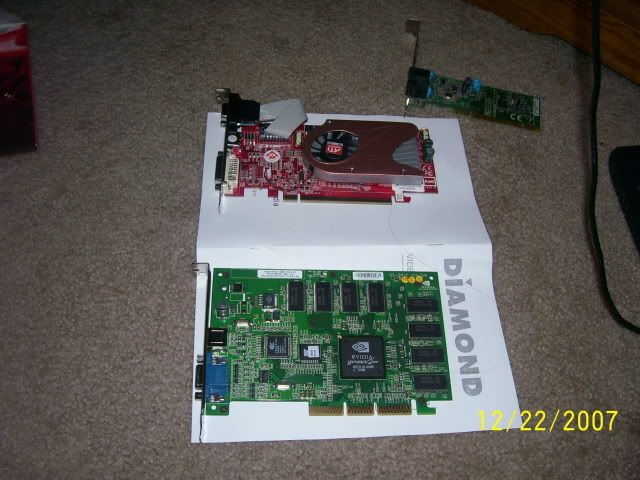
Picked up an ATI Radeon HD2400PRO - 512MB Vid Card. PCI Express. The one I had from my dad was an AGP that didn't fit. Went to pop this baby in and BAM - won't fit either?? Now I am totally confused.

Here are some pics to rack the brain with (sorry for the bluriness!):

First pic shows the AGP and the PCI-E Cards I have tried installing In the background is my modem card (not used) that fits the slot perfectly.


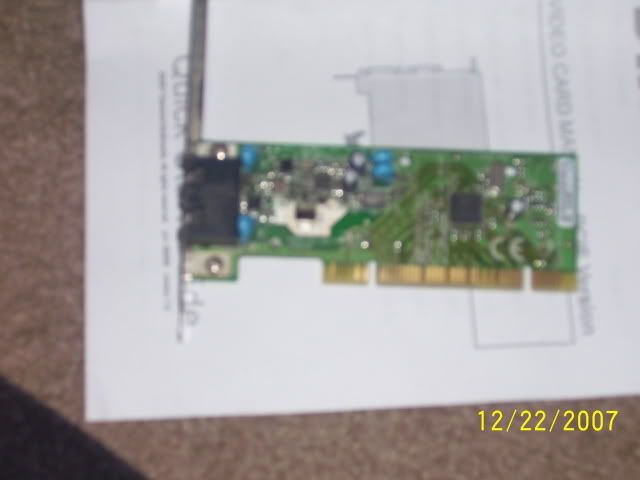
Second pic shows my modem card that actually fits the same slot. Very different pinset indeed.


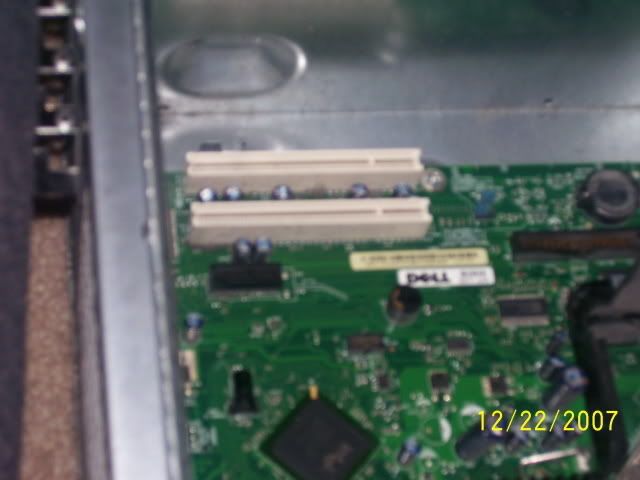
Third pic shows the slot in the CPU I need to occupy.


Machine is a Dell Dimension E310. My obvious question is whether there is a PCI slot and a PCI-E slot (if so, anyone recommend a decent PCI card??).

_________________
Back to top
View user's profile
Shades
Forum Tree-Rat

Offline Offline
Joined: Mar 07, 2005
Posts: 6478
Location: 3rd Branch up, 'Ye Olde Oak', Green Wood.
PostPosted: Sat Dec 22, 2007 6:08 pm
Post subject: Re: Vid Card Woes - Continued!

Hiya Hunt,

I've had a look at the REVIEWS for your system and I'm not sure there's an upgrade option for a separate vid card.

I may be wrong (it's very possible) but, looking at photo's of the inside of your case, it seems like there's only a single PCI slot for an expansion card like your modem card not a graphics card.


It appears to be totally reliant on the onboard intel graphics from the mobo.

Could you post a pic of your mobo so I can make sure as the photo's I found on the web are very small.

All I need to see are the slots on your mobo toward the back of the case.
If there's only one, you're a victim of Dell.

I was once, then I realised that building these suckers is not that much harder than re-wiring a plug and started building my own. I'd urge anyone buying a Dell to do the same. For similar money you can build a machine with much better gaming performance.

_________________
Skwerl's place.

Com-Central's cutest, fluffiest, twitchiest, tail.
CPU > Intel i9-9900k (o/c 4.9GHz); COOLING > BeQuiet! Dark Rock Pro 4;
MOBO > ASUS PRIME Z390-A; RAM > 2x32GB Corsair LPX 2666MHz;
GPU > Gigabyte GEFORCE GTX650Ti PCI-e 3.0 2Gb GDDR5;
AUDIO > Creative X-Fi Xtreme Music (plus - Universal Audio UAD2 Quad Custom accelerator);
HDD > 3x1TB+ M.2. SSDs; LCD > DELL - S2419HGF (1920x1080);
PSU > 650W be quiet Straight Power 11 - 80+ Gold;
CASE > BeQuiet! SILENT BASE 601; OS > Windows 11 Home Advanced (64-bit).
Back to top
View user's profile Visit poster's website ICQ Number
JG300_Hunt
Power User

Offline Offline
Joined: Mar 08, 2006
Posts: 750
Location: WA State
PostPosted: Sat Dec 22, 2007 6:18 pm
Post subject: Re: Vid Card Woes - Continued!

Fortunately, I have two slots on the CPU. Your picture is identical to my board with that exception. The Modem card can be removed - I have a separate networking slot further up the back of the case.

Dell had an older ATI for the E310 - not a big fan of the one offered and want to get something decent on my own - just can't figure out which card fits! Mr. Green

_________________
Back to top
View user's profile
JG300-fr8ycat
Power User

Offline Offline
Joined: Mar 13, 2005
Posts: 1530
Location: Los Angeles
PostPosted: Sat Dec 22, 2007 6:24 pm
Post subject: Re: Vid Card Woes - Continued!

Looks like both of those are PCI slots Hunt. PCI & PCI-E are different slots. I imagine you might still be able to get a PCI video card somewhere but think they are pretty rare at this point.

Willing to bet I still have an old PCI video card laying around, but not sure if it would do ya much good as I'm sure it's pretty old and probably something like 56mb of memory max.

_________________
Back to top
View user's profile MSN Messenger Photo Gallery
JG300-fr8ycat
Power User

Offline Offline
Joined: Mar 13, 2005
Posts: 1530
Location: Los Angeles
PostPosted: Sat Dec 22, 2007 6:31 pm
Post subject: Re: Vid Card Woes - Continued!

Well I guess there are still plenty around. Here's some to look at.

www.newegg.com/Product...2&name=PCI

_________________
Back to top
View user's profile MSN Messenger Photo Gallery
JG300-Stoopy
Power User

Offline Offline
Joined: Jan 05, 2005
Posts: 5840
Location: Group W bench
PostPosted: Sat Dec 22, 2007 6:59 pm
Post subject: Re: Vid Card Woes - Continued!

Interesting. Hunt it does appear your option are a bit limited with that motherboard, Shades and Fr8ycat are right. That's a nice link to newegg (always excellent prices and FAST delivery, very happy with them myself) and particularly, if you plan on keeping that system for a while, that Diamond X1550PRO with 256MB and GDDR2 RAM for $89 might be a fine choice if it's in your price range. Although it's a different card and slot type, I have a PCIe-x16 ATI 1650PRO with 512MB and am very, very happy with ATI after using NVidia for a while (although to each their own and NVidia high-end GTX8800 cards in the PCIe x16 spectrum are the ones to beat right now).

Chipset, amount of memory, and RAM type are the critical things. For ATI, the 1000-series chipset (1550, etc) are newer chipsets than the 9000-series. 256MB of RAM is far more desireable for flight simming, and DDR2 RAM is going to have a much faster spped than DDR. The NVidia alterniatives are based on the GeFORCE 5200 and 5500 series which, I think, may be a bit longer in the tooth than the ATI 1000 series.

The main consideration is, this card won't be what you'd want to carry over to a new PC when you eventually move up, since at that point you'll get PCIe-x16 and can use the faster slot and transfer speeds so you wouldn't want to. So you're factoring in how much you want to spend on a card that has a life only as long as your current computer....which only you can say. I spent about $180 for my card back when I bought it, but it was transferred over to my new computer when I built it a while back, so it amortizes out about the same.

Power supply can also be a factor. The specs I found on your system (HERE)show a 230W power supply, and a healthy vid card might be a stress. Maybe the newegg specs will show power consumption too, I haven't looked that far.

BUT.....the review from a guy on the page below (6th one down) says he has a Dell Dimension E310, same as yours, and he seems happy....read on:

www.newegg.com/Product...amp;Page=3

_________________
"Once your reputation is ruined, you can live quite freely."
Back to top
View user's profile Visit poster's website Photo Gallery
Shades
Forum Tree-Rat

Offline Offline
Joined: Mar 07, 2005
Posts: 6478
Location: 3rd Branch up, 'Ye Olde Oak', Green Wood.
PostPosted: Sat Dec 22, 2007 8:51 pm
Post subject: Re: Vid Card Woes - Continued!

Just going on from what Stoop was saying;
If you do start thinking of a new system, you should only be thinking in terms "PCI-e" graphics (see below). That means a PCI-e graphic card and a PCI-e compatable motherboard.

"PCI" is reached its limit a few years ago and is pretty much dead;
"AGP" has now reached the limit of what can be achieved with it and is dying;
Only "PCI-e" still has scope for more development and only PCI-e will be able to cope with newer games as they come up - unless something else comes out in the mean time, but I haven't heard of anything in the pipeline.

That doesn't mean you should fork out a fortune if you're happy with the machine you have. But, if you're trying to upgrade it, I'm guessing you're not. If you start looking at new kit, there's lots of members here who can offer you excellent advice on how best to proceed. Either buying a pre-build or building your own.

_________________
Skwerl's place.

Com-Central's cutest, fluffiest, twitchiest, tail.
CPU > Intel i9-9900k (o/c 4.9GHz); COOLING > BeQuiet! Dark Rock Pro 4;
MOBO > ASUS PRIME Z390-A; RAM > 2x32GB Corsair LPX 2666MHz;
GPU > Gigabyte GEFORCE GTX650Ti PCI-e 3.0 2Gb GDDR5;
AUDIO > Creative X-Fi Xtreme Music (plus - Universal Audio UAD2 Quad Custom accelerator);
HDD > 3x1TB+ M.2. SSDs; LCD > DELL - S2419HGF (1920x1080);
PSU > 650W be quiet Straight Power 11 - 80+ Gold;
CASE > BeQuiet! SILENT BASE 601; OS > Windows 11 Home Advanced (64-bit).
Back to top
View user's profile Visit poster's website ICQ Number
JG300_Hunt
Power User

Offline Offline
Joined: Mar 08, 2006
Posts: 750
Location: WA State
PostPosted: Sat Dec 22, 2007 9:28 pm
Post subject: Re: Vid Card Woes - Continued!

The computer I have is 2 years old - a Xmas gift infact. I would like to keep it for the time being. Just picked up 2GB RAM for it too. Problem is it came with the Intel Video chipset - which means no memory really. Just looking for a card to enhance FS9 and CFS3 type applications seeing as how that is really all I use it for these days. Although a newer system in the future would be great, I am happy with the one I have thus far. The ATI I picked up was right around $100. Plan on returning it this weekend.

As I typed, also went to New Egg and picked up a brand new shiny DIAMOND X1550PRO256PSB Radeon X1550 256MB 128-bit GDDR2 PCI Video Card! Thanks for the assistance gents! Mr. Green

_________________
Back to top
View user's profile
Kitform
Bar Maid

Offline Offline
Joined: Jan 22, 2005
Posts: 2011
Location: Cleveland. UK.
PostPosted: Sat Dec 22, 2007 9:49 pm
Post subject: Re: Vid Card Woes - Continued!

Just remember to turn off your on-board graphics, probably in the bios setting or maybe a jumper on the mobo, no point in driving two video 'cards'.
Smile
Back to top
View user's profile Send e-mail Visit poster's website Photo Gallery
JG300_Hunt
Power User

Offline Offline
Joined: Mar 08, 2006
Posts: 750
Location: WA State
PostPosted: Sat Dec 22, 2007 10:52 pm
Post subject: Re: Vid Card Woes - Continued!

The ATI I just bought had good instructions on how to fix that monster! Thanks Kit Mr. Green

_________________
Back to top
View user's profile
JG300-Stoopy
Power User

Offline Offline
Joined: Jan 05, 2005
Posts: 5840
Location: Group W bench
PostPosted: Sun Dec 23, 2007 4:04 pm
Post subject: Re: Vid Card Woes - Continued!

Well I guess that dang new thing better WORK then or we're in deep kimche!

Keep us posted Hunt! And glad you're back...now I know why we hadn't heard from ya lately!

_________________
"Once your reputation is ruined, you can live quite freely."
Back to top
View user's profile Visit poster's website Photo Gallery
JG300_Hunt
Power User

Offline Offline
Joined: Mar 08, 2006
Posts: 750
Location: WA State
PostPosted: Sun Dec 23, 2007 5:02 pm
Post subject: Re: Vid Card Woes - Continued!

I'll have to post an update Wink

_________________
Back to top
View user's profile
JG300_Hunt
Power User

Offline Offline
Joined: Mar 08, 2006
Posts: 750
Location: WA State
PostPosted: Sun Dec 23, 2007 5:18 pm
Post subject: Re: Vid Card Woes - Continued!

Yeah - if this vid card doesn't work, I'm going back to my Atari 2600! Mr. Green

_________________
Back to top
View user's profile
JG300-Stoopy
Power User

Offline Offline
Joined: Jan 05, 2005
Posts: 5840
Location: Group W bench
PostPosted: Sun Dec 23, 2007 6:10 pm
Post subject: Re: Vid Card Woes - Continued!

Well...I feel good about it......I mean I'm not sure how it could have been narrowed down even farther with the collective expertise and downright righteous brainpower here...and heck there's even a testimonial from a fellow E310 owner.

But if it comes to the Atari 2600, I might have my old Amiga 1000 shipped to you from California...

_________________
"Once your reputation is ruined, you can live quite freely."
Back to top
View user's profile Visit poster's website Photo Gallery
JG300_Hunt
Power User

Offline Offline
Joined: Mar 08, 2006
Posts: 750
Location: WA State
PostPosted: Mon Dec 24, 2007 5:24 am
Post subject: Re: Vid Card Woes - Continued!

Believe it or not, I believe I still have my old Amiga laying around in the Attic! It's amazing - I grew up on Pong and then into the 2600 when it came out -- My 4 yr old son has already mastered Halo 2 on Xbox! My how things have changed. Mr. Green

And I remember my first flight simming experience on an old Apple 2 with the all green display. Played every version of FS since!

_________________
Back to top
View user's profile
Display posts from previous:   
Post new topic    Revive this topic    Printer Friendly Page    Forum Index ›  Hardware
Page 1 of 2
All times are GMT - 6 Hours
Go to page 1, 2  Next

Archive Revive
Username:
This is an archived topic - your reply will not be appended here.
Instead, a new topic will be generated in the active forum.
The new topic will provide a reference link to this archived topic.